
Last updated on
Nov 6, 2026

SG Ministry of Education Language Centre Withdrawal Form 2013-2026 free printable template
We are not affiliated with any brand or entity on this form

Fill out
Complete the form online in a simple drag-and-drop editor.

eSign
Add your legally binding signature or send the form for signing.

Share
Share the form via a link, letting anyone fill it out from any device.

Export
Download, print, email, or move the form to your cloud storage.
Why pdfFiller is the best tool for your documents and forms


End-to-end document management
From editing and signing to collaboration and tracking, pdfFiller has everything you need to get your documents done quickly and efficiently.
Accessible from anywhere
pdfFiller is fully cloud-based. This means you can edit, sign, and share documents from anywhere using your computer, smartphone, or tablet.
Secure and compliant
pdfFiller lets you securely manage documents following global laws like ESIGN, CCPA, and GDPR. It's also HIPAA and SOC 2 compliant.
What is SG Ministry of Education Language Centre Withdrawal Form
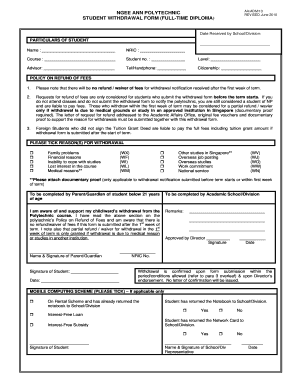
The MOE Language Centre Withdrawal Form is a procedural document used by students, parents/guardians, and educational institutions in Singapore to officially withdraw a student from the MOE Language Centre.
pdfFiller scores top ratings on review platforms




Who needs SG Ministry of Education Language Centre Withdrawal Form?
Explore how professionals across industries use pdfFiller.

SG Ministry of Education Language Centre Withdrawal Form is needed by:
-
Parents or Guardians of students wishing to withdraw
-
School or College Principals responsible for student enrollment
-
MOE Language Centre Librarians overseeing documentation
-
Supervisors of the MOE Language Centre managing student registrations
-
Students who are withdrawing from the MOE Language Centre
Comprehensive Guide to SG Ministry of Education Language Centre Withdrawal Form
What is the MOE Language Centre Withdrawal Form?
The MOE Language Centre Withdrawal Form is a vital document used by students, parents, and educational institutions in Singapore to initiate the withdrawal process from the MOE Language Centre. This form ensures that the withdrawal is formally documented, granting legitimacy to the student's departure. Typically, the form is utilized by students seeking to withdraw, parents or guardians signing on behalf of minors, and educational institutions requiring official notifications.
Understanding the importance of the Singapore student withdrawal form is crucial, as it facilitates smoother transitions between educational institutions or allows students to pursue different learning pathways.
Purpose and Benefits of the MOE Language Centre Withdrawal Form
The primary purpose of the MOE Language Centre Withdrawal Form is to ensure that all necessary steps are taken for a secure and structured withdrawal. Properly completing and submitting this form not only streamlines the process but also protects the student’s educational records.
Benefits of accurately filling out the form include ensuring a timely withdrawal, preventing potential miscommunication, and avoiding complications in future educational endeavors. Neglecting to use this withdrawal form can lead to administrative delays and issues with record transfers.
Who Needs the MOE Language Centre Withdrawal Form?
Completion of the MOE Language Centre Withdrawal Form requires input from several key individuals:
-
Parents or guardians must provide their signatures to authenticate the request.
-
The school or college principal is also required to sign, confirming acknowledgment of the withdrawal.
-
The MOE Language Centre Librarian needs to endorse the request to finalize the documentation.
-
Finally, the Supervisor of the MOE Language Centre plays a crucial role in the approval process by also signing the form.
How to Fill Out the MOE Language Centre Withdrawal Form Online (Step-by-Step)
To correctly fill out the MOE Language Centre Withdrawal Form online, follow these steps:
-
Access the form via the MOE Language Centre's official website or designated portal.
-
Complete the necessary fields, paying close attention to student details, the reason for withdrawal, and required signatures.
-
Review the entered information to avoid common mistakes.
By adhering to these guidelines, users can ensure a smooth and efficient withdrawal process.
Field-by-Field Instructions for the MOE Language Centre Withdrawal Form
Each field of the MOE Language Centre Withdrawal Form serves a specific purpose:
-
Personal information fields such as the student’s name and ID are essential for identifying the individual.
-
The withdrawal reason must be accurately stated to clarify the context of the decision.
-
Obtaining the required signatures is crucial, as missing endorsements could lead to processing delays.
Submission Methods and Delivery for the MOE Language Centre Withdrawal Form
Submitting the MOE Language Centre Withdrawal Form involves several steps:
-
Forms should be submitted to the General Office of the MOE Language Centre.
-
Submission can be done in person or via fax, depending on the preferences of the institution.
-
Tracking the submission status and confirming receipt is recommended to ensure the process is completed.
What Happens After You Submit the MOE Language Centre Withdrawal Form?
Upon submission, the processing of the MOE Language Centre Withdrawal Form entails several procedures. Notifications regarding the status of the withdrawal will be communicated to the relevant parties within a few days. Additionally, the student's e-Learning account will be deactivated to prevent access to educational materials post-withdrawal.
Failure to follow up on the submission can result in unresolved status and potential complications in future enrollments.
Common Errors to Avoid When Submitting the MOE Language Centre Withdrawal Form
To ensure an efficient withdrawal process, avoid the following common errors:
-
Submitting an incomplete form, which may delay processing.
-
Neglecting to gather required signatures, resulting in processing complications.
-
Failing to review the form for accuracy before submission.
Why Use pdfFiller for Your MOE Language Centre Withdrawal Form?
Using pdfFiller offers several advantages for managing the MOE Language Centre Withdrawal Form. The platform provides tools for editing, filling, and eSigning documents securely. Users benefit from numerous features designed to enhance document management and facilitate ease of use.
With a focus on security, pdfFiller guarantees the safety of sensitive information through robust encryption protocols.
Get Started with Your MOE Language Centre Withdrawal Form Today
Utilizing pdfFiller can significantly simplify the process of filling out and submitting the MOE Language Centre Withdrawal Form. The platform offers comprehensive support and resources to ensure users can navigate their withdrawal requirements effectively. Start using pdfFiller today to streamline your withdrawal process and benefit from its user-friendly features.
How to fill out the SG Ministry of Education Language Centre Withdrawal Form
-
1.Begin by visiting the pdfFiller website and logging into your account. If you don't have an account, create one to access document templates.
-
2.Use the search bar on pdfFiller to locate the 'MOE Language Centre Withdrawal Form'. Click on the form to open it.
-
3.Carefully read through the form once it is loaded. Gather necessary information such as the student's full name, identification number, and the reason for withdrawal before you start filling out the form.
-
4.Navigate through the form using the tool panel on the right. Click on the fields marked for entry, such as name, reasons for withdrawal, and any other required information.
-
5.Make sure to fill in all the sections completely, as incomplete forms may delay the processing. Use checkboxes where applicable, especially for the required roles' signatures.
-
6.Once all fields are filled out, review the information entered for accuracy. Ensure all required signatures are gathered from the relevant parties, which include the parent/guardian and the principal.
-
7.After verifying all information, use the save function to store a copy of the completed form on your device. You can also download it directly to keep a local copy.
-
8.Finally, submit the completed form to the General Office of the MOE Language Centre via the required methods, such as faxing or delivering it personally as instructed.

Who is eligible to use the MOE Language Centre Withdrawal Form?
The MOE Language Centre Withdrawal Form is intended for students wishing to withdraw, as well as their parents or guardians, school principals, and designated librarians and supervisors associated with the MOE Language Centre.
What documents are required when submitting this form?
The submission of the MOE Language Centre Withdrawal Form requires signatures from several parties. It does not specify additional documents, but ensure you have the student’s identification on hand.
How should I submit the completed withdrawal form?
You can submit the MOE Language Centre Withdrawal Form by fax or by delivering it in person to the General Office of the MOE Language Centre. Make sure to confirm the preferred method beforehand.
Are there any processing fees associated with withdrawing from the MOE Language Centre?
While the form metadata does not mention processing fees, it is generally advisable to check with the MOE Language Centre directly for any applicable fees regarding student withdrawal.
What common mistakes should I avoid when completing this form?
Common mistakes include failing to obtain necessary signatures from required parties and leaving important fields blank. Ensure all information is accurate and the form is fully completed before submission.
How long does the withdrawal process take after submitting the form?
The form metadata does not specify processing times, but typically, withdrawal processes can take several days. It's best to inquire directly with the MOE Language Centre for timelines.
Can I edit the form after filling it out on pdfFiller?
Yes, pdfFiller allows you to edit your entries anytime before saving or finalizing the form. Ensure all changes are made before the final submission to avoid errors.
Related Forms




Get the latest insights from our blog


If you believe that this page should be taken down, please follow our DMCA take down process
here
.
This form may include fields for payment information. Data entered in these fields is not covered by PCI DSS compliance.