
Last updated on
Oct 31, 2026

Get the free DME Request for Authorization
We are not affiliated with any brand or entity on this form

Fill out
Complete the form online in a simple drag-and-drop editor.

eSign
Add your legally binding signature or send the form for signing.

Share
Share the form via a link, letting anyone fill it out from any device.

Export
Download, print, email, or move the form to your cloud storage.
Why pdfFiller is the best tool for your documents and forms


End-to-end document management
From editing and signing to collaboration and tracking, pdfFiller has everything you need to get your documents done quickly and efficiently.
Accessible from anywhere
pdfFiller is fully cloud-based. This means you can edit, sign, and share documents from anywhere using your computer, smartphone, or tablet.
Secure and compliant
pdfFiller lets you securely manage documents following global laws like ESIGN, CCPA, and GDPR. It's also HIPAA and SOC 2 compliant.
What is DME Authorization
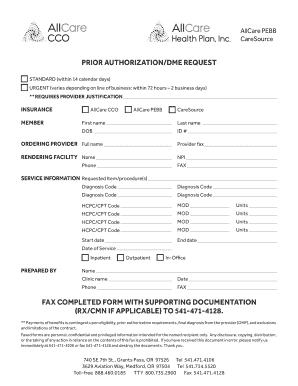
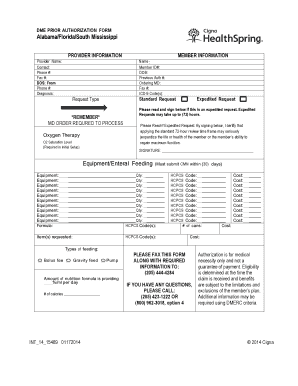
The DME Request for Authorization is a healthcare form used by Medicaid beneficiaries to request authorization for durable medical equipment (DME) or medical supplies.
pdfFiller scores top ratings on review platforms




Who needs DME Authorization?
Explore how professionals across industries use pdfFiller.

DME Authorization is needed by:
-
Medicaid beneficiaries requiring durable medical equipment
-
Healthcare providers submitting requests on behalf of patients
-
Medical supply companies seeking authorization for products
-
Caregivers managing authorization for patients
-
Healthcare professionals conducting medical assessments
Comprehensive Guide to DME Authorization
What is the DME Request for Authorization?
The DME Request for Authorization is a critical healthcare form used to obtain approval for durable medical equipment (DME) or medical supplies under Medicaid. This form streamlines the authorization process, ensuring patients receive necessary medical supplies efficiently. The authorization is particularly relevant in contexts where Medicaid is involved, helping healthcare providers navigate these requirements seamlessly.
Durable medical equipment refers to items such as wheelchairs, hospital beds, and other devices prescribed by healthcare professionals to support patients' health. Understanding the role of Medicaid in processing DME requests is essential for both patients and healthcare providers.
Purpose and Benefits of the DME Request for Authorization
The DME Request for Authorization is designed to streamline the approval process for necessary medical supplies. Utilizing this form is essential due to its compliance with Medicaid's regulatory requirements, which helps avoid potential delays in obtaining equipment. Patients benefit significantly as this form paves the way for timely access to vital medical equipment.
-
Facilitates quicker approval times for medical supplies.
-
Ensures compliance with Medicaid's stringent guidelines.
-
Increases the likelihood of obtaining essential equipment for patient care.
Who Needs the DME Request for Authorization?
This form is essential for a variety of stakeholders in the healthcare system. Patients who require durable medical equipment prescribed by their healthcare providers must submit this request for authorization. Additionally, physicians and other healthcare providers need to understand the importance of this form, as they often submit requests on behalf of their patients to ensure their medical needs are met.
-
Patients prescribed DME by healthcare providers.
-
Physicians submitting requests for patient authorization.
-
Medicaid stakeholders involved in processing the requests.
How to Fill Out the DME Request for Authorization Online (Step-by-Step)
Filling out the DME Request for Authorization accurately is vital for the approval process. Begin by gathering essential information, including member details, the specific diagnosis, and relevant provider information. The following steps provide a comprehensive guide to completing the form online using pdfFiller:
-
Access the DME Request for Authorization through pdfFiller.
-
Input all required member information clearly.
-
List the diagnosis as prescribed by the healthcare provider.
-
Fill in the provider's information accurately.
-
Double-check all fields for completeness and accuracy before submitting.
Required Documents and Supporting Materials
To ensure a successful submission of the DME Request for Authorization, it is essential to include all necessary documents. Required documents typically accompany the form and may include a medical prescription and any additional supportive information that validates the request.
-
Medical prescriptions to justify the need for DME.
-
Additional documentation to support the request.
-
Comprehensive information helps expedite the approval process.
Submission Methods and Delivery of the DME Request for Authorization
Submitting the DME Request for Authorization can be accomplished through multiple methods, ensuring flexibility for users. Common methods include faxing the completed form to Select Health or utilizing electronic submission options. It is crucial to adhere to the designated deadlines and processing times associated with each submission method.
-
Faxing to Select Health for quick processing.
-
Using online forms for electronic submission.
-
Tracking submission status for confirmation of receipt.
Common Errors and How to Avoid Them
Common errors when filling out the DME Request for Authorization can lead to delays or rejection. It is vital to be aware of these potential pitfalls to ensure a smooth submission process. To avoid mistakes, consider the following tips:
-
Review all entries for accuracy and completeness.
-
Ensure correct diagnosis and provider information are provided.
-
Validate the form thoroughly before submission to prevent issues.
What Happens After You Submit the DME Request for Authorization
Upon submission of the DME Request for Authorization, patients can expect a following process to ensure transparency and clarity. Generally, a timeline is established for receiving approval or additional information requests. Understanding the next steps is important in managing expectations following submission.
-
Anticipate communication regarding approval or necessary additional details.
-
Prepare to receive DME soon after the authorization is granted.
-
Know how to address potential rejections or requests for further information.
Security and Compliance for the DME Request for Authorization
Handling sensitive health information with utmost care is crucial during the DME Request for Authorization process. pdfFiller employs robust security measures, including encryption and compliance with HIPAA regulations, to ensure the privacy of patients' health information throughout the submission process.
-
Utilizes 256-bit encryption for data protection.
-
Maintains compliance with HIPAA and GDPR standards.
-
Prioritizes user privacy and secure data handling.
Simplifying Your DME Request with pdfFiller
Using pdfFiller to complete and submit the DME Request for Authorization can significantly enhance the overall experience. The platform offers user-friendly features such as editing, eSigning, and easy document management.
-
Streamlines the completion process with intuitive tools.
-
Ensures compliance and security during submission.
-
Enhances user experience with features that simplify form handling.
How to fill out the DME Authorization
-
1.To access the DME Request for Authorization form on pdfFiller, visit the pdfFiller website and use the search bar to find the specific form by its name.
-
2.Once you locate the form, click on it to open it in the pdfFiller interface, where you can easily edit and fill out your information.
-
3.Before filling out the form, gather necessary information such as member details, diagnosis, provider and practitioner information to ensure all required data is ready.
-
4.Carefully navigate through the form, filling in each blank field with the relevant information, utilizing pdfFiller's tools to add text, checkboxes, and any other needs.
-
5.Once you have completed all fields, review the form thoroughly to confirm that all information is accurate and complete, making any necessary edits.
-
6.After reviewing, finalize your form by saving it in your pdfFiller account or downloading it directly to your device for submission.
-
7.To submit, follow the instructions provided on the form regarding how to fax it to Select Health or any other specified submission method.

Who is eligible to use the DME Request for Authorization form?
The DME Request for Authorization form is intended for Medicaid beneficiaries who require durable medical equipment or medical supplies. If you are covered by Medicaid in South Carolina, you can use this form.
What information do I need to fill out this form?
You will need member information, a diagnosis details, provider information, and practitioner information. Gather these details beforehand for faster completion.
How do I submit the completed DME Request for Authorization form?
The completed form should be faxed to Select Health for processing. Ensure you check that all information is filled correctly before submission.
Are there any common mistakes to avoid when filling out the form?
Common mistakes include leaving fields blank, providing incorrect member information, or not including a diagnosis. Double-check all entries before submission to avoid delays.
What are the processing times for the DME request?
Processing times may vary, but it is advisable to submit your request as early as possible. Check with Select Health for specifics regarding processing timelines.
Is there a fee associated with submitting this form?
Typically, submitting a DME Request for Authorization through Medicaid should not involve additional fees, but it’s best to verify with your provider or Select Health.
Do I need a signature or notarization for this form?
No, the DME Request for Authorization does not require a signature or notarization. However, all required fields must be accurately filled before submission.
Related Forms




Get the latest insights from our blog


If you believe that this page should be taken down, please follow our DMCA take down process
here
.
This form may include fields for payment information. Data entered in these fields is not covered by PCI DSS compliance.