
Last updated on
Oct 31, 2026

HMEA Employment Application 2011-2026 free printable template
pdfFiller is not affiliated with any government organization

Fill out
Complete the form online in a simple drag-and-drop editor.

eSign
Add your legally binding signature or send the form for signing.

Share
Share the form via a link, letting anyone fill it out from any device.

Export
Download, print, email, or move the form to your cloud storage.
Why pdfFiller is the best tool for your documents and forms


End-to-end document management
From editing and signing to collaboration and tracking, pdfFiller has everything you need to get your documents done quickly and efficiently.
Accessible from anywhere
pdfFiller is fully cloud-based. This means you can edit, sign, and share documents from anywhere using your computer, smartphone, or tablet.
Secure and compliant
pdfFiller lets you securely manage documents following global laws like ESIGN, CCPA, and GDPR. It's also HIPAA and SOC 2 compliant.
What is HMEA Employment Application
The Employment Application Form is a document used by HMEA, Inc. to collect essential information from job applicants for the hiring process.
pdfFiller scores top ratings on review platforms




Who needs HMEA Employment Application?
Explore how professionals across industries use pdfFiller.

HMEA Employment Application is needed by:
-
Job seekers applying for positions at HMEA, Inc.
-
Human resources personnel involved in recruitment.
-
Educational institutions assisting students with job applications.
-
Recruitment agencies representing job applicants.
-
Community organizations supporting unemployed individuals.
Comprehensive Guide to HMEA Employment Application
What is the Employment Application Form?
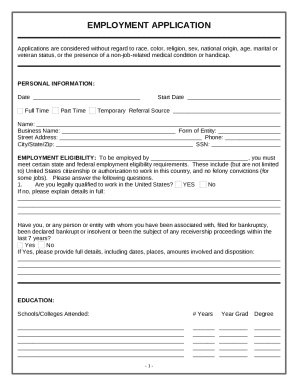
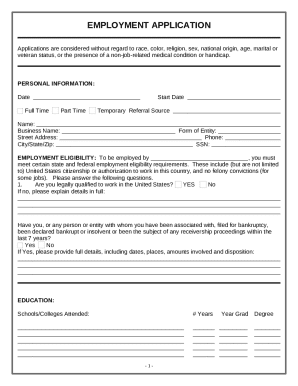
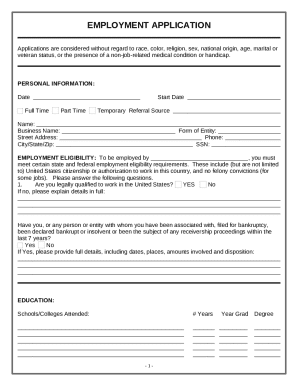
The Employment Application Form serves as a vital document in the hiring process for HMEA, Inc. It collects essential information from job applicants, including personal details, educational background, work experience, and references. The form is designed to standardize data collection across applicants, ensuring that all necessary information is presented uniformly.
Applicants are required to provide their signature, signifying that they understand the terms and conditions of the application process. This signature requirement helps maintain the integrity of the application and verifies the authenticity of the information provided.
Benefits of Using the Employment Application Form
Utilizing the Employment Application Form offers several advantages that streamline the hiring process for both applicants and employers. By adopting a standardized method for collecting applicant information, organizations can significantly enhance efficiency in reviewing applications and making hiring decisions.
-
Ensures compliance with Massachusetts laws and regulations
-
Speeds up the application review process
-
Facilitates consistent data collection
Key Features of the Employment Application Form
The Employment Application Form includes several key sections that are critical for evaluating an applicant's background and qualifications. These sections encompass personal details, work experience, education, and references.
Each section contains fillable fields where applicants must accurately provide information, followed by a requirement for a signature at the end. The details gathered in these sections play an integral role in assessing eligibility and determining the best fit for the job.
Eligibility Criteria for the Employment Application Form
Eligibility to apply using the Employment Application Form in Massachusetts is defined by both state and federal regulations. Applicants must meet specific criteria that demonstrate their employment eligibility and readiness to work.
-
Proof of legal eligibility for employment in the USA
-
Compliance with relevant state laws and regulations
How to Complete the Employment Application Form Online
Filling out the Employment Application Form online through pdfFiller is straightforward. Here’s a step-by-step guide to assist you:
-
Access the form on pdfFiller.
-
Fill in the required fields including your personal details.
-
Ensure all sections, such as work experience and education, are completed.
-
Review your entries to avoid common mistakes.
-
Sign the form electronically using pdfFiller’s eSigning feature.
Following this guide will facilitate a smooth experience when submitting your application.
Submission Methods for the Employment Application Form
Once you've completed the Employment Application Form, there are several methods you can use to submit it:
-
Online submission directly through pdfFiller
-
Email to the designated HR address
-
Mail your application to the HMEA, Inc. office
Be sure to include any required documents or supporting materials that accompany the form. It’s also advisable to confirm the successful submission of your application for peace of mind.
Common Issues and Solutions When Using the Employment Application Form
While filling out the Employment Application Form, applicants may face some common challenges. To enhance the likelihood of acceptance, consider the following:
-
Ensure all information is accurate and complete to avoid rejection.
-
If corrections are needed, promptly amend the submission.
-
Track your application status by following instructions provided on the submission platform.
Security and Privacy Considerations for Employment Applications
At pdfFiller, security is paramount when handling sensitive applicant data. The platform employs 256-bit encryption, ensuring that your information remains confidential and secure.
Additionally, pdfFiller adheres to privacy regulations such as HIPAA and GDPR, protecting user data throughout the employment application process. Applicants are advised to follow best practices to safeguard their information, further enhancing data security.
How pdfFiller Can Help with Your Employment Application
pdfFiller offers numerous features to aid in filling out the Employment Application Form efficiently. Users can edit text, create fillable forms, and utilize the eSigning capabilities—all within a secure environment.
By choosing pdfFiller, applicants can experience a streamlined application process that is both easy and secure, allowing them to focus on securing their desired position.
Example of a Completed Employment Application Form
Providing a visual example or template of a filled-out Employment Application Form can be incredibly helpful. This example can demonstrate how to properly complete each section, emphasizing the importance of accuracy and completeness in submissions.
Each part of the application is crafted to gather critical information that supports your candidacy, further illustrating why meticulous attention to detail is essential.
How to fill out the HMEA Employment Application
-
1.Access the Employment Application Form by visiting pdfFiller and searching for 'Employment Application Form'.
-
2.Once located, click on the form to open it in the pdfFiller interface.
-
3.Before starting, gather your personal details such as name, contact information, educational background, and employment history.
-
4.Begin filling out the form by clicking on the designated fields to enter your information.
-
5.Use the type tool to fill in blank fields for your name, address, and other personal information.
-
6.For checkbox options, simply click on the boxes to indicate your eligibility and consent status.
-
7.Carefully enter your work history, including company names, positions held, and employment dates.
-
8.Provide references by entering their names and contact information in the specified section of the form.
-
9.Once all sections are completed, review the form thoroughly for any missed information or errors.
-
10.After confirming that all information is accurate, navigate to the signature section and use the signing tool to add your signature.
-
11.Once the document is complete, save your changes by clicking on the save button.
-
12.You can then download the completed form directly to your computer or submit it online through pdfFiller, if applicable.

What are the eligibility requirements for filling out the Employment Application Form?
Applicants must be legally eligible for employment in the USA. Ensure you understand your eligibility status before signing the application.
Is there a deadline for submitting the Employment Application Form?
While specific deadlines may vary, it's best to submit your application as soon as possible after the job posting is available to enhance your chances.
How should I submit the completed Employment Application Form?
You can submit the application via email or an online portal, if provided. Alternatively, you may need to print and mail it to HMEA, Inc.
What supporting documents are required with the Employment Application Form?
Typically, you may need to provide a resume, cover letter, and any certifications relevant to the job you are applying for.
What common mistakes should I avoid when filling out the Employment Application Form?
Avoid leaving any fields blank, especially essential personal information. Double-check for spelling errors and ensure all dates are accurate.
How long does the processing of the Employment Application Form take?
Processing times can vary, depending on the organization’s hiring timeline. Check with HMEA, Inc. for specific details regarding their processing times.
What if I need assistance with completing the Employment Application Form?
If you require help, consider reaching out to local employment agencies or career services that support job seekers in completing application forms.
Related Forms



Related Catalogs
Get the latest insights from our blog


If you believe that this page should be taken down, please follow our DMCA take down process
here
.
This form may include fields for payment information. Data entered in these fields is not covered by PCI DSS compliance.