
Last updated on
Oct 31, 2026

Get the free APTC Form 58 Contingent Bill
We are not affiliated with any brand or entity on this form

Fill out
Complete the form online in a simple drag-and-drop editor.

eSign
Add your legally binding signature or send the form for signing.

Share
Share the form via a link, letting anyone fill it out from any device.

Export
Download, print, email, or move the form to your cloud storage.
Why pdfFiller is the best tool for your documents and forms


End-to-end document management
From editing and signing to collaboration and tracking, pdfFiller has everything you need to get your documents done quickly and efficiently.
Accessible from anywhere
pdfFiller is fully cloud-based. This means you can edit, sign, and share documents from anywhere using your computer, smartphone, or tablet.
Secure and compliant
pdfFiller lets you securely manage documents following global laws like ESIGN, CCPA, and GDPR. It's also HIPAA and SOC 2 compliant.
What is APTC Form 58
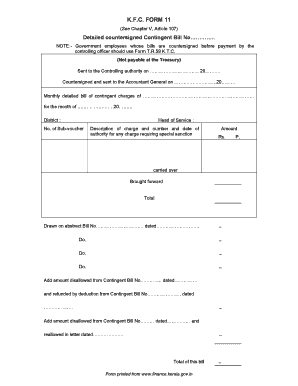
The APTC Form 58 Contingent Bill is a government financial document used by authorized personnel in India to facilitate financial transactions.
pdfFiller scores top ratings on review platforms




Had similar capability on work computer(s)> I was fine with filling out PDF files and saving them. Ths allows signatures and other features that may get me to keep it.
GREAT, SIMPLE, EASY! THANKS FOR THE EXPLAINER VIDEOS TOO!
Who needs APTC Form 58?
Explore how professionals across industries use pdfFiller.

APTC Form 58 is needed by:
-
Drawing Officers responsible for financial reporting.
-
Treasury Officers overseeing financial transactions.
-
Government departments managing expenditures.
-
Auditors auditing financial claims.
-
Finance teams handling contingent bills.
Comprehensive Guide to APTC Form 58
What is the APTC Form 58 Contingent Bill?
The APTC Form 58 is a critical government financial form that's utilized within the Indian financial system. This form plays a significant role in financial transactions, being specifically designed for managing contingent bills. Its importance lies in aiding government agencies to process payments efficiently, ensuring a transparent and accountable financial system.
Purpose and Benefits of the APTC Form 58 Contingent Bill
The APTC Form 58 serves multiple purposes in government financial processes. Primarily, it functions to streamline transactions and maintain accountability in financial dealings. The benefits of using this form include enhanced efficiency in payment processing and improved tracking of government expenses.
Key Features of the APTC Form 58 Contingent Bill
This form includes essential fields that are necessary for accurate completion:
-
Head of account
-
Major and minor head
-
Amount to be billed
-
Additional details such as District, Token No, Voucher No
Moreover, it requires signatures from the Drawing Officer and the Treasury Officer, ensuring that proper authorizations are in place before processing the contingent bill.
Who Needs the APTC Form 58 Contingent Bill?
Specific roles that require the APTC Form 58 include the Drawing Officers and Treasury Officers within government departments. These professionals must fill out the form accurately, especially in scenarios where contingent expenditures are being processed, ensuring the government adheres to its financial protocols.
How to Fill Out the APTC Form 58 Contingent Bill Online (Step-by-Step)
Filling out the APTC Form 58 online is straightforward. Here are the steps:
-
Access pdfFiller’s online platform.
-
Upload the APTC Form 58 template.
-
Fill in the required fields, including head of account and amounts.
-
Ensure signatures from both the Drawing Officer and Treasury Officer are in place.
-
Review the completed form for accuracy.
-
Submit the form as per your jurisdiction’s guidelines.
Using pdfFiller simplifies this process, making online form filling efficient and user-friendly.
Common Errors and How to Avoid Them When Submitting the APTC Form 58
While completing the APTC Form 58, several common errors can occur. Here are tips to avoid them:
-
Incomplete fields can delay processing.
-
Omitting necessary signatures leads to rejection.
-
Double-checking amounts helps prevent financial discrepancies.
It’s crucial to review the form thoroughly before submission to minimize mistakes.
Submission Methods for the APTC Form 58 Contingent Bill
The completed APTC Form 58 can be submitted through various methods. Users should be aware of the following:
-
Online submission via government portals where applicable.
-
Physical submission at designated financial offices.
-
State-specific procedures may vary, so it's important to consult local requirements.
What Happens After You Submit the APTC Form 58?
Once submitted, the form will undergo a processing period, which can vary based on jurisdiction and workload. Users can track their submission status through authorized channels, allowing them to stay informed about their contingent bill’s progress and any subsequent actions needed.
How pdfFiller Can Simplify the APTC Form 58 Process
pdfFiller enhances the experience of completing the APTC Form 58 by offering several key features:
-
eSigning capabilities for quick approvals.
-
Secure document handling to protect sensitive information.
-
User-friendly interface for easy navigation.
By using pdfFiller, users can manage the APTC Form 58 process more efficiently, ensuring accuracy and security.
Final Thoughts on Using the APTC Form 58 Contingent Bill
Accuracy and timeliness are paramount when filing the APTC Form 58. Utilizing pdfFiller not only simplifies the management of this form but also adds layers of security for sensitive financial data. Making sure the form is completed correctly contributes significantly to the efficiency of government financial processes.
How to fill out the APTC Form 58
-
1.To begin, access the pdfFiller website and log into your account or create a new one if necessary.
-
2.Use the search bar on the pdfFiller dashboard to locate 'APTC Form 58 Contingent Bill' and click to open it.
-
3.Familiarize yourself with the layout of the form, noting the areas that require input and any sections that need signatures.
-
4.Before filling out the form, gather necessary information such as the head of account, major and minor heads, and the total amount to be paid.
-
5.Start filling in the blank fields with all required details, ensuring accuracy in the District, Token No, and Voucher No sections.
-
6.Utilize pdfFiller's features to navigate through the form, using the tab key or mouse to move from one field to another.
-
7.Once all fields are completed, review the information for accuracy and completeness, making any necessary adjustments.
-
8.After reviewing, locate the signature lines and ensure both the Drawing Officer and Treasury Officer provide their signatures.
-
9.When you are satisfied with the completed form, use the options to save your progress, download a copy, or submit it directly through the platform.
-
10.Follow the prompts for submission, and check confirmation of your submission if required.

Who is eligible to fill out the APTC Form 58?
The APTC Form 58 is designed for authorized Drawing Officers and Treasury Officers within government departments in India involved in financial transactions.
What are the common mistakes to avoid when completing the form?
Common mistakes include missing required fields, providing incorrect financial details, and failing to obtain necessary signatures. Double-check all entries before submitting.
How can I submit the completed APTC Form 58?
The completed APTC Form 58 can be submitted through pdfFiller by utilizing the submission options provided once you finalize the form.
Are there any specific supporting documents required?
While specific supporting documents are not mentioned, generally required documents might include prior approval letters or financial authorizations relevant to the transaction.
What should I do if I encounter issues while filling out the form on pdfFiller?
If you encounter issues, consult pdfFiller's help resources or customer support. They provide guidance on form handling and technical assistance.
How long does it take to process the APTC Form 58?
Processing times for the APTC Form 58 can vary based on internal government procedures, so it is advisable to submit the form well in advance of any financial deadline.
Is notarization required for the APTC Form 58?
No, notarization is not required for the APTC Form 58, making it easier to complete and submit within governmental procedures.
Related Forms





Get the latest insights from our blog


If you believe that this page should be taken down, please follow our DMCA take down process
here
.
This form may include fields for payment information. Data entered in these fields is not covered by PCI DSS compliance.