
Last updated on
Oct 31, 2026

AZ UDM-011 - City of Chandler 2011-2026 free printable template
pdfFiller is not affiliated with any government organization

Fill out
Complete the form online in a simple drag-and-drop editor.

eSign
Add your legally binding signature or send the form for signing.

Share
Share the form via a link, letting anyone fill it out from any device.

Export
Download, print, email, or move the form to your cloud storage.
Why pdfFiller is the best tool for your documents and forms


End-to-end document management
From editing and signing to collaboration and tracking, pdfFiller has everything you need to get your documents done quickly and efficiently.
Accessible from anywhere
pdfFiller is fully cloud-based. This means you can edit, sign, and share documents from anywhere using your computer, smartphone, or tablet.
Secure and compliant
pdfFiller lets you securely manage documents following global laws like ESIGN, CCPA, and GDPR. It's also HIPAA and SOC 2 compliant.
What is AZ UDM-011 - City of Chandler
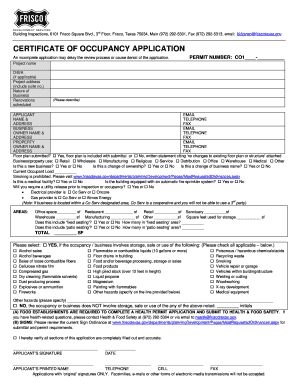
The Certificate of Occupancy Application is a government document used by businesses to request a certificate allowing occupancy in Chandler, Arizona.
pdfFiller scores top ratings on review platforms




Who needs AZ UDM-011 - City of Chandler?
Explore how professionals across industries use pdfFiller.

AZ UDM-011 - City of Chandler is needed by:
-
Business owners seeking occupancy for new premises.
-
Construction contractors finalizing project completions.
-
Property managers needing formal occupancy certification.
-
Real estate agents facilitating commercial property transactions.
-
Developers applying for business permits in Arizona.
Comprehensive Guide to AZ UDM-011 - City of Chandler
Certificate of Occupancy Application Overview
The Certificate of Occupancy Application is essential for businesses operating in Chandler, Arizona. A Certificate of Occupancy (CO) verifies that a building meets all local building codes and regulations, ensuring it is safe for occupancy. This application is crucial for legal occupancy and compliance with city regulations governing building permits.
-
A Certificate of Occupancy ensures the property meets safety standards.
-
The city of Chandler outlines specific requirements for obtaining a CO.
Purpose and Benefits of the Certificate of Occupancy Application
The Certificate of Occupancy Application is necessary for establishing legal occupancy of business premises. By obtaining this certification, businesses can demonstrate compliance with safety regulations, thus enhancing their credibility. Additionally, certification provides benefits such as insurance and financial security, critical for business operations.
-
Ensures legal occupation of business locations.
-
Enhances safety and regulatory compliance.
Eligibility Criteria and Who Needs the Certificate of Occupancy Application
Understanding the eligibility criteria for the Certificate of Occupancy Application is vital for potential applicants. Businesses of various types, including retail, commercial, and service-oriented entities, may require a CO to operate legally.
-
Business owners applying for a CO must meet specific eligibility requirements.
-
Diverse business scenarios, such as new locations or renovations, necessitate a CO.
Required Documents and Supporting Materials
When submitting the Certificate of Occupancy Application, it’s essential to include all necessary documents. Proper organization of supporting materials will facilitate a smoother application process. Documents may include architectural plans and a Hazardous Material Inventory Statement if applicable.
-
Architectural or site plans detailing the premises.
-
Proof of ownership or lease agreement.
-
Potentially a Hazardous Material Inventory Statement.
How to Fill Out the Certificate of Occupancy Application Online
Completing the Certificate of Occupancy Application accurately is crucial for approval. Following a step-by-step process can help ensure all fields are filled correctly. Each section of the application will require specific information from the applicant.
-
Complete fields such as 'Applicant Name' and 'Business Information'.
-
Double-check all entries to avoid common errors.
Filing Options and Submission Methods
Applicants have various options for submitting the Certificate of Occupancy Application. Both online and in-person submissions are available, allowing for flexibility depending on the applicant's preference. It's important to be aware of any associated fees and deadlines that may apply.
-
Online submission is encouraged for speed and convenience.
-
Check the city’s website for specific filing deadlines and fee structures.
Consequences of Not Filing or Late Filing
Failing to file the Certificate of Occupancy Application on time can result in serious consequences for businesses. Delayed or missing submissions can lead to penalties and operational disruptions, emphasizing the importance of timely compliance.
-
Penalties may include fines or suspension of occupancy rights.
-
Timely filing is crucial to avoid complications that could affect business operations.
How to Track Your Application Status and What Happens Next
After submitting the application, tracking its status is essential for applicants. Understanding the application process timeline helps manage expectations and plan accordingly, ensuring that all procedural steps are followed after filing.
-
Applicants can check their application status online using the city’s official portal.
-
Be aware of typical processing times to anticipate approval or any needed follow-ups.
Tips for Document Security and Compliance
Handling documents securely is vital when managing sensitive information for the Certificate of Occupancy Application. Utilizing established document management platforms can enhance data security while ensuring compliance with relevant regulations.
-
Utilize platforms that offer secure document handling, such as 256-bit encryption.
-
Stay informed about compliance with data protection laws to safeguard business information.
Utilizing pdfFiller to Simplify Your Application Process
pdfFiller is an excellent resource for those navigating the Certificate of Occupancy Application. The platform provides tools that streamline document handling, making filling out forms easier and more efficient.
-
Features such as electronic signing and secure document storage are available.
-
Users can efficiently manage their applications from any device without downloads.
How to fill out the AZ UDM-011 - City of Chandler
-
1.Begin by accessing pdfFiller and searching for 'Certificate of Occupancy Application.' Open the form in the pdfFiller interface.
-
2.Familiarize yourself with the layout, noting the various fillable fields such as 'Date,' 'Applicant Name,' and 'Business Owner Name.'
-
3.Before filling out the form, gather all necessary information about your business and building specifics. This may include your business license, property details, and any required hazardous materials inventory.
-
4.Start filling out the form, entering your date in the appropriate field. Ensure your applicant name is accurate before proceeding.
-
5.Continue by entering the business owner’s name in the designated space, confirming it matches official documentation.
-
6.Locate the 'Applicant Signature' area and prepare to sign electronically if required. You might also need to provide additional documentation on hazardous materials, if applicable.
-
7.After filling in all sections, review the form carefully for any errors or missing information.
-
8.Use the pdfFiller tools to correct or amend any details. Once satisfied, proceed to the saving options.
-
9.You can save a copy to your device, download it as a PDF, or choose to submit it directly through pdfFiller if this option is available.
-
10.Be mindful of the processing fee of $100, and ensure you are ready to make payment if submitting the form online.

Who is eligible to apply for a Certificate of Occupancy?
Applicants must be business owners or contractors completing a project. The form requires the applicant's signature, confirming eligibility.
What is the processing time for the Certificate of Occupancy Application?
Processing times can vary based on the department's workload, but applicants should typically expect a response within 2-4 weeks.
What supporting documents are required for submission?
You may need to provide a Hazardous Material Inventory Statement, along with business licenses and building specifications, depending on your situation.
How can I submit the completed certificate application?
Completed applications can be submitted online via pdfFiller or in person at the Transportation and Development Department, ensure to pay the $100 fee.
What common mistakes should I avoid when filling out the form?
Be careful to ensure that all details match your official documents. Missing signatures and incorrect business information can delay processing.
Is notarization required for the Certificate of Occupancy Application?
No, this form does not require notarization, but it must be signed by the applicant.
How can I verify the status of my application after submission?
You can contact the Transportation and Development Department or check their website for information regarding your application status.
Related Forms






Get the latest insights from our blog


If you believe that this page should be taken down, please follow our DMCA take down process
here
.
This form may include fields for payment information. Data entered in these fields is not covered by PCI DSS compliance.