
Last updated on
Oct 31, 2026

TX National Youth Theater Costume Measurement Form 2017-2026 free printable template
pdfFiller is not affiliated with any government organization

Fill out
Complete the form online in a simple drag-and-drop editor.

eSign
Add your legally binding signature or send the form for signing.

Share
Share the form via a link, letting anyone fill it out from any device.

Export
Download, print, email, or move the form to your cloud storage.
Why pdfFiller is the best tool for your documents and forms


End-to-end document management
From editing and signing to collaboration and tracking, pdfFiller has everything you need to get your documents done quickly and efficiently.
Accessible from anywhere
pdfFiller is fully cloud-based. This means you can edit, sign, and share documents from anywhere using your computer, smartphone, or tablet.
Secure and compliant
pdfFiller lets you securely manage documents following global laws like ESIGN, CCPA, and GDPR. It's also HIPAA and SOC 2 compliant.
What is TX National Youth Theater Costume Measurement Form
The Costume Measurement Form is a personal document used by individuals or organizations to accurately collect and record costume sizes for fitting purposes.
pdfFiller scores top ratings on review platforms




Who needs TX National Youth Theater Costume Measurement Form?
Explore how professionals across industries use pdfFiller.

TX National Youth Theater Costume Measurement Form is needed by:
-
Costume designers for theater productions
-
Parents needing to measure children for costumes
-
Adults seeking costumes for events
-
Participants in community theater
-
Fashion designers for custom clothing
-
Costume committees organizing events
Comprehensive Guide to TX National Youth Theater Costume Measurement Form
What is the Costume Measurement Form?
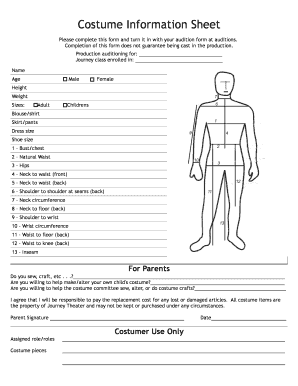
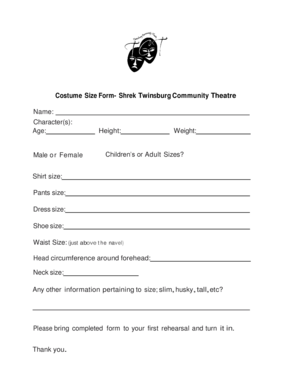
The Costume Measurement Form is crucial for recording the measurements of individuals, particularly for costume fittings. This form includes essential fields such as name, age, and contact information, alongside specific clothing measurements like shirt and pant sizes. It ensures accurate sizing by guiding users through the measurement process, making it easier to achieve the right fit for various clothing sizes.
By providing clear instructions and prompting for detailed inputs, the costume fitting form enhances the fitting experience for both the wearer and the organizers.
Purpose and Benefits of the Costume Measurement Form
This form plays a vital role in the preparation stages of theater productions or events, as it guarantees a proper fit and comfort in costumes. Users are encouraged to complete this measurement guide form to avoid potential mishaps during fittings.
Using the costume measurement form simplifies the overall measurement process, particularly for individuals and committees involved in organizing performances, ensuring everyone is dressed appropriately.
Key Features of the Costume Measurement Form
The uniqueness of the costume measurement form lies in its comprehensive design. It includes essential fields such as:
-
Name
-
Age
-
Contact Information
-
Clothing Measurements
Additionally, the form features a measuring guide that offers precise instructions to achieve accurate measurements, making it useful for both adult and child measurement purposes.
Who Needs the Costume Measurement Form?
This form is designed for various audience segments who will benefit from its structured approach to gathering measurements. Theater groups, families, and individual performers utilize this document to ensure they obtain the correct sizes.
Different age groups require distinct measurements, making this costume fitting form adaptable to a wide array of users and circumstances.
How to Fill Out the Costume Measurement Form Online (Step-by-Step)
Completing the costume measurement form online is straightforward. Follow these steps for accurate submissions:
-
Access the form through the pdfFiller platform.
-
Fill in your name, age, and contact information in the appropriate fields.
-
Carefully measure and record your clothing sizes using the included measuring guide.
-
Double-check all entries to ensure no fields are left blank.
-
Submit the form for processing.
Common errors can usually be avoided by double-checking your measurements and ensuring all required fields are filled out correctly during the submission process.
Common Errors and How to Avoid Them
Users may face specific challenges while filling out the costume measurement form, such as providing inaccurate measurements or omitting crucial information. To ensure accuracy, consider the following tips:
-
Use the measuring guide to ensure correct measurement techniques.
-
Verify that each field is filled completely before submission.
Addressing these issues proactively can enhance the accuracy and reliability of the submitted form.
Security and Compliance When Using the Costume Measurement Form
It's essential to assure users about the safety of their personal information when using the costume measurement form. pdfFiller employs robust security measures, including 256-bit encryption, to protect sensitive data.
Compliance with regulations like HIPAA and GDPR further reinforces users' trust in handling their confidential information while submitting the measurement guide form.
How to Download and Save the Costume Measurement Form PDF
Users can easily access and save the costume measurement form by following this simple download process:
-
Visit the pdfFiller platform to locate the form.
-
Select the option to download the PDF directly to your device.
-
Choose to print or save the completed form for future reference.
This flexibility allows users to have the form readily available whenever needed.
What Happens After You Submit the Costume Measurement Form?
After submitting the costume measurement form, users will receive confirmation of their submission. Tracking options available to users will keep them informed about the status of their request.
Additional steps required post-submission may be communicated through the platform, ensuring users know what to expect.
Get Started with Your Costume Measurement Form Today
Experience the ease of completing your costume measurement form using pdfFiller. The user-friendly platform allows you to fill, edit, and eSign your form online without any downloads, ensuring a seamless process while keeping your information secure.
How to fill out the TX National Youth Theater Costume Measurement Form
-
1.Begin by accessing pdfFiller and search for the Costume Measurement Form in the template library.
-
2.Once located, click to open the form. Ensure you are familiar with the pdfFiller interface for ease of navigation.
-
3.Before starting to fill out the form, gather all necessary information such as name, age, contact details, and specific clothing measurements like shirt size, pant size, and shoe size.
-
4.Begin filling in the form by clicking on each field. Use the text boxes to input your information in the spaces labeled 'NAME: ____', 'AGE: ____', and 'CONTACT PHONE & EMAIL: ____'.
-
5.For clothing measurements, follow the measuring guide provided in the form to ensure accuracy. Click on the appropriate sizes for shirt and pant selections.
-
6.If you need to refer back to the measuring guide while filling out the form, you can do so using pdfFiller's tabs or side navigation.
-
7.Once all fields are completed, take a moment to review the entire form for any errors or omissions, checking for clear and legible entries.
-
8.When satisfied with your entries, proceed to save your progress by clicking on the 'Save' button at the top of the pdfFiller interface.
-
9.To download your completed form, simply select the 'Download' option, which will provide you with a file for storing or printing.
-
10.If submission is required, check if there is a digital submission option available through pdfFiller or follow the provided directions to submit the form as needed.

Who needs to fill out the Costume Measurement Form?
Individuals such as costume designers, parents measuring children, community theater actors, and anyone needing costumes for events should use the Costume Measurement Form for accurate fitting.
Are there any deadlines for submitting this form?
Typically, there's no specific deadline unless tied to an event. It’s best to complete the Costume Measurement Form well in advance of any costume fitting or production schedules to ensure availability.
How can I submit the Costume Measurement Form?
The form can be submitted digitally through pdfFiller or printed for manual submission. Check for specific submission guidelines related to your event or organization.
What information do I need to gather before filling out the form?
Gather details including your name, age, contact information, and all required clothing measurements like shirt and pant sizes to accurately complete the form.
What common mistakes should I avoid when filling out the form?
Ensure all measurements are accurate, double-check contact information for typos, and make certain all required fields are filled out to avoid delays in costume fitting.
What is the processing time for the Costume Measurement Form?
Processing times may vary based on the costume committee or designer’s schedule. It's best to allow ample time after submission to account for fitting adjustments.
Do I need to notarize the Costume Measurement Form?
No, the Costume Measurement Form does not require notarization as it is primarily used for recording personal measurements without legal implications.
Related Forms



Related Catalogs
Get the latest insights from our blog


If you believe that this page should be taken down, please follow our DMCA take down process
here
.
This form may include fields for payment information. Data entered in these fields is not covered by PCI DSS compliance.