
Last updated on
Oct 31, 2026

Get the free Costume Measurement Sheet
We are not affiliated with any brand or entity on this form

Fill out
Complete the form online in a simple drag-and-drop editor.

eSign
Add your legally binding signature or send the form for signing.

Share
Share the form via a link, letting anyone fill it out from any device.

Export
Download, print, email, or move the form to your cloud storage.
Why pdfFiller is the best tool for your documents and forms


End-to-end document management
From editing and signing to collaboration and tracking, pdfFiller has everything you need to get your documents done quickly and efficiently.
Accessible from anywhere
pdfFiller is fully cloud-based. This means you can edit, sign, and share documents from anywhere using your computer, smartphone, or tablet.
Secure and compliant
pdfFiller lets you securely manage documents following global laws like ESIGN, CCPA, and GDPR. It's also HIPAA and SOC 2 compliant.
What is Male Costume Sheet
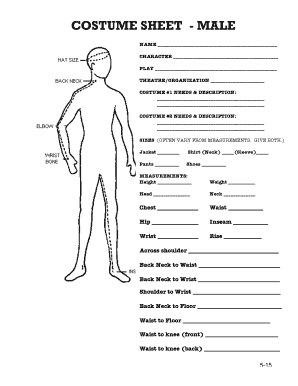
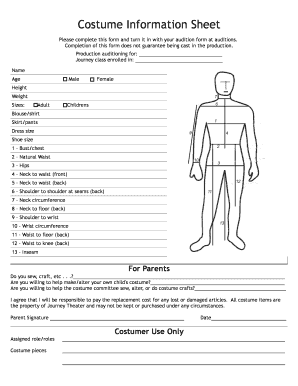
The Costume Measurement Sheet is a personal form used by actors and costume designers to record detailed body measurements for accurate costume fittings.
pdfFiller scores top ratings on review platforms




Who needs Male Costume Sheet?
Explore how professionals across industries use pdfFiller.

Male Costume Sheet is needed by:
-
Male actors preparing for costume fittings
-
Theater production teams requiring actor measurements
-
Costume designers creating custom outfits
-
Tailors and seamstresses specializing in theater garments
-
Drama schools and acting workshops
-
Event organizers for cosplay and performance costumes
Comprehensive Guide to Male Costume Sheet
What is the Costume Measurement Sheet?
The Costume Measurement Sheet is a crucial document used in the theater industry, specifically for costume fitting. This form collects essential data about an actor's measurements to ensure proper fitting of costumes. Information gathered includes body dimensions necessary for creating garments that fit well and enhance the actor's performance.
Through the actor measurement form, costume designers can acquire reliable data, which directly impacts the quality of costumes and the overall production.
Purpose and Benefits of the Costume Measurement Sheet
The Costume Measurement Sheet plays a vital role for both actors and costume designers. Accurate measurements are necessary to achieve perfect fitting for each character's attire. This precision not only enhances visual appeal but also contributes to the actor's comfort on stage.
Employing this template ensures that all relevant male costume measurements are documented correctly, minimizing issues during fittings and leading to a more polished production.
Key Features of the Costume Measurement Sheet
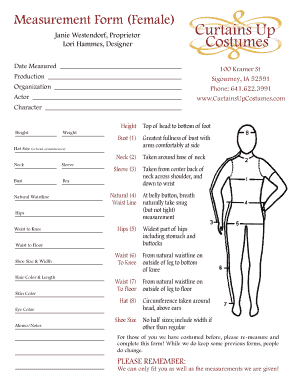
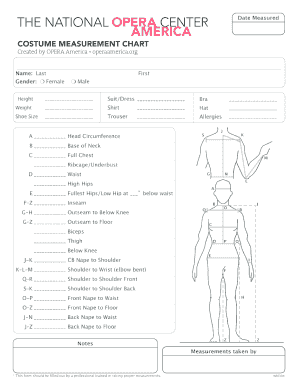
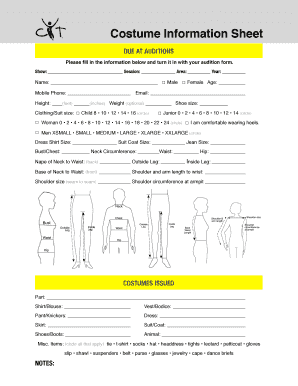
Essential features of the Costume Measurement Sheet include various measurement categories like chest, waist, height, neck, and inseam. Each category has specific instructions to help users take measurements accurately.
The clarity of instructions aims to enhance user experience, making it straightforward for actors and designers to fill out the form efficiently.
Who Needs the Costume Measurement Sheet?
This form is crucial for a specific audience including actors, costume designers, and theater companies. It is employed prominently in scenarios where accurate and detailed measurements dictate costume development.
Knowing who utilizes this form helps streamline the fitting process, ensuring that professionals from different roles in the production understand its importance.
How to Fill Out the Costume Measurement Sheet Online (Step-by-Step)
Filling out the Costume Measurement Sheet online requires specific steps to ensure accuracy:
-
Access the form through the pdfFiller platform.
-
Enter measurements into the designated fields carefully.
-
Double-check the data entered for accuracy before submission.
Utilizing pdfFiller simplifies this process, enabling actors and designers to fill out the form conveniently without the need for physical paperwork.
Common Errors and How to Avoid Them
While filling out the Costume Measurement Sheet, several common measurement errors can occur:
-
Incorrect measuring tools can lead to inaccurate dimensions.
-
Misunderstanding measurement instructions may yield incorrect data.
To prevent these mistakes, it's crucial to double-check all measurements and review the completed form for completeness before submission.
How to Sign the Costume Measurement Sheet
If necessary, signing the Costume Measurement Sheet can be done in two ways: utilizing digital signatures or traditional ink signatures. Digital signature options enhance security and convenience.
Signing the form helps maintain document authenticity, and pdfFiller offers secure features to protect this process effectively.
Where to Submit the Costume Measurement Sheet
Submitting the completed Costume Measurement Sheet can be done through various avenues. Common methods include sending the form directly to the production team or utilizing designated online platforms.
Important considerations include meeting required deadlines and understanding any regulations that pertain to data submission and processing.
How to Protect Your Data When Using the Costume Measurement Sheet
Data privacy and security are paramount when using the Costume Measurement Sheet. pdfFiller employs robust security measures such as encryption to keep your data safe during and after the filling process.
Ensuring confidentiality and data integrity can be further supported by following tips for safe storage and sharing practices.
Experience the Benefits of pdfFiller for Your Costume Measurement Needs
pdfFiller stands out as an ideal platform for managing the Costume Measurement Sheet. Its comprehensive features support users in creating, filling, and editing forms seamlessly.
User testimonials highlight improved experiences in form completion, encouraging new users to utilize pdfFiller for their costume measurement needs.
How to fill out the Male Costume Sheet
-
1.Access the Costume Measurement Sheet on pdfFiller by searching the title in the pdfFiller search bar or visiting the website.
-
2.Once the form is open, navigate through the document to locate the input fields designated for each measurement.
-
3.Before you begin filling in the form, gather the necessary tools for accurate measurements, such as a flexible measuring tape, a notepad, and a pen.
-
4.Start by measuring the actor’s chest, waist, and height. Use the flexible measuring tape to ensure precision, capturing each measurement in the corresponding field on the form.
-
5.Continue to measure the inseam and outseam, as well as the neck and sleeve length. Be sure to record these measurements accurately in their designated fields.
-
6.For hat size, use appropriate measuring methods and ensure the measurement fits correctly; input this in the relevant section.
-
7.After all measurements are filled in, review the form thoroughly to check for any missed fields or incorrect entries.
-
8.Finalize the form by saving your changes on pdfFiller. Consider downloading a copy for your records or sharing it directly with your costume designer.
-
9.Submit the completed Costume Measurement Sheet as required, either by sending it via email or through any other submission method specified by your project.

Who should use the Costume Measurement Sheet?
The Costume Measurement Sheet is primarily designed for male actors needing to have accurate measurements taken for costume fittings, ensuring costumes fit correctly for performances.
What measurements are required on this form?
This form includes fields for chest, waist, height, inseam, outseam, neck, sleeve, and hat size, allowing for a comprehensive understanding of the actor's body dimensions.
Can I edit the form after filling it out?
Yes, you can easily edit the Costume Measurement Sheet on pdfFiller before saving or submitting it. Make sure to review all data for accuracy after making any changes.
How do I ensure measurements are accurate?
To ensure accuracy, use a flexible measuring tape and refer to the provided measuring instructions in the form. Having someone assist you can also help in getting precise measurements.
When do I need to submit the Costume Measurement Sheet?
Submission timelines may vary depending on your production schedule. It’s best to provide the Costume Measurement Sheet well in advance of costume fittings to allow for adjustments if necessary.
Is there a cost associated with using pdfFiller?
Using pdfFiller may require a subscription or payment, depending on the services you choose. Check their website for updated pricing information and available features.
What common mistakes should I avoid when filling out the form?
Common mistakes include overlooking a measurement field or entering data inaccurately. Double-check every measurement before finalizing the form to avoid fitting issues later.
Related Forms




Get the latest insights from our blog


If you believe that this page should be taken down, please follow our DMCA take down process
here
.
This form may include fields for payment information. Data entered in these fields is not covered by PCI DSS compliance.