
Last updated on
Nov 6, 2026

Get the free Provider Credentialing Checklist
We are not affiliated with any brand or entity on this form

Fill out
Complete the form online in a simple drag-and-drop editor.

eSign
Add your legally binding signature or send the form for signing.

Share
Share the form via a link, letting anyone fill it out from any device.

Export
Download, print, email, or move the form to your cloud storage.
Why pdfFiller is the best tool for your documents and forms


End-to-end document management
From editing and signing to collaboration and tracking, pdfFiller has everything you need to get your documents done quickly and efficiently.
Accessible from anywhere
pdfFiller is fully cloud-based. This means you can edit, sign, and share documents from anywhere using your computer, smartphone, or tablet.
Secure and compliant
pdfFiller lets you securely manage documents following global laws like ESIGN, CCPA, and GDPR. It's also HIPAA and SOC 2 compliant.
What is Credentialing Checklist
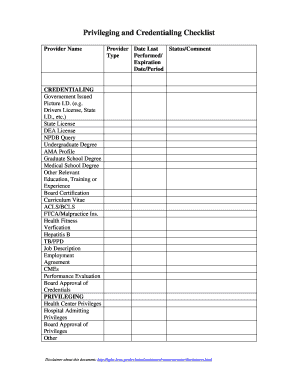
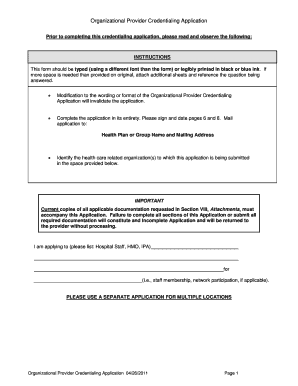
The Provider Credentialing Checklist is a healthcare form used by providers to submit necessary information for credentialing with insurance payors.
pdfFiller scores top ratings on review platforms




Easy to use -- and produces high quality results
Im still in my trail period but I am…
Im still in my trail period but I am very impressed with this PDFfiller. Its super easy to use and I think im going to purchased it for the year. It makes filling out commercial insurance applications easy to do in a very timely manner.
Who needs Credentialing Checklist?
Explore how professionals across industries use pdfFiller.

Credentialing Checklist is needed by:
-
Healthcare Providers seeking credentialing
-
Medical Practices enrolling in insurance plans
-
Administrators managing provider registrations
-
Office Managers handling medical documentation
-
Compliance Officers ensuring proper enrollment
-
Insurance Companies processing provider applications
Comprehensive Guide to Credentialing Checklist
What is the Provider Credentialing Checklist?
The Provider Credentialing Checklist is an essential document designed to assist healthcare providers in completing their credentialing applications. This form serves the purpose of gathering vital information required by insurance payors to verify a provider's qualifications. Credentialing is critical for healthcare providers across the U.S. as it ensures they meet the necessary standards to deliver services under various health plans.
Incorporating a provider credentialing checklist enhances the process by reducing errors and expediting approvals. Furthermore, it supports both compliance and administrative accuracy within healthcare settings.
Purpose and Benefits of the Provider Credentialing Checklist
Healthcare providers must utilize the Provider Credentialing Checklist to ensure a smooth credentialing experience. The checklist outlines the necessary steps to complete the medical credentialing application, making clear provider credentialing requirements essential to successful applications. Using this checklist helps minimize the risk of inaccuracies that can lead to delays or denials.
Among its benefits, the checklist ensures compliance with state and federal regulations and simplifies the submission process for healthcare provider documentation.
Key Features of the Provider Credentialing Checklist
The Provider Credentialing Checklist includes various sections that detail the required information and documentation necessary for accurate submission. Essential features of the checklist encompass:
-
Fillable form with designated fields for easy completion.
-
Comprehensive breakdown of documentation requirements.
-
Instructions for providers to follow during the registration process.
The form's design allows users to leverage pdfFiller for a seamless experience, enhancing usability for insurance credentialing forms.
Who Needs the Provider Credentialing Checklist?
Many roles within healthcare require the use of the Provider Credentialing Checklist, including:
-
Physicians who must apply for proficiency in various programs.
-
Nurse practitioners looking to enroll in health systems.
-
Allied health professionals who need to register with insurance providers.
This checklist is significant across multiple specialties and practice settings, ensuring that everyone involved in healthcare delivery meets necessary registration and enrollment standards.
How to Fill Out the Provider Credentialing Checklist Online: A Step-by-Step Guide
Completing the Provider Credentialing Checklist online with pdfFiller is simple. Follow these steps for a successful submission:
-
Access the checklist on pdfFiller's platform.
-
Gather all necessary documents such as licenses, certifications, and personal identification.
-
Carefully fill out each section of the checklist, ensuring accuracy.
-
Review the form for any potential errors.
-
Submit your completed checklist via the appropriate channel.
These steps are vital for maintaining accuracy and enhancing the overall experience in the medical credentialing checklist process.
Common Errors and How to Avoid Them When Submitting the Provider Credentialing Checklist
Healthcare providers often encounter a range of common mistakes while completing the Provider Credentialing Checklist. Frequent errors include incomplete sections, incorrect data entries, and missing documentation. To prevent these issues:
-
Thoroughly review the checklist against your documents before submission.
-
Utilize the validation features available within pdfFiller to ensure all required fields are filled.
By being proactive, providers can ensure their application meets the required provider credentialing requirements, leading to smoother processing.
Submission Methods for the Provider Credentialing Checklist
Providers have several options for submitting the completed Provider Credentialing Checklist. The methods include:
-
Online submission through platforms like pdfFiller for convenience.
-
Mail-in options for providers who prefer traditional methods.
Choosing digital submission offers the advantage of easy tracking of submission status, ensuring timely follow-up on your medical credentialing application.
What Happens After You Submit the Provider Credentialing Checklist?
After submitting the Provider Credentialing Checklist, providers enter a waiting period where their application is reviewed. Typical outcomes include acceptance, request for additional information, or potential rejections.
Providers can check their application status through the pdfFiller platform and should be prepared to address any common rejection reasons and solutions should they arise.
Security and Compliance in Handling the Provider Credentialing Checklist
When handling sensitive healthcare documentation, data security is of utmost importance. Providers must ensure that their information is protected during the credentialing process. pdfFiller prioritizes security with features such as encryption and adherence to HIPAA and GDPR regulations.
These measures are crucial for maintaining privacy and data protection, offering peace of mind as providers complete their checklist.
Streamline Your Credentialing Process with pdfFiller
Utilizing pdfFiller enables healthcare providers to efficiently create, fill out, and eSign their Provider Credentialing Checklist. With its cloud-based capabilities, pdfFiller enhances document management through streamlined workflows, making the process secure and user-friendly.
Emphasizing ease of use and security, pdfFiller stands as a vital tool for healthcare providers managing their documentation needs.
How to fill out the Credentialing Checklist
-
1.To get started on pdfFiller, visit the pdfFiller website and log in to your account. If you do not have an account, you can create one or use a trial version.
-
2.Once logged in, use the search bar to look for the 'Provider Credentialing Checklist' form. Click on the form title to open it.
-
3.Before completing the form, gather all necessary information such as your name, clinic details, specialty, service locations, and any required certificates or documents.
-
4.As you navigate through the form, fill in the blank fields with the gathered information. Click on each field to enter your details. Use the checkboxes where applicable.
-
5.Be sure to read the instructions provided alongside the form fields to ensure you complete each section accurately.
-
6.Review your entries thoroughly before finalizing the form. Check for any missing information or errors in the provided details.
-
7.Once satisfied with the form's content, you can save your progress or directly download the completed form in your desired format.
-
8.If required, submit the form to relevant insurance payors through their specified submission methods, often outlined on their websites.

Who is eligible to use the Provider Credentialing Checklist?
Healthcare providers and organizations seeking credentialing with insurance companies are eligible to use the Provider Credentialing Checklist. This includes individual healthcare practitioners and medical practices enrolled in government-sponsored plans.
What supporting documents are required to complete this form?
You will need to provide information such as your provider name, clinic address, specialty, service locations, as well as relevant certificates and documents. Ensure all documentation is in order before starting the process.
How should I submit the completed Provider Credentialing Checklist?
After completing the Provider Credentialing Checklist, you can submit it electronically to the insurance payors or agencies as specified. Some may require you to mail a hard copy, while others may provide an online submission platform.
Are there any common mistakes to avoid when filling out this form?
Common mistakes include omitting required information, misinterpreting instructions, and not signing the form. Verify that all fields are completed accurately and that you have attached the necessary supporting documents.
What is the processing time for credentialing after submission?
Processing times for credentialing can vary by insurance company, typically taking anywhere from a few weeks to several months. For more accurate estimates, you may contact the specific payor directly after submission.
Is notarization required for the Provider Credentialing Checklist?
No, notarization is not required for the Provider Credentialing Checklist. However, you must provide your signature where indicated on the form.
Can I access the form in languages other than English?
The Provider Credentialing Checklist is available in English. For assistance in other languages, consider reaching out to a translator or check if the insurance company offers support in multiple languages.
Related Forms





Related Catalogs
Get the latest insights from our blog


If you believe that this page should be taken down, please follow our DMCA take down process
here
.
This form may include fields for payment information. Data entered in these fields is not covered by PCI DSS compliance.