
Last updated on
Nov 9, 2026
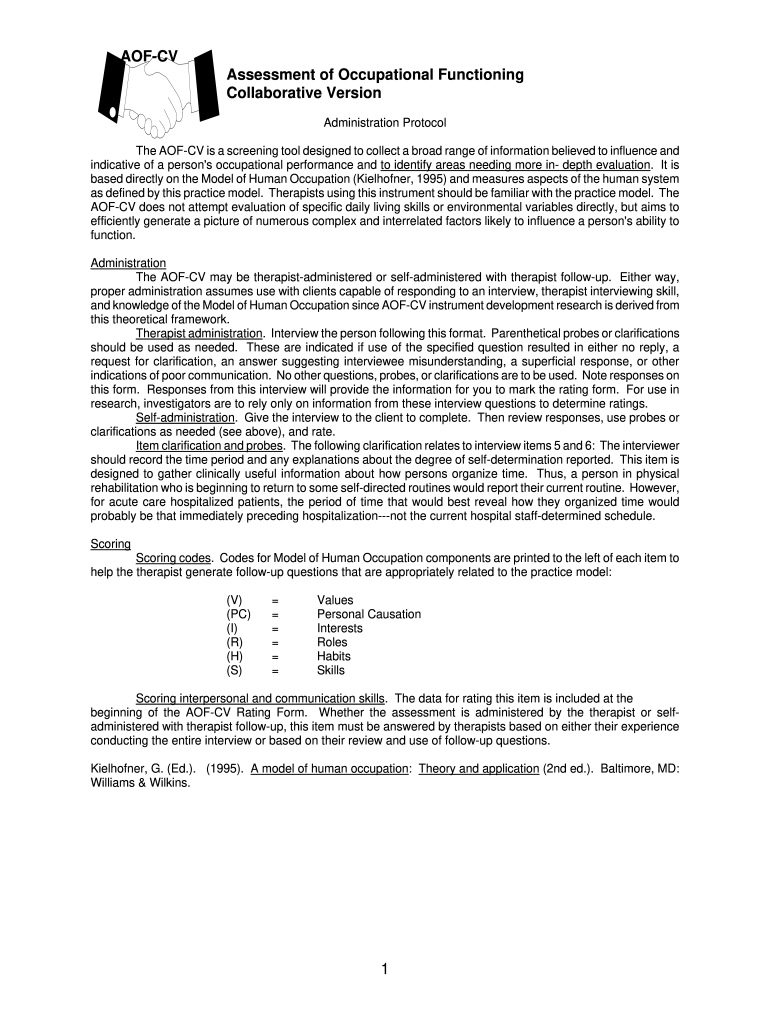
AOF-CV Form free printable template
We are not affiliated with any brand or entity on this form

Fill out
Complete the form online in a simple drag-and-drop editor.

eSign
Add your legally binding signature or send the form for signing.

Share
Share the form via a link, letting anyone fill it out from any device.

Export
Download, print, email, or move the form to your cloud storage.
Why pdfFiller is the best tool for your documents and forms


End-to-end document management
From editing and signing to collaboration and tracking, pdfFiller has everything you need to get your documents done quickly and efficiently.
Accessible from anywhere
pdfFiller is fully cloud-based. This means you can edit, sign, and share documents from anywhere using your computer, smartphone, or tablet.
Secure and compliant
pdfFiller lets you securely manage documents following global laws like ESIGN, CCPA, and GDPR. It's also HIPAA and SOC 2 compliant.
What is AOF-CV Form
The Assessment of Occupational Functioning Collaborative Version is a healthcare form used by therapists to evaluate a person's occupational performance and identify areas needing further evaluation.
pdfFiller scores top ratings on review platforms




Who needs AOF-CV Form?
Explore how professionals across industries use pdfFiller.

AOF-CV Form is needed by:
-
Occupational therapists looking to assess clients’ functioning.
-
Healthcare providers wanting to screen for occupational performance issues.
-
Patients or clients needing to report their occupational engagement.
-
Clinical researchers studying occupational therapy effectiveness.
-
Educational institutions assessing students' occupational skills.
Comprehensive Guide to AOF-CV Form
What is the Assessment of Occupational Functioning Collaborative Version?
The Assessment of Occupational Functioning Collaborative Version (AOF-CV) is a screening tool designed for evaluating occupational performance. It is grounded in the Model of Human Occupation, allowing healthcare professionals to gain comprehensive insights into a person's functioning. This versatile tool can be utilized in two formats: therapist-administered and self-administered, ensuring a flexible approach to assessment.
Purpose and Benefits of the AOF-CV
The AOF-CV serves as a clinical assessment tool that aids in understanding an individual's occupational performance. By employing this assessment, professionals can create personalized care plans based on specific needs. The form also helps in identifying areas that require further evaluation, streamlining the workflow for healthcare providers and therapists.
Key Features of the AOF-CV
The AOF-CV is structured into several sections that collect vital information on an individual’s functioning. Key features include:
-
Sections for personal information, interests, values, and habits.
-
Interview questions designed to elicit detailed responses, enhancing the quality of collected data.
-
Clear instructions for completing both the therapist-administered and self-administered forms.
Who Should Use the AOF-CV?
This assessment is particularly beneficial for a variety of professionals and individuals involved in healthcare. Users include:
-
Healthcare professionals and therapists who require a structured approach to assessing patient needs.
-
Clients seeking insight into their occupational functioning.
-
Specific situations where the AOF-CV can illuminate areas for improvement in occupational therapy practices.
How to Fill Out the AOF-CV Online (Step-by-Step)
Filling out the AOF-CV online is a straightforward process. Follow these steps:
-
Access the AOF-CV document online.
-
Fill in your personal information, including name and age.
-
Provide details about your education and occupational interests.
-
Submit the completed form for review.
Ensure accuracy by taking your time to complete each field to avoid any oversights.
Common Errors and How to Avoid Them
When completing the AOF-CV, users often encounter common pitfalls. To enhance the accuracy of submissions, consider the following tips:
-
Avoid leaving any mandatory fields blank; ensure all relevant information is provided.
-
Check for spelling errors and clarity in your responses.
-
Review the completed form thoroughly before submission to minimize mistakes.
How to Sign or Notarize the AOF-CV
Signing the AOF-CV is simple, and users can choose between methods. You can opt for:
-
A digital signature for quick and secure completion.
-
A traditional wet signature, if required.
Be mindful of any notarization requirements based on the context of your submission.
Submission Methods and Where to Submit the AOF-CV
Once you have completed the AOF-CV, you can submit it through various methods. Your options include:
-
Online submission via secure channels.
-
Printing the form and mailing it to the designated office.
Check for any applicable fees and processing times associated with your submission method to ensure a smooth experience.
How pdfFiller Assists with the AOF-CV
pdfFiller offers a range of features that streamline the process of completing the AOF-CV, including:
-
Editing capabilities for making necessary adjustments to the form.
-
Secure eSigning options that keep your documents safe.
-
User testimonials showcasing the effectiveness of using pdfFiller for form completion.
Start Filling Out Your AOF-CV Today!
Utilizing pdfFiller allows for an efficient process to fill out the AOF-CV form. With its seamless platform, users can easily navigate through the occupational therapy form, ensuring that all pertinent information is collected efficiently. Take the first step towards completing your assessment for better insight into your occupational functioning.
How to fill out the AOF-CV Form
-
1.To access the Assessment of Occupational Functioning Collaborative Version form, visit pdfFiller and find the document by searching its name in the search bar.
-
2.Open the form once it's found, and make sure to familiarize yourself with the layout to understand where to input your information.
-
3.Before filling out the form, gather any necessary personal details such as your name, age, years of education, and information about your interests, values, and routines.
-
4.Utilize pdfFiller’s user-friendly interface to click on each blank field and type your responses directly into the form, ensuring accuracy and completeness.
-
5.If you need clarification on any questions, refer to the instructions provided in the form or consult a therapist for assistance.
-
6.After completing all sections, review your answers closely to avoid any common mistakes, such as omitting required fields or providing incorrect information.
-
7.Once satisfied with your inputs, save your progress by clicking the save option or choose to download the completed form directly to your computer.
-
8.If you need to submit the form, check for the submission options provided on pdfFiller, which may allow sending it directly via email or printing it for physical submission.

Who is eligible to use the Assessment of Occupational Functioning Collaborative Version?
Anyone seeking to evaluate their occupational performance can use this form. It is particularly useful for clients working with occupational therapists or healthcare providers.
What type of information do I need to fill out this form?
You will need basic personal information such as your name and age, along with details about your educational background and occupational interests.
How do I submit the completed form?
After filling out the form on pdfFiller, you can submit it by either downloading it for printing or using pdfFiller's email submission feature directly from the platform.
Are there any deadlines for completing the form?
There are typically no strict deadlines for completing the Assessment of Occupational Functioning, but it should be completed whenever you are ready for a therapy session or evaluation.
What common mistakes should I avoid while filling out the form?
Ensure that you don’t skip fields marked as required and double-check that the information you provide is accurate and relevant to your occupational history.
Will I need to provide any supporting documents?
No specific supporting documents are required for the Assessment of Occupational Functioning, but be prepared to discuss your responses in further detail with a therapist if needed.
How long does it typically take to complete this form?
Filling out the Assessment of Occupational Functioning Collaborative Version usually takes about 15-30 minutes, depending on how thoroughly you want to answer the questions.
Related Forms



Related Catalogs
Get the latest insights from our blog


If you believe that this page should be taken down, please follow our DMCA take down process
here
.
This form may include fields for payment information. Data entered in these fields is not covered by PCI DSS compliance.