
Last updated on
Oct 31, 2026
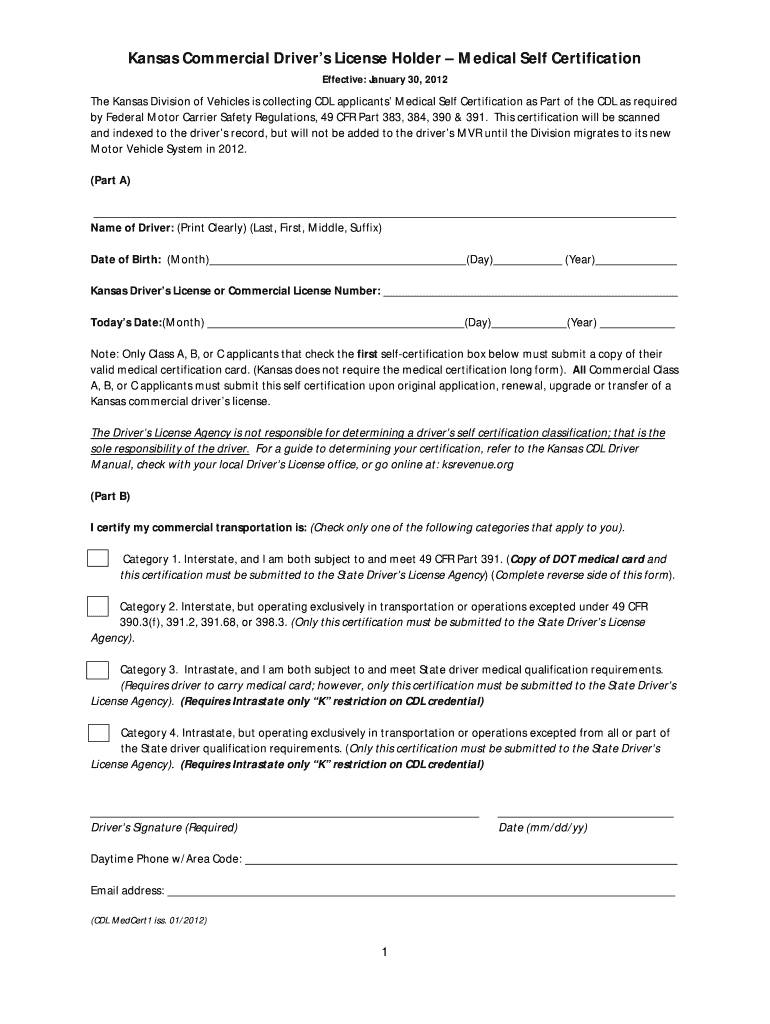
KS CDL MedCert 1 2012-2026 free printable template
pdfFiller is not affiliated with any government organization

Fill out
Complete the form online in a simple drag-and-drop editor.

eSign
Add your legally binding signature or send the form for signing.

Share
Share the form via a link, letting anyone fill it out from any device.

Export
Download, print, email, or move the form to your cloud storage.
Why pdfFiller is the best tool for your documents and forms


End-to-end document management
From editing and signing to collaboration and tracking, pdfFiller has everything you need to get your documents done quickly and efficiently.
Accessible from anywhere
pdfFiller is fully cloud-based. This means you can edit, sign, and share documents from anywhere using your computer, smartphone, or tablet.
Secure and compliant
pdfFiller lets you securely manage documents following global laws like ESIGN, CCPA, and GDPR. It's also HIPAA and SOC 2 compliant.
What is KS CDL MedCert 1
The Kansas CDL Medical Self Certification Form is a government document used by commercial driver license applicants in Kansas to certify their medical status as mandated by federal regulations.
pdfFiller scores top ratings on review platforms




Who needs KS CDL MedCert 1?
Explore how professionals across industries use pdfFiller.

KS CDL MedCert 1 is needed by:
-
Kansas commercial driver license applicants
-
Existing CDL holders renewing their license
-
Drivers upgrading their license category
-
Individuals transferring a Kansas CDL
-
Medical examiners providing certification details
Comprehensive Guide to KS CDL MedCert 1
What is the Kansas CDL Medical Self Certification Form?
The Kansas CDL Medical Self Certification Form is an essential document for CDL applicants in Kansas, used to certify their medical status according to the Federal Motor Carrier Safety Regulations. This form plays a crucial role for drivers, ensuring that they meet the necessary health standards required for operating commercial vehicles. Without proper certification, applicants may face significant impacts on their driving status.
-
Overview of the Kansas CDL Medical Self Certification Form and its purpose.
-
Importance for CDL applicants in certifying medical status.
-
Compliance with Federal Motor Carrier Safety Regulations.
Purpose and Benefits of the Kansas CDL Medical Self Certification Form
Completing the Kansas CDL Medical Self Certification Form is essential for various reasons and offers several benefits. This form ensures that commercial drivers comply with legal requirements, avoiding any potential downgrading to a non-commercial license. Proper completion also smooths out the application, renewal, and upgrade processes for drivers, allowing them to maintain their CDL status effectively.
-
Ensures compliance with legal requirements for CDL holders.
-
Prevents downgrading of CDL to a non-commercial status.
-
Facilitates smooth application, renewal, and upgrade processes.
Who Needs the Kansas CDL Medical Self Certification Form?
The Kansas CDL Medical Self Certification Form is required by specific individuals, particularly those seeking a CDL in Kansas. This includes individuals applying for an original CDL, those renewing their existing licenses, and drivers transferring their CDL from another state. Understanding the requirements of this form is crucial for individuals in various medical categories that need to self-certify their fitness to drive.
-
Clarification on who qualifies as a CDL applicant in Kansas.
-
Scenarios requiring submission (original application, renewal, transfer).
-
Importance of self-certification for different medical categories.
How to Fill Out the Kansas CDL Medical Self Certification Form Online
Filling out the Kansas CDL Medical Self Certification Form online is a straightforward process. Users need to access the form via pdfFiller, providing their personal information as well as choosing the appropriate certification categories. It is crucial to ensure that the driver's signature is included, along with any required details from a medical examiner if applicable.
-
Access the Kansas CDL Medical Self Certification Form on pdfFiller.
-
Fill out personal information and select the correct certification categories.
-
Include the required driver's signature and medical examiner's details if necessary.
Common Errors and How to Avoid Them
While completing the Kansas CDL Medical Self Certification Form, applicants often encounter common pitfalls. Mistakes such as leaving fields incomplete or issues with signatures can delay the process. To avoid these obstacles, applicants should adopt best practices for checking their forms for accuracy before submission.
-
Identification of frequent mistakes (incomplete fields, signature issues).
-
Tips for checking accuracy before submission.
-
Importance of reviewing the form to prevent delays.
Submission Methods for the Kansas CDL Medical Self Certification Form
Once the Kansas CDL Medical Self Certification Form is completed, applicants have several submission methods available. Submissions can be made online, via mail, or in person at designated locations. Understanding these submission options is vital, along with being aware of any deadlines specific to application types like renewals or upgrades.
-
Outline the different submission options (online, mail, in-person).
-
Mention deadlines for submission based on application type.
-
Brief on tracking submission status after filing.
Importance of Using pdfFiller to Complete the Form
Using pdfFiller to complete the Kansas CDL Medical Self Certification Form simplifies the process significantly. The platform allows users to edit and fill forms online without the hassle of downloads. Additionally, pdfFiller enhances security with document handling features, making it a reliable choice for sensitive forms.
-
Highlight the ease of editing and filling forms online.
-
Emphasize security features offered by pdfFiller.
-
Mention additional capabilities like eSigning and document sharing.
Sample of a Completed Kansas CDL Medical Self Certification Form
Providing a visual representation of a completed Kansas CDL Medical Self Certification Form can aid users in understanding the required details. By reviewing a sample form, applicants can see which sections are filled out correctly and learn about common areas of confusion.
-
Visual representation of a completed form for better understanding.
-
Highlights on sections filled out correctly which may confuse users.
-
Using pdfFiller ensures compliance with required formats.
What to Do After Submitting the Kansas CDL Medical Self Certification Form
After submitting the Kansas CDL Medical Self Certification Form, applicants should know what to expect next. Understanding processing times and how to check application status post-submission is essential. If any errors are discovered after submission, knowing the steps to amend the form will help ensure compliance and maintain licensing.
-
Explanation of what to expect in terms of processing time.
-
Insight on how to check application status post-submission.
-
Instructions for amending or correcting the form if necessary.
How to fill out the KS CDL MedCert 1
-
1.Begin by accessing pdfFiller and searching for the Kansas CDL Medical Self Certification Form in the template library.
-
2.Open the form to view the editable version within the platform.
-
3.Gather personal information before starting, including your full name, date of birth, and any medical details relevant to your certification.
-
4.Use the navigation tools to jump between fields, filling in personal information accurately in the designated areas.
-
5.Select your certification category by checking the appropriate box as per your medical status.
-
6.Review the form thoroughly, ensuring all fields are completed and your signature is present where required.
-
7.Once complete, utilize the review feature to check for any errors or missing information.
-
8.Save your work frequently to avoid losing any entries, and ensure that you have the most recent version of the form.
-
9.After reviewing, download a copy of the completed form to keep for your records.
-
10.Submit the form through your state’s DMV website or in person, following local guidelines.

Who is required to complete the Kansas CDL Medical Self Certification Form?
The form must be completed by anyone applying for a commercial driver's license in Kansas, as well as existing drivers renewing, upgrading, or transferring their CDL.
What are the deadlines for submitting the Kansas CDL Medical Self Certification Form?
The form should be submitted along with your CDL application or renewal requests. Ensure it’s submitted before the application deadline to avoid license downgrading.
How can I submit the Kansas CDL Medical Self Certification Form?
You can submit the completed form either online through the Kansas DMV website or in person at a local DMV office, following their procedures.
What supporting documents do I need with the form?
While the primary requirement is the Medical Self Certification Form, you may also need identification and any medical examiner's certificates if applicable.
What common mistakes should I avoid when filling out this form?
Be sure to fill out all required fields and check for accuracy in your personal information. Missing signatures or incorrect category selections could cause processing delays.
How long does it take to process the Kansas CDL Medical Self Certification Form?
Processing times may vary, but it typically takes a few business days. Ensure timely submission to avoid any disruptions in your CDL status.
Are there any fees associated with this form?
There are usually no fees specifically for completing the Kansas CDL Medical Self Certification Form, but standard application or renewal fees apply through the DMV.
Related Content
Related Forms



Related Catalogs
Get the latest insights from our blog


If you believe that this page should be taken down, please follow our DMCA take down process
here
.
This form may include fields for payment information. Data entered in these fields is not covered by PCI DSS compliance.