
Last updated on
Nov 9, 2026

Metlife JY0333 2012 free printable template
pdfFiller is not affiliated with any government organization

Fill out
Complete the form online in a simple drag-and-drop editor.

eSign
Add your legally binding signature or send the form for signing.

Share
Share the form via a link, letting anyone fill it out from any device.

Export
Download, print, email, or move the form to your cloud storage.
Why pdfFiller is the best tool for your documents and forms


End-to-end document management
From editing and signing to collaboration and tracking, pdfFiller has everything you need to get your documents done quickly and efficiently.
Accessible from anywhere
pdfFiller is fully cloud-based. This means you can edit, sign, and share documents from anywhere using your computer, smartphone, or tablet.
Secure and compliant
pdfFiller lets you securely manage documents following global laws like ESIGN, CCPA, and GDPR. It's also HIPAA and SOC 2 compliant.
What is Metlife JY0333
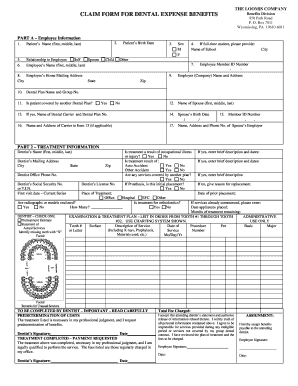
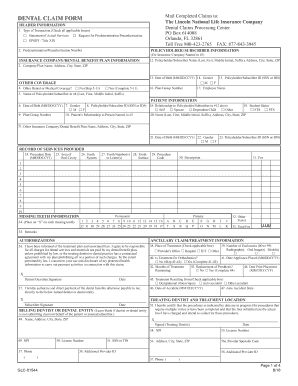
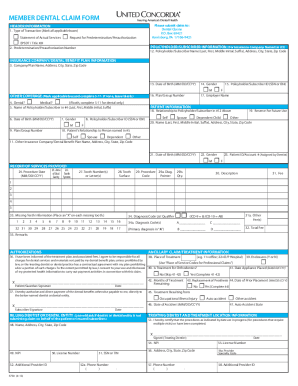
The MetLife Dental Expense Claim Form is a medical billing document used by patients and employees to submit dental expense claims to MetLife for reimbursement.
pdfFiller scores top ratings on review platforms




Who needs Metlife JY0333?
Explore how professionals across industries use pdfFiller.

Metlife JY0333 is needed by:
-
Patients seeking reimbursement for dental expenses
-
Employees filling out claims for dental treatments
-
Dentists providing care and billing for treatments
-
Insurance administrators managing claims
-
Financial coordinators in healthcare facilities
Comprehensive Guide to Metlife JY0333
What is the MetLife Dental Expense Claim Form?
The MetLife Dental Expense Claim Form is a crucial document utilized by patients, employees, and dentists for submitting dental expense claims to MetLife. This form serves as a structured means for requesting reimbursement for dental treatments covered by MetLife dental insurance. Understanding the roles of the patient, employee, and dentist is essential, as each has specific responsibilities in the submission process. This form ensures that dental expenses are properly documented and reimbursed accordingly.
The importance of the MetLife dental expense claim form cannot be overstated, as it streamlines the reimbursement requests, facilitating timely payments to patients and providers.
Purpose and Benefits of the MetLife Dental Expense Claim Form
This form plays a significant role in expediting the dental expense reimbursement process for both patients and employees. By using the dental expense reimbursement form, users can enjoy various benefits, including faster claim processing and improved accuracy in expense documentation. The advantages of utilizing this form extend to simplifying the complexities associated with dental treatment claims.
-
Timeliness in submissions enhances reimbursement speed.
-
Accurate record-keeping minimizes disputes over expenses.
-
Streamlined processes save time for claimants and dental providers.
Key Features of the MetLife Dental Expense Claim Form
The MetLife Dental Expense Claim Form is designed with user-friendliness in mind. Several key features enhance the experience for all parties involved in the claim submission process, ensuring that necessary information is easily accessible and comprehensible.
-
Multiple fillable fields and checkboxes for efficient data entry.
-
Detailed instructions guide patients, employees, and dentists through completion.
-
Robust security features protect sensitive dental expense information.
Who Needs the MetLife Dental Expense Claim Form?
The MetLife Dental Expense Claim Form is essential for patients who require reimbursement for dental services, employees submitting claims on behalf of their dependents, and dentists who document treatments performed. Understanding when to use this form is crucial, as it is typically required after dental visits or treatments.
Eligibility for filing claims using this form depends on the roles of the users in relation to the dental services rendered. Patients and employees must provide accurate information to ensure proper claim processing.
How to Fill Out the MetLife Dental Expense Claim Form Online (Step-by-Step)
Completing the MetLife Dental Expense Claim Form online can be straightforward if you follow a series of organized steps. Start by gathering all necessary documents related to the dental treatment, including receipts and treatment details.
-
Begin with filling out the patient’s information accurately.
-
Provide the employee’s details if applicable.
-
List the dentist’s information and the treatment performed.
-
Detail the costs associated with the dental services.
-
Review the completed form to catch any errors or missing signatures.
Avoid common mistakes, such as leaving fields blank or omitting signatures, to ensure successful processing of the claim.
Submission Methods and Delivery of the MetLife Dental Expense Claim Form
Once you have completed the MetLife Dental Expense Claim Form, it is crucial to submit it correctly to facilitate timely processing. Multiple submission methods are available for sending this form.
-
Submit the form online through MetLife's designated portal.
-
Mail the completed form to the appropriate MetLife office.
-
Keep records of the submission for your personal tracking.
Understanding where to send the documents ensures that your claims are received and processed promptly.
Common Errors and How to Avoid Them While Filing the MetLife Dental Expense Claim Form
Being aware of common errors is key to successfully filing the MetLife Dental Expense Claim Form. Frequent mistakes can lead to claim rejections and delays in reimbursement.
-
Missing signatures from necessary parties can invalidate the claim.
-
Incorrect or incomplete information can result in processing issues.
-
Failing to double-check the amount claimed against receipts may cause discrepancies.
Utilizing available resources, such as customer support, can provide assistance to avoid these common pitfalls.
Security and Compliance for the MetLife Dental Expense Claim Form
Security and compliance are paramount when handling the MetLife Dental Expense Claim Form to protect sensitive user data. MetLife employs numerous security measures to safeguard personal and treatment information throughout the submission process.
-
256-bit encryption ensures that all data is transmitted securely.
-
Compliance with HIPAA and GDPR regulations reinforces user trust.
-
Utilizing platforms like pdfFiller adds additional layers of security in handling forms.
How pdfFiller Simplifies the Process of Completing the MetLife Dental Expense Claim Form
pdfFiller provides a seamless experience when completing the MetLife Dental Expense Claim Form. This cloud-based platform streamlines the entire process, making it user-friendly and efficient.
-
The ability to edit and fill in the form directly online simplifies information entry.
-
eSigning features allow users to complete the form without printing.
-
Document management capabilities help keep track of submissions.
Using pdfFiller ensures that you can manage your documents securely and efficiently every step of the way.
Final Steps After Submitting the MetLife Dental Expense Claim Form
After submitting the MetLife Dental Expense Claim Form, it’s important to know what to expect in the following days. Processing times for claims can vary, and knowing how to check the status of your submitted application can alleviate anxiety.
-
Typical processing times can range from a few days to a couple of weeks.
-
Users should keep an eye out for confirmation emails regarding their claims.
-
If amendments are necessary, understanding the process for corrections is beneficial.
Staying informed will help you navigate the claim process effectively.
How to fill out the Metlife JY0333
-
1.Visit pdfFiller’s website and log in or create an account to access the platform.
-
2.In the search bar, type 'MetLife Dental Expense Claim Form' and select the relevant document from the results.
-
3.Once the form opens, familiarize yourself with the layout. You’ll see various fillable fields for your information.
-
4.Before you fill out the form, gather all necessary information including patient details, treatment specifics, and cost breakdowns.
-
5.Begin filling out the form by clicking on each field to enter the required information. You can use tab key to navigate through fields smoothly.
-
6.Complete all sections, including details about the treatment, costs incurred, and any necessary signatures.
-
7.Once you have filled out all the fields, double-check for any inaccuracies or missing information.
-
8.If needed, use the comments or notes feature on pdfFiller to clarify any specific details.
-
9.To finalize the form, use the review option to ensure everything is correctly entered and signed.
-
10.Save your progress periodically or choose to download the completed form directly in PDF format.
-
11.After reviewing, submit the form electronically if the option is available or follow instructions for printing and mailing it to MetLife.

Who is eligible to use the MetLife Dental Expense Claim Form?
Patients who have received dental care covered by MetLife and employees filing claims on their behalf can use this form. It's essential that all parties involved in the treatment complete their sections.
What information do I need to complete the claim form?
Before starting, gather patient identification details, dental treatment descriptions, dates of service, and total costs. Ensure you also have the signatures of the patient, employee, and dentist.
What happens if I submit my claim late?
Submitting your claim late may lead to denial of reimbursement. It's crucial to be aware of MetLife's deadlines for submission to ensure your claim is processed.
How do I submit the completed claim form?
You can submit the completed MetLife Dental Expense Claim Form by email or postal mail to MetLife, depending on their submission guidelines. Ensure all required signatures are included.
Are there any common mistakes to avoid when filling out the form?
Common mistakes include missing signatures, incomplete fields, and incorrect cost reporting. Review the form thoroughly before submission to avoid delays.
What's the expected processing time for claims?
Claim processing times can vary, but typically take 2-4 weeks. Always check MetLife's guidelines for the most accurate information.
Do I need to notarize the MetLife Dental Expense Claim Form?
No, the MetLife Dental Expense Claim Form does not require notarization. Ensure only the necessary signatures are obtained for a valid submission.
Metlife JY0333 Form Versions
Related Content
Related Forms




Get the latest insights from our blog


If you believe that this page should be taken down, please follow our DMCA take down process
here
.
This form may include fields for payment information. Data entered in these fields is not covered by PCI DSS compliance.