
Last updated on
Oct 31, 2026

Get the free AVID Binder Check Grading Practice
We are not affiliated with any brand or entity on this form

Fill out
Complete the form online in a simple drag-and-drop editor.

eSign
Add your legally binding signature or send the form for signing.

Share
Share the form via a link, letting anyone fill it out from any device.

Export
Download, print, email, or move the form to your cloud storage.
Why pdfFiller is the best tool for your documents and forms


End-to-end document management
From editing and signing to collaboration and tracking, pdfFiller has everything you need to get your documents done quickly and efficiently.
Accessible from anywhere
pdfFiller is fully cloud-based. This means you can edit, sign, and share documents from anywhere using your computer, smartphone, or tablet.
Secure and compliant
pdfFiller lets you securely manage documents following global laws like ESIGN, CCPA, and GDPR. It's also HIPAA and SOC 2 compliant.
What is AVID Binder Check
The AVID Binder Check Grading Practice is an educational document used by students and parents to evaluate a student's binder organization and content effectively.
pdfFiller scores top ratings on review platforms




Who needs AVID Binder Check?
Explore how professionals across industries use pdfFiller.

AVID Binder Check is needed by:
-
Students who need to assess their binder organization.
-
Parents wishing to support their child's academic skills.
-
Teachers evaluating student materials for academic performance.
-
School administrators overseeing academic evaluations.
-
Counselors guiding students on organizational skills.
Comprehensive Guide to AVID Binder Check
What is the AVID Binder Check Grading Practice?
The AVID Binder Check Grading Practice is a crucial tool for evaluating students' organizational skills regarding their binders. This grading practice primarily serves to assess how well students maintain their binder contents, which reflects their academic preparedness.
This form helps educators monitor students' binder organization, ensuring that necessary materials are present and well organized. Furthermore, it requires signatures from both students and parents, encouraging accountability and engagement in the evaluation process.
Purpose and Benefits of the AVID Binder Check Grading Practice
The AVID Binder Check Grading Practice offers several advantages for students and parents alike. Structured evaluations provide a clear overview of a student’s academic records, making it easier to track progress over time.
By implementing this grading practice, schools promote students' accountability and enhance organizational skills. Teachers benefit as well, as the evaluation aids in assessing student progress effectively.
Key Features of the AVID Binder Check Grading Practice
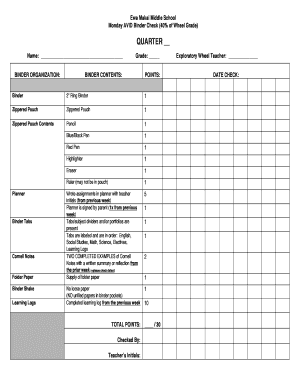
The AVID Binder Check Grading Practice includes several essential components to simplify the evaluation process. Key sections of the form cover required materials and various organization checks tailored to ensure students maintain neat and orderly binders.
-
Fillable fields for user input, such as 'Name: __________________________'
-
Checkboxes for easy organization assessment
-
Clear guidelines to emphasize the importance of neatness in binder presentation
Who Needs the AVID Binder Check Grading Practice?
This form is designed for all students participating in the AVID program. Students who meet specific eligibility criteria should fill out the form, and it requires a parent’s signature to enhance engagement and accountability.
Both parents and teachers benefit from the results of the evaluation, as it provides insights into a student's organizational habits and overall academic readiness.
How to Fill Out the AVID Binder Check Grading Practice Online (Step-by-Step)
Filling out the AVID Binder Check Grading Practice online is straightforward. Follow these steps:
-
Access the digital form from the designated platform.
-
Fill in the necessary fields, ensuring all required information is provided, including the student’s name and grade.
-
Pay special attention to required materials that need to be checked off.
-
Obtain the required signatures from both the student and parent.
Review and Validation Checklist for the AVID Binder Check Grading Practice
Prior to submission, users should ensure accuracy by utilizing a review checklist. Common errors while filling out the form can include:
-
Missing or incorrect signatures
-
Omitted required materials
-
Errors in student’s name or grade details
Reviewing the completed form meticulously before submission is crucial for maintaining the integrity of the evaluation process.
Submission Methods for the AVID Binder Check Grading Practice
Once the AVID Binder Check Grading Practice is completed, users have several submission options. Digital submissions can be made directly through the platform, while printed versions can be turned in at designated locations.
It's advisable to be aware of any timelines or deadlines relevant to submissions to ensure evaluations are received on time.
Security and Compliance for the AVID Binder Check Grading Practice
User security is of utmost importance when handling sensitive academic records. The AVID Binder Check Grading Practice adheres to stringent security measures, including 256-bit encryption.
Compliance with regulations such as HIPAA and GDPR ensures that personal information is managed appropriately. pdfFiller prioritizes data protection, offering a secure environment for all users of the tool.
How pdfFiller Helps with the AVID Binder Check Grading Practice
pdfFiller enhances the user experience with the AVID Binder Check Grading Practice through its cloud-based platform. Users can easily create, edit, and fill out forms from any device with internet access.
Key features of pdfFiller include editing tools, eSigning capabilities, and secure sharing options, making it an ideal choice for managing educational forms efficiently.
Getting Started with Your AVID Binder Check Grading Practice Today
Engage with the AVID Binder Check Grading Practice to streamline your form-filling experience. Utilize pdfFiller’s intuitive features for an efficient workflow in managing academic records.
Discover the various capabilities of pdfFiller that extend beyond the AVID Binder Check, facilitating comprehensive document management needs.
How to fill out the AVID Binder Check
-
1.To begin, navigate to pdfFiller and log into your account. If you do not have an account, register for a free trial or create one.
-
2.Once logged in, use the search bar to locate the 'AVID Binder Check Grading Practice' form. You can also browse through the Education Forms category to find it.
-
3.Click on the form title to open it in the editor. Familiarize yourself with the layout, including various sections and fields that need to be filled out.
-
4.Before you start filling out the form, gather all necessary information such as the student's name and any details regarding the binder contents.
-
5.Begin filling in the required fields. Enter the student's name in the designated 'Name' field and have the student evaluate their binder by checking the appropriate boxes for each requirement.
-
6.Encourage the student to provide detailed feedback where blank fields are available, which generally includes their assessment of the binder's organization and neatness.
-
7.Once all fields are complete, review the form for accuracy. Ensure all necessary sections are filled out, including any signatures needed from both the student and the parent.
-
8.Finalize the document by checking for any errors or omissions. Use pdfFiller's features to highlight any omitted fields.
-
9.After confirming everything is correct, click on the 'Save' button to store the completed form in your pdfFiller account.
-
10.You can download or print the form by selecting the appropriate option. If you wish to submit it electronically, follow the on-screen instructions for sharing or sending the form directly from pdfFiller.

Who is eligible to fill out the AVID Binder Check Grading Practice form?
The AVID Binder Check Grading Practice form should be filled out by students and their parents. Both parties are required to sign, confirming their acknowledgment of the evaluation.
Are there any deadlines for submitting this form?
There are typically no strict deadlines associated with the AVID Binder Check Grading Practice form, but it's advisable to complete it in a timely manner, especially if it's being used for evaluations or school meetings.
How should I submit the completed AVID Binder Check form?
After completing the AVID Binder Check form, it can be printed and submitted in person or shared electronically via email. Confirm submission procedures with your school or teacher.
What supporting documents do I need when filling out the form?
No additional documents are required to complete the AVID Binder Check Grading Practice. However, having the student's actual binder nearby for reference will aid in accurately filling out the assessment.
What common mistakes should I avoid when filling out this form?
Common mistakes include failing to complete all required fields, not obtaining necessary signatures from both the student and the parent, and overlooking the review process to ensure accuracy.
How long does processing take after submitting this form?
Processing time can vary. Typically, once submitted, evaluations based on the AVID Binder Check are handled in a timely manner, but check with your specific educational institution for detailed processing timelines.
What concerns might I have regarding the AVID Binder Check Grading Practice?
Common concerns may include ensuring accurate evaluations, understanding how the feedback will be used, and confirming whether there are any immediate follow-ups required after submitting the form.
Related Forms





Related Catalogs
Get the latest insights from our blog


If you believe that this page should be taken down, please follow our DMCA take down process
here
.
This form may include fields for payment information. Data entered in these fields is not covered by PCI DSS compliance.