
Last updated on
Nov 10, 2026

OR 2.130.2 2017-2026 free printable template
pdfFiller is not affiliated with any government organization

Fill out
Complete the form online in a simple drag-and-drop editor.

eSign
Add your legally binding signature or send the form for signing.

Share
Share the form via a link, letting anyone fill it out from any device.

Export
Download, print, email, or move the form to your cloud storage.
Why pdfFiller is the best tool for your documents and forms


End-to-end document management
From editing and signing to collaboration and tracking, pdfFiller has everything you need to get your documents done quickly and efficiently.
Accessible from anywhere
pdfFiller is fully cloud-based. This means you can edit, sign, and share documents from anywhere using your computer, smartphone, or tablet.
Secure and compliant
pdfFiller lets you securely manage documents following global laws like ESIGN, CCPA, and GDPR. It's also HIPAA and SOC 2 compliant.
What is OR 2.130.2
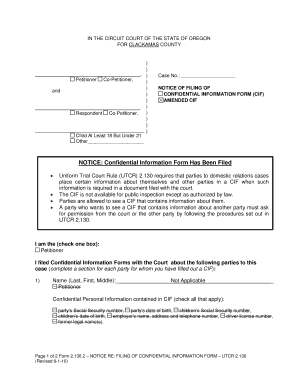
The Oregon Confidential Information Form Notice is a legal document used by parties involved in domestic relations cases to notify the court of sensitive personal information submitted through a Confidential Information Form (CIF).
pdfFiller scores top ratings on review platforms




Who needs OR 2.130.2?
Explore how professionals across industries use pdfFiller.

OR 2.130.2 is needed by:
-
Petitioners filing for confidentiality in legal cases
-
Respondents involved in domestic relations disputes
-
Co-Petitioners seeking to submit confidential information
-
Legal professionals managing cases in Oregon
-
Individuals needing to protect sensitive data in court documents
-
Families navigating Oregon family law processes
Comprehensive Guide to OR 2.130.2
What is the Oregon Confidential Information Form Notice?
The Oregon Confidential Information Form Notice serves as a critical document within domestic relations cases, designed to alert the court that a Confidential Information Form has been submitted. This form primarily addresses the safeguarding of sensitive personal information, which may include social security numbers and dates of birth, emphasizing privacy and legal compliance.
This form is governed by the Uniform Trial Court Rule (UTCR) 2.130, which outlines the requirements for handling confidential information effectively. It is essential for those who file this document to understand its legal implications within the context of family law, ensuring the protection of all involved parties.
Purpose and Benefits of the Oregon Confidential Information Form Notice
The primary objectives of filing the Oregon Confidential Information Form Notice in court proceedings include the protection of sensitive information and adherence to legal requirements. By utilizing this form, individuals can ensure that appropriate steps are taken to maintain the confidentiality of their information throughout the legal process.
-
Safeguards sensitive personal details from public disclosure
-
Facilitates compliance with legal standards in sensitive cases
-
Serves as an official notification to the court regarding confidential matters
Who Needs the Oregon Confidential Information Form Notice?
The stakeholders involved in this process are typically the Petitioner, Respondent, and Co-Petitioner. All these roles play a critical part in domestic relations, and understanding who needs to complete the form is vital for legal compliance.
Situations that necessitate the usage of this form commonly include divorce proceedings, child custody cases, and other domestic issues where confidentiality is paramount. Each role carries specific legal responsibilities which must be met to ensure a successful filing.
How to Fill Out the Oregon Confidential Information Form Notice Online
Filling out the Oregon Confidential Information Form Notice can be done efficiently online using a platform such as pdfFiller. Here is a step-by-step guide to help you through the process:
-
Access pdfFiller and choose the Oregon Confidential Information Form template.
-
Enter the required fields, including names and personal information.
-
Review the information for accuracy before finalizing.
-
Save and submit the completed form directly through the platform.
Using pdfFiller streamlines the process, making form completion accessible and user-friendly.
Field-by-Field Instructions for the Oregon Confidential Information Form Notice
Each field in the Oregon Confidential Information Form requires specific information for proper completion. Key fields include:
-
Name (Last, First, Middle)
-
Date of completion
-
Role selection (Petitioner, Respondent, Co-Petitioner)
It’s crucial to avoid common pitfalls during this process. Double-check entered information to ensure accuracy and refer to sample data if needed for guidance.
Filing the Oregon Confidential Information Form Notice: Process and Methods
Once the Oregon Confidential Information Form Notice has been completed, it can be submitted through various methods:
-
Online through pdfFiller for faster processing
-
Mail to the appropriate court office
-
In-person submission at the courthouse
Be aware of any associated fees and ensure payment is made at the time of filing. Additionally, keeping track of deadlines and expected processing times is crucial after submission.
What Happens After You Submit the Oregon Confidential Information Form Notice?
After submitting the Oregon Confidential Information Form Notice, you will follow a clear set of steps:
-
Confirmation of submission
-
Wait for processing notifications from the court
-
Monitor the status of your submission actively
Understanding this timeline aids in managing expectations and ensuring that the form does not encounter common rejection issues.
Security and Compliance with the Oregon Confidential Information Form Notice
Prioritizing the privacy and data protection of sensitive information is essential when filling out the Oregon Confidential Information Form Notice. pdfFiller provides robust security measures to safeguard personal data.
-
256-bit encryption ensures data security
-
Compliance with HIPAA and GDPR regulations
-
Regular audits to maintain secure document handling
This level of protection allows users to complete the form online with confidence.
Sample or Example of a Completed Oregon Confidential Information Form Notice
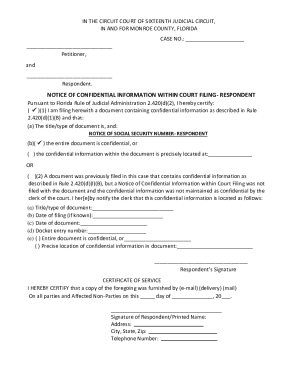
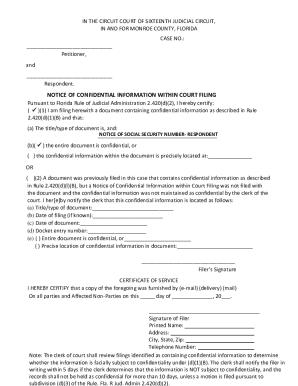
Having a visual reference can greatly assist in completing the Oregon Confidential Information Form Notice accurately. A correctly filled example of the form can provide clarity on format and required entries.
When reviewing examples, be mindful of potential variances based on different case scenarios, as the information required may differ slightly among various domestic cases.
Streamline Your Filing with pdfFiller
Utilizing pdfFiller for filling out the Oregon Confidential Information Form Notice can simplify your filing process significantly. The platform offers features such as eSigning, document management, and easy editing to foster convenience during the submission process.
With its strong emphasis on security and efficiency, pdfFiller emerges as a valuable tool for anyone navigating the complexities of family law documentation.
How to fill out the OR 2.130.2
-
1.To access the Oregon Confidential Information Form Notice, visit pdfFiller's website and log in to your account. If you don’t have an account, create one by following the prompts to register.
-
2.Once logged in, use the search bar to find the 'Oregon Confidential Information Form Notice' by typing the form name. Click on the form title to open it in the editor.
-
3.Before filling out the form, gather necessary information including names, social security numbers, dates of birth, and other personal details of the involved parties to ensure all required fields are completed accurately.
-
4.Using pdfFiller’s interface, navigate through the form by clicking on each field. Enter information by clicking in the blank spaces and typing directly. Utilize the checkbox options for roles such as Petitioner, Respondent, or Co-Petitioner as needed.
-
5.Review all entered information by scrolling through the entire form. Ensuring accuracy is crucial, as incorrect or incomplete information may affect processing or validity in court.
-
6.Once satisfied with your entries, finalize the form by selecting the 'Save' option on the toolbar. To download a copy, choose 'Download' or 'Export', and select your desired file format.
-
7.If you wish to submit directly, check for any online submission options available based on your case requirements. Follow the on-screen instructions and ensure that you adhere to any specific guidelines provided in your legal context.

Who is eligible to use the Oregon Confidential Information Form Notice?
Eligibility typically includes Petitioners, Respondents, and Co-Petitioners involved in domestic relations cases in Oregon. Legal professionals assisting these individuals can also utilize this form.
Is there a deadline for submitting the Oregon Confidential Information Form Notice?
Deadlines for submission can vary based on the specific court case and its schedule. It’s advised to file as soon as the Confidential Information Form is completed to adhere to any pertinent timelines.
What methods can I use to submit the form?
The Oregon Confidential Information Form Notice can usually be submitted in person at the court, via mail, or, where applicable, electronically through a court’s online filing system. Check with your local court for specific submission options.
What supporting documents are required with this form?
While the form itself is primarily focused on confidential information, you may need additional documents related to your case, such as court filings or previous legal agreements. Verify requirements with your attorney or local courthouse.
What are common mistakes to avoid when filling out this form?
Common mistakes include overlooking signature lines, leaving fields incomplete, and not properly identifying your role. Always double-check entries for accuracy to prevent processing delays.
How long does processing take for this form?
Processing times can vary by court. Typically, expect a few days to a couple of weeks, depending on the court's workload and whether the form is filed correctly with all required details.
Can I edit my form after it has been submitted?
Once submitted, correcting information on the Oregon Confidential Information Form Notice may require additional legal steps. It’s recommended to consult with a legal professional if changes are necessary after submission.
OR 2.130.2 Form Versions
Related Content
Related Forms




Related Catalogs
Get the latest insights from our blog


If you believe that this page should be taken down, please follow our DMCA take down process
here
.
This form may include fields for payment information. Data entered in these fields is not covered by PCI DSS compliance.