
Last updated on
Oct 31, 2026

Get the free SAE Experience Record Book Evaluation
We are not affiliated with any brand or entity on this form

Fill out
Complete the form online in a simple drag-and-drop editor.

eSign
Add your legally binding signature or send the form for signing.

Share
Share the form via a link, letting anyone fill it out from any device.

Export
Download, print, email, or move the form to your cloud storage.
Why pdfFiller is the best tool for your documents and forms


End-to-end document management
From editing and signing to collaboration and tracking, pdfFiller has everything you need to get your documents done quickly and efficiently.
Accessible from anywhere
pdfFiller is fully cloud-based. This means you can edit, sign, and share documents from anywhere using your computer, smartphone, or tablet.
Secure and compliant
pdfFiller lets you securely manage documents following global laws like ESIGN, CCPA, and GDPR. It's also HIPAA and SOC 2 compliant.
What is SAE Evaluation
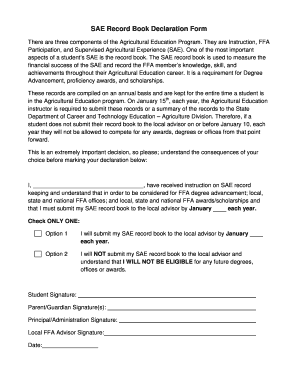
The SAE Experience Record Book Evaluation is a document used by educators and inspectors to assess the accuracy of a student's Supervised Agricultural Experience record book.
pdfFiller scores top ratings on review platforms




Who needs SAE Evaluation?
Explore how professionals across industries use pdfFiller.

SAE Evaluation is needed by:
-
Agricultural educators seeking to evaluate student progress.
-
FFA advisors responsible for supervising agricultural education.
-
School administrators needing to validate educational records.
-
Students aiming to document SAE experiences comprehensively.
-
Inspectors verifying the authenticity of agricultural education.
-
Parents interested in understanding their child's agricultural education outcomes.
Comprehensive Guide to SAE Evaluation
What is the SAE Experience Record Book Evaluation?
The SAE Experience Record Book Evaluation is a crucial tool used to assess the completeness and accuracy of a student’s Supervised Agricultural Experience (SAE) documentation. This evaluation serves to ensure that students thoroughly document their agricultural experiences, which is essential for both educational accountability and progression in agricultural education.
Documenting a student's SAE plays a vital role in agricultural education evaluation. It allows for a structured assessment of students' engagement and practical skills in the agricultural sector, thereby enhancing their learning outcomes and opportunities for future endeavors.
Purpose and Benefits of the SAE Experience Record Book Evaluation
This evaluation serves multiple purposes, primarily focusing on assessing the clarity and thoroughness of SAE records. By providing a detailed review of these records, the evaluation ensures that students maintain high standards of documentation.
The benefits extend beyond the classroom. For students, a comprehensive evaluation often translates to more significant feedback and recognition of their efforts. Educators gain insights into students' learning journeys, while inspection bodies can ensure compliance with educational standards.
Key Features of the SAE Experience Record Book Evaluation
The SAE Experience Record Book Evaluation contains several key sections crucial for effective documentation:
-
Engagement activities with FFA or community programs
-
Details of SAE experiences, including project descriptions
-
Financial documentation, such as expenses and income
-
Inventory of resources utilized during projects
An essential feature of the evaluation is the requirement for two inspector signatures. This verification step enhances the credibility of the evaluation, ensuring that records have been accurately assessed and endorsed.
Who Needs to Use the SAE Experience Record Book Evaluation?
The primary users of the SAE Experience Record Book Evaluation include students, educators, and inspectors involved in agricultural education. It is designed for individuals who are directly engaged in the process of evaluating and documenting agricultural experiences.
Inspectors hold significant responsibilities in this process, with roles that include verifying the accuracy of the records and providing constructive feedback to students. Each inspector is tasked with signing the evaluation to affirm its validity.
How to Fill Out the SAE Experience Record Book Evaluation Online (Step-by-Step)
Completing the SAE Experience Record Book Evaluation online can be straightforward if you follow these steps:
-
Access the evaluation form and locate the 'Student Name' field. Enter the student's full name.
-
Fill in the 'Date' field with the current date or the date of submission.
-
Proceed to each section, documenting engagement, experiences, and financial details as required.
-
Review all entered information for accuracy to avoid common mistakes.
-
Ensure that sections requiring inspector signatures are marked for verification.
Filling out the form accurately while navigating each section can lead to a more effective evaluation process.
Common Errors and How to Avoid Them
While filling out the SAE Experience Record Book Evaluation, several common mistakes can hinder the quality of the submission. Frequent errors include:
-
Leaving blank fields that are required for completion
-
Inaccurate reporting of financial data
-
Failure to obtain necessary signatures from inspectors
Maintaining clarity and accuracy during the evaluation process is critical. Double-checking entries can help avoid these issues, ensuring a smooth evaluation experience.
How to Sign the SAE Experience Record Book Evaluation
Signing the SAE Experience Record Book Evaluation can be accomplished in two primary ways: digital signatures and traditional handwritten signatures. Digital signatures are increasingly preferred due to their security and convenience.
pdfFiller offers streamlined eSigning options, allowing users to sign documents electronically, which facilitates secure submissions without the need for physical paperwork.
Submitting the SAE Experience Record Book Evaluation
Submitting the SAE Experience Record Book Evaluation involves several steps. Users should be aware of the various submission methods available, which may include electronic submissions or mailing physical copies.
Additionally, it is crucial to stay informed about any applicable submission deadlines and potential fees associated with the evaluation process.
What Happens After You Submit the SAE Experience Record Book Evaluation?
After submission, the evaluation enters a validation and review phase. It is essential to track and confirm the status of the submission to ensure timely feedback and processing.
Understanding the processing time can help manage expectations and facilitate planning for any subsequent steps required in the educational journey.
Experience Seamless Document Management with pdfFiller
To enhance your experience with the SAE Experience Record Book Evaluation, consider utilizing pdfFiller. This platform provides a user-friendly interface for editing, filling, and securely signing documents online.
With capabilities such as document security, efficient form filling, and eSigning, pdfFiller ensures that users can manage their agricultural education documentation effectively.
How to fill out the SAE Evaluation
-
1.Access pdfFiller via your browser and log in or create an account if you haven't done so.
-
2.In the pdfFiller dashboard, use the search bar to find 'SAE Experience Record Book Evaluation' and select it.
-
3.Review the form layout to familiarize yourself with available fields and sections.
-
4.Before filling out the form, gather necessary information such as the student's name, date of evaluation, SAE experiences, operating expenses, income, and inventory records.
-
5.Begin filling in the form by clicking on the designated fields to enter information. Use the text box for written responses and check boxes for selections.
-
6.Complete all required sections marked clearly on the form to ensure a thorough evaluation.
-
7.Once you've filled out the form, review each section carefully to confirm that all information is accurate and complete.
-
8.Utilize the 'Preview' feature to see how the completed form will appear and make any necessary corrections.
-
9.After finalizing the form, click on the 'Save' option to keep a digital copy or download the completed document in your preferred format.
-
10.You can submit the form by sharing it directly from pdfFiller via email or print it out for physical submission.

Who is eligible to use the SAE Experience Record Book Evaluation?
Students involved in agricultural education programs and their instructors or inspectors may utilize this evaluation form to document and assess SAE activities.
Are signatures required on this form?
Yes, the SAE Experience Record Book Evaluation requires signatures from two inspectors to validate the evaluation process and confirm the accuracy of the information provided.
How can I submit the completed form?
You can submit the completed form electronically through pdfFiller by email or download it for physical submission to relevant parties like educators or administrators.
What information do I need to complete the form?
Before filling the form, gather details about the student's SAE experiences, including names, dates, operating expenses, income, and any relevant inventory information.
What common mistakes should I avoid when filling out this form?
Ensure that all mandatory fields are filled, avoid leaving check boxes unchecked if applicable, and double-check for typos or misplaced information to prevent delays in processing.
How long does it take to process this evaluation form?
Processing times may vary based on the review by inspectors; typically, it can take several days to complete evaluations and provide feedback after submission.
Is notarization required for this form?
No, the SAE Experience Record Book Evaluation does not require notarization; however, it does need signatures from designated inspectors for validation.
Related Forms





Related Catalogs
Get the latest insights from our blog


If you believe that this page should be taken down, please follow our DMCA take down process
here
.
This form may include fields for payment information. Data entered in these fields is not covered by PCI DSS compliance.