
Last updated on
Oct 31, 2026

Get the free Copy Declaration by Document Custodian
We are not affiliated with any brand or entity on this form

Fill out
Complete the form online in a simple drag-and-drop editor.

eSign
Add your legally binding signature or send the form for signing.

Share
Share the form via a link, letting anyone fill it out from any device.

Export
Download, print, email, or move the form to your cloud storage.
Why pdfFiller is the best tool for your documents and forms


End-to-end document management
From editing and signing to collaboration and tracking, pdfFiller has everything you need to get your documents done quickly and efficiently.
Accessible from anywhere
pdfFiller is fully cloud-based. This means you can edit, sign, and share documents from anywhere using your computer, smartphone, or tablet.
Secure and compliant
pdfFiller lets you securely manage documents following global laws like ESIGN, CCPA, and GDPR. It's also HIPAA and SOC 2 compliant.
What is Copy Declaration
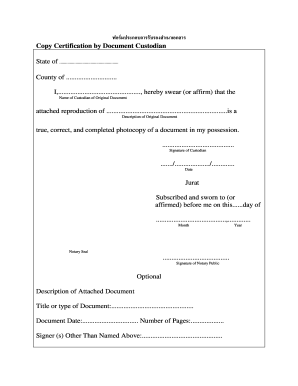
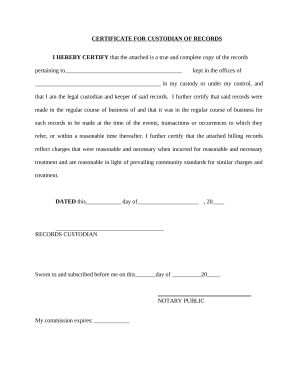
The Copy Declaration by Document Custodian is a legal form used by custodians to certify that a reproduction of a document is a true copy of the original document.
pdfFiller scores top ratings on review platforms




Who needs Copy Declaration?
Explore how professionals across industries use pdfFiller.

Copy Declaration is needed by:
-
Custodians of original documents needing to affirm copies
-
Notary publics responsible for notarizing documents
-
Lawyers requiring verified document reproductions
-
Individuals submitting legal documents in New York
-
Firms managing document reproduction processes
Comprehensive Guide to Copy Declaration
What is the Copy Declaration by Document Custodian?
The Copy Declaration by Document Custodian serves as a crucial legal document in New York. This form is utilized to certify that a reproduction of an original document is an accurate copy, emphasizing the significance of certifying copies in legal and official contexts. By providing validation, this affidavit form enhances the trustworthiness of document submissions in various legal scenarios.
Purpose and Benefits of the Copy Declaration by Document Custodian
The primary purpose of the Copy Declaration is to substantiate the authenticity of document copies. It streamlines the legal processes involved when presenting certified copies, thereby reducing complications for all parties involved. Ultimately, this document increases trust and credibility, ensuring smooth transactions and interactions in legal settings.
Eligibility Criteria for the Copy Declaration by Document Custodian
To utilize the Copy Declaration by Document Custodian, specific eligibility criteria must be met. First, custodians of original documents must possess the necessary credentials to certify copies. Additionally, the Notary Public plays a vital role, as they are responsible for notarizing the declaration. Moreover, compliance with New York's legal requirements is essential for ensuring the document's validity.
How to Fill Out the Copy Declaration by Document Custodian Online
Filling out the Copy Declaration online through pdfFiller is a straightforward process. Follow these essential steps:
-
Access the form on pdfFiller's platform.
-
Provide a detailed description of the document and the issuing authority.
-
Complete all required fields accurately to ensure validity.
How to Sign and Notarize the Copy Declaration by Document Custodian
Signing and notarizing the Copy Declaration are critical steps in the process. The custodian must sign the affidavit, followed by the Notary Public, to validate the document. It is important to consider the differences between digital signing and traditional wet signing, as both have different requirements. Follow these steps to ensure proper notarization:
-
Sign the declaration in the presence of the Notary Public.
-
Complete any necessary identification verification with the Notary.
-
Ensure the Notary signs and stamps the document appropriately.
Common Errors and How to Avoid Them with the Copy Declaration by Document Custodian
When submitting the Copy Declaration, several common errors may lead to rejection. To avoid delays, consider these tips:
-
Cross-check all filled fields for accuracy.
-
Ensure the custodian's signature is present.
-
Review the document for completeness before submission.
Where to Submit the Copy Declaration by Document Custodian
Submitting the completed Copy Declaration involves several options. You can choose to:
-
Deliver the document in person at the designated office.
-
Mail the form to the appropriate authority.
-
Utilize electronic submission if available.
Be aware of any associated fees and processing timelines that may apply to your submission method.
What Happens After You Submit the Copy Declaration by Document Custodian
After submitting your Copy Declaration, you will receive a confirmation of your submission. The processing time typically varies based on the submission method. If amendments are necessary, follow the outlined procedures to correct or amend the submitted form efficiently.
Security and Compliance for the Copy Declaration by Document Custodian
When utilizing pdfFiller for your declaration, you can be assured of the highest security measures for handling sensitive documents. The platform adheres to relevant laws and regulations, including HIPAA and GDPR, ensuring compliance. Implementing best practices for data protection while filling out forms is also recommended.
Get Started with pdfFiller to Complete Your Copy Declaration by Document Custodian
Choosing pdfFiller for your copy declaration simplifies the overall process. Users gain access to features such as editing, securely signing, and submitting documents online. With robust functionalities tailored for legal documentation, pdfFiller is a reliable choice for managing your document needs.
How to fill out the Copy Declaration
-
1.To begin, access pdfFiller and use the search bar to find 'Copy Declaration by Document Custodian'. Click on the form to open it.
-
2.Once the form loads, familiarize yourself with the layout. Locate the blank fields where you will enter information.
-
3.Gather the necessary details about the original document, including its description, document number, issue date, and issuing authority before filling in the form.
-
4.Click on each text box to input your data in the provided fields, ensuring accuracy and completeness. Utilize the tabs to navigate easily between sections.
-
5.Once all information is entered, review the fields for any potential errors. Make sure all entries match the original documentation details to avoid discrepancies.
-
6.After confirming correctness, locate the signature lines for the custodial declaration and the notary. Ensure to leave space for signatures.
-
7.To finalize your form, click on 'Save' to retain your progress. You can also download the form in your desired format or submit it directly through pdfFiller if required.

Who needs to complete the Copy Declaration by Document Custodian?
This form is necessary for custodians of original documents who need to certify that copies are true representations. Notaries public who verify these declarations will also need to understand this form.
Is notarization required for this form?
Yes, the Copy Declaration by Document Custodian requires notarization. Both the custodian of the original document and the notary public must sign the form to validate it.
What details must be included on the form?
You need to include critical information about the original document, such as its description, document number, issue date, and issuing authority, ensuring that all fields are accurately filled.
How can I submit the completed Copy Declaration by Document Custodian?
Completed forms can be submitted by either printing and mailing them or using online submission options available through the entity that requires the form. Check specific submission guidelines.
Are there any common mistakes to avoid when filing this form?
Common mistakes include overlooking signature requirements, inaccurate document details, and incomplete fields. Ensure you double-check all entries before submission.
What are the processing times for notarized declarations?
Processing times can vary based on the notary public's availability and the submitting organization’s review processes. It's best to plan for delays and submit as early as possible.
Can I fill this form out electronically?
Yes, you can fill out the Copy Declaration by Document Custodian electronically using platforms like pdfFiller, which simplifies data entry and submission.
Related Forms





Related Catalogs
Get the latest insights from our blog


If you believe that this page should be taken down, please follow our DMCA take down process
here
.
This form may include fields for payment information. Data entered in these fields is not covered by PCI DSS compliance.