
Last updated on
Oct 31, 2026

KY KSBA 05.4 AP.21 2006 free printable template
pdfFiller is not affiliated with any government organization

Fill out
Complete the form online in a simple drag-and-drop editor.

eSign
Add your legally binding signature or send the form for signing.

Share
Share the form via a link, letting anyone fill it out from any device.

Export
Download, print, email, or move the form to your cloud storage.
Why pdfFiller is the best tool for your documents and forms


End-to-end document management
From editing and signing to collaboration and tracking, pdfFiller has everything you need to get your documents done quickly and efficiently.
Accessible from anywhere
pdfFiller is fully cloud-based. This means you can edit, sign, and share documents from anywhere using your computer, smartphone, or tablet.
Secure and compliant
pdfFiller lets you securely manage documents following global laws like ESIGN, CCPA, and GDPR. It's also HIPAA and SOC 2 compliant.
What is KY KSBA 05.4 AP.21
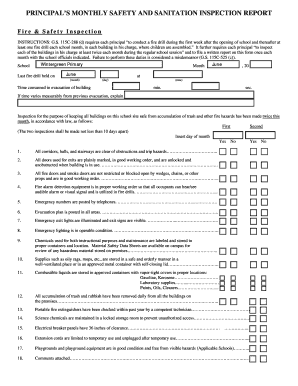
The School Facilities Monthly Safety Inspection Report is a form used by school inspectors to evaluate and document the safety conditions of school facilities.
pdfFiller scores top ratings on review platforms




This is an amazing application! Well worth money
straight forward, easy to use, very helpful!
Who needs KY KSBA 05.4 AP.21?
Explore how professionals across industries use pdfFiller.

KY KSBA 05.4 AP.21 is needed by:
-
School Inspectors
-
Superintendents
-
Facility Maintenance Personnel
-
School Administrators
-
Emergency Response Teams
-
Educational Authorities
Comprehensive Guide to KY KSBA 05.4 AP.21
What is the School Facilities Monthly Safety Inspection Report?
The School Facilities Monthly Safety Inspection Report is designed to evaluate and document safety conditions across various areas of a school. It covers key elements such as grounds maintenance, emergency procedures, and general safety practices. This report plays a crucial role in maintaining safe environments for students and staff by ensuring that safety conditions are consistently documented and reviewed.
Documenting safety conditions is vital for compliance with established safety standards. Regular inspections not only highlight areas that may need attention but also contribute to fostering a culture of safety within educational institutions.
Purpose and Benefits of the School Facilities Monthly Safety Inspection Report
The primary purpose of conducting regular safety inspections is to ensure compliance with safety standards. This proactive approach helps in identifying areas needing attention to enhance the safety of both students and staff. Furthermore, maintaining a documented history of safety compliance is essential for audit purposes and accountability.
Utilizing a monthly safety inspection form can significantly improve how schools manage their safety protocols, fostering a safer learning environment for everyone.
Who Needs the School Facilities Monthly Safety Inspection Report?
This report is intended for specific roles within the school environment. Inspectors and recipients are the primary users who must complete and sign the form. It is important for school administrators and maintenance staff to understand the significance of this report for ensuring safety compliance.
Inspectors are responsible for completing the inspection, while recipients must verify and sign the report. This collaborative process ensures that all stakeholders are informed about the safety status of the facilities.
How to Fill Out the School Facilities Monthly Safety Inspection Report Online (Step-by-Step)
Filling out the School Facilities Monthly Safety Inspection Report can be straightforward when following these steps:
-
Access the report online through your designated platform.
-
Fill out the checklist, indicating whether each item is 'acceptable' or 'needs attention.'
-
Provide specific locations and comments for items that require further action.
-
Review the information for accuracy.
-
Save your progress and submit the completed report as per your school's submission guidelines.
Common Errors When Filling Out the School Facilities Monthly Safety Inspection Report
When completing the School Facilities Monthly Safety Inspection Report, certain common errors should be avoided to ensure its effectiveness. Frequent mistakes include missing signatures, incorrect dates, and failing to clearly note inspected items.
To ensure completeness before submission, consider using a checklist to verify that all required fields are filled in accurately. Clarity in documenting each inspected item is essential for a successful report.
How to Sign and Submit the School Facilities Monthly Safety Inspection Report
Proper signing and submission of the School Facilities Monthly Safety Inspection Report are critical for maintaining its validity. Users must choose between a digital signature and a wet signature, depending on the submission guidelines of their school.
Once signed, the report should be submitted to the Superintendent or their designee, and it is important to retain a copy for the records. This ensures that there is a verifiable trail of compliance with safety protocols.
Security and Compliance with the School Facilities Monthly Safety Inspection Report
Understanding the security measures surrounding the School Facilities Monthly Safety Inspection Report is crucial. The platform used to handle the form must include robust security features to protect sensitive data. Compliance with regulations like HIPAA and GDPR is essential, ensuring that user information is safeguarded throughout the reporting process.
Users can feel assured that their data is protected when utilizing trusted platforms for form handling.
Why Choose pdfFiller for Your School Facilities Monthly Safety Inspection Report?
pdfFiller offers an efficient solution for managing the School Facilities Monthly Safety Inspection Report. Its features include ease of use and electronic signing capabilities, which simplify the process for school inspectors and recipients.
Additionally, being a cloud-based platform ensures that all documents are managed securely and can be accessed from any device, further enhancing the inspection and reporting process for school administrators.
Sample of a Completed School Facilities Monthly Safety Inspection Report
Providing a visual aid can enhance understanding when filling out the School Facilities Monthly Safety Inspection Report. A completed report serves as an excellent example, illustrating best practices and how to accurately document inspections.
Key points to note in a filled-out report include completed fields, annotations, and necessary corrections made during the inspection. Understanding how to interpret these details will improve the effectiveness of future inspections.
Get Started with Your School Facilities Monthly Safety Inspection Report Through pdfFiller
Getting started with your School Facilities Monthly Safety Inspection Report using pdfFiller is simple. Begin by accessing the form online, where you can easily create and fill it out.
By leveraging the resources available on the pdfFiller platform, you can efficiently complete and submit your report while enjoying seamless document management capabilities.
How to fill out the KY KSBA 05.4 AP.21
-
1.Access and open the School Facilities Monthly Safety Inspection Report on pdfFiller by searching the form's name in the pdfFiller search bar or use a direct link if available.
-
2.Navigate through the pdfFiller interface using the side toolbar to locate different sections of the form. Click on fields to input data easily.
-
3.Prior to starting, gather necessary information such as previous inspection reports, maintenance records, and safety checklists to effectively fill out the form.
-
4.Begin completing the form by checking each item as 'acceptable' or 'needs attention.' Ensure to fill in location details and the dates corrections were made appropriately.
-
5.Review all entries to ensure accuracy. Double-check that you have adhered to all required sections and have included signatures where necessary.
-
6.Finalize the form by ensuring all mandatory fields are filled. Utilize pdfFiller's review features to catch any errors.
-
7.Save your completed report by clicking on the 'Save' button. You can also download the form as a PDF or submit it directly to the designated Superintendent/designee through pdfFiller.

Who is eligible to fill out the School Facilities Monthly Safety Inspection Report?
Eligible individuals include school inspectors and qualified personnel responsible for facility evaluations. Both roles require signature validation on the form.
What is the deadline for submitting the Monthly Safety Inspection Report?
The completed report should be submitted immediately after the inspection and must be sent to the Superintendent or their designee. Timely submission ensures compliance with safety regulations.
How should I submit the completed inspection report?
The form can be submitted electronically via pdfFiller or can be printed and sent directly to the Superintendent/designee. Always keep a copy for your records.
What supporting documents may I need when filling out this form?
It is advisable to have past inspection reports, safety compliance documents, and incident reports on hand to ensure thorough evaluations during the filling of the form.
What are common mistakes to avoid when completing the form?
Common mistakes include forgetting signature fields, missing locations of issues, and not providing detailed notes for 'needs attention' items. Always review before submitting.
How long does it take to process the submitted report?
Processing times can vary but typically range from a few days to a week, depending on the school's administrative process and any necessary follow-up actions.
What items are checked in the Monthly Safety Inspection Report?
The report covers various areas, such as emergency procedures, means of egress, electrical systems, and overall grounds safety to ensure comprehensive facility safety evaluation.
KY KSBA 05.4 AP.21 Form Versions
Related Forms




Related Catalogs
Get the latest insights from our blog


If you believe that this page should be taken down, please follow our DMCA take down process
here
.
This form may include fields for payment information. Data entered in these fields is not covered by PCI DSS compliance.