
Last updated on
Oct 31, 2026

Get the free eSIS/EMIS Student Registration Form
We are not affiliated with any brand or entity on this form

Fill out
Complete the form online in a simple drag-and-drop editor.

eSign
Add your legally binding signature or send the form for signing.

Share
Share the form via a link, letting anyone fill it out from any device.

Export
Download, print, email, or move the form to your cloud storage.
Why pdfFiller is the best tool for your documents and forms


End-to-end document management
From editing and signing to collaboration and tracking, pdfFiller has everything you need to get your documents done quickly and efficiently.
Accessible from anywhere
pdfFiller is fully cloud-based. This means you can edit, sign, and share documents from anywhere using your computer, smartphone, or tablet.
Secure and compliant
pdfFiller lets you securely manage documents following global laws like ESIGN, CCPA, and GDPR. It's also HIPAA and SOC 2 compliant.
What is Student Registration Form
The eSIS/EMIS Student Registration Form is an education document used by teachers to register students in the eSIS/EMIS system for enrollment purposes.
pdfFiller scores top ratings on review platforms




Who needs Student Registration Form?
Explore how professionals across industries use pdfFiller.

Student Registration Form is needed by:
-
Teachers registering students for the school year
-
School administrators managing student data
-
Parents ensuring their child is enrolled in school
-
Education authorities monitoring school attendance
-
District officials coordinating student enrollment processes
Comprehensive Guide to Student Registration Form
What is the eSIS/EMIS Student Registration Form?
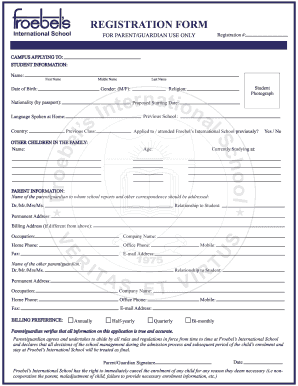
The eSIS/EMIS Student Registration Form serves as a critical component in registering students within the eSIS/EMIS system. This form requires essential details such as the student’s name, address, and enrollment status, which are vital for accurate student records. Completing the form ensures that teachers, school administrators, and parents have organized and accessible student information, aligning with the educational institution's compliance standards.
Purpose and Benefits of the eSIS/EMIS Student Registration Form
This registration form is necessary for teachers and schools to maintain organized student records while complying with district requirements. By utilizing the form, educators can streamline the enrollment process, significantly reducing delays. Moreover, the eSIS/EMIS student registration form facilitates better communication between parents and schools, promoting stronger engagement and understanding of student needs.
Key Features of the eSIS/EMIS Student Registration Form
-
Fillable fields include 'Name', 'Address', 'Parent's or Guardian's Name', and 'Birthdate'.
-
Checkboxes enable the selection of program enrollment and attendance.
-
Instructions emphasize accurately filling out the form to avoid common errors.
Who Needs to Complete the eSIS/EMIS Student Registration Form?
The primary audiences for completing this form are teachers, school administrators, and parents or guardians of students. Teachers are responsible for filling out the form for their students, particularly at the beginning of each school year or when a new student enrolls. Accurate submissions are crucial for ensuring timely enrollment and maintaining compliance with school policies.
How to Fill Out the eSIS/EMIS Student Registration Form Online (Step-by-Step)
-
Access the online form through pdfFiller.
-
Fill in the required fields, paying attention to details in each section.
-
Review the form for missing information before submitting.
-
Submit the form following the submission guidelines provided within the platform.
Ensure that all necessary details are included to avoid rejection during processing. Each section's importance should not be overlooked, as it directly impacts enrollment efficiency.
Submission Methods and Processing of the eSIS/EMIS Student Registration Form
Completed forms can be submitted electronically through designated channels set by the school or district. Adhering to submission deadlines is critical, as processing times may vary based on workload and district policies. Keeping track of submission status and obtaining confirmation ensures transparency and accountability in the enrollment process.
Common Errors to Avoid When Submitting the eSIS/EMIS Student Registration Form
-
Missing essential information that can lead to application rejection.
-
Incorrectly filling out fields can create confusion and delays.
-
Neglecting to review the form prior to submission increases the risk of errors.
To minimize submission errors, utilize a validation checklist before sending the form. For further assistance, support contact details should be readily available to address any arising issues.
Ensuring Security and Compliance with the eSIS/EMIS Student Registration Form
Throughout the form completion process, pdfFiller prioritizes document security by employing 256-bit encryption and maintaining compliance with privacy regulations such as HIPAA and GDPR. This commitment is crucial for protecting sensitive information submitted within the registration form, ensuring that only authorized personnel have access to data.
How pdfFiller Can Help with the eSIS/EMIS Student Registration Form
pdfFiller offers various capabilities that enhance the experience of managing the eSIS/EMIS registration process. Users can edit, fill, and eSign documents easily, facilitating a smoother registration process. Utilizing these features ensures that users benefit from an efficient and effective way to complete their student registration forms.
Next Steps After Submitting the eSIS/EMIS Student Registration Form
Upon submission, applicants can expect a timeline for processing and should be aware of procedures for checking their application status. Depending on the outcome, actions may include awaiting approval or making necessary amendments. Timely follow-ups are essential to securing student enrollment and ensuring all paperwork is properly processed.
How to fill out the Student Registration Form
-
1.To begin, visit pdfFiller and search for 'eSIS/EMIS Student Registration Form' in the search bar.
-
2.Once you locate the form, click on it to open the interactive PDF interface offered by pdfFiller.
-
3.Before filling out the form, gather all necessary information, including each student's name, address, parent's or guardian's name, birthdate, grade, and program enrollment details.
-
4.Start with the 'Name' field by clicking on the box and typing in the student's full name as it appears on official documents.
-
5.Next, proceed to fill in the 'Address' field with the current residential address of the student.
-
6.Continue to the 'Parent’s or Guardian’s Name' section, entering the full name of the guardian responsible for the student.
-
7.In the 'Birthdate' field, select the correct date from the calendar or type it in the appropriate format.
-
8.Then, fill out the 'Grade This Year' field to reflect the student's current grade level.
-
9.For program enrollment, check the relevant boxes as applicable to the student’s programs.
-
10.Once all fields are filled, review the entire form for accuracy and completeness to ensure no details are missed.
-
11.After reviewing, you can save your progress within pdfFiller to a secure location on your device.
-
12.To submit the form, either download the completed form to your computer or directly email it to Pam Limperos– TCESC as instructed.

Who is required to fill out the eSIS/EMIS Student Registration Form?
Teachers must fill out this form for each student in their class, ensuring accurate registration within the eSIS/EMIS system.
What is the deadline for submitting the form?
This form needs to be submitted at the beginning of each school year and whenever a new student enrolls, making timely submission important.
How can I submit the eSIS/EMIS Student Registration Form?
Once completed, you can submit the form by emailing it to Pam Limperos– TCESC or by following any other submission guidelines provided by your district.
What supporting documents are required with this form?
Typically, you should provide identification and proof of residency documents along with the registration form to ensure compliance with enrollment policies.
What common mistakes should I avoid when filling out this form?
Ensure all information is accurate, particularly the student’s name and birthdate, to prevent processing delays or issues with enrollment.
How long does it take for the registration to be processed?
Processing times may vary, but you can typically expect confirmation of registration within a few days to a couple of weeks after submission.
Is notarization required for the eSIS/EMIS Student Registration Form?
No, notarization is not required for this form. Just ensure all fields are completed accurately.
Related Forms




Related Catalogs
Get the latest insights from our blog


If you believe that this page should be taken down, please follow our DMCA take down process
here
.
This form may include fields for payment information. Data entered in these fields is not covered by PCI DSS compliance.