
Last updated on
Oct 31, 2026

WI DT2005 2003-2026 free printable template
pdfFiller is not affiliated with any government organization

Fill out
Complete the form online in a simple drag-and-drop editor.

eSign
Add your legally binding signature or send the form for signing.

Share
Share the form via a link, letting anyone fill it out from any device.

Export
Download, print, email, or move the form to your cloud storage.
Why pdfFiller is the best tool for your documents and forms


End-to-end document management
From editing and signing to collaboration and tracking, pdfFiller has everything you need to get your documents done quickly and efficiently.
Accessible from anywhere
pdfFiller is fully cloud-based. This means you can edit, sign, and share documents from anywhere using your computer, smartphone, or tablet.
Secure and compliant
pdfFiller lets you securely manage documents following global laws like ESIGN, CCPA, and GDPR. It's also HIPAA and SOC 2 compliant.
What is WI DT2005
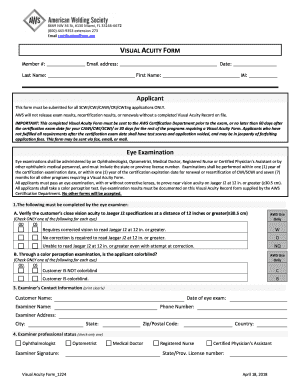
The Wisconsin Visual Acuity Record Form is a government document used by the Wisconsin Department of Transportation to certify the visual acuity of Bridge Inspection Team Leader candidates.
pdfFiller scores top ratings on review platforms




Who needs WI DT2005?
Explore how professionals across industries use pdfFiller.

WI DT2005 is needed by:
-
Bridge Inspection Team Leader candidates
-
Eye examiners performing visual acuity tests
-
Wisconsin Department of Transportation staff
-
Certification bodies for bridge safety
-
Individuals applying for bridge inspection certification
Comprehensive Guide to WI DT2005
What is the Wisconsin Visual Acuity Record Form?
The Wisconsin Visual Acuity Record Form is a critical document used by the Wisconsin Department of Transportation (WisDOT) for certifying the visual acuity of Bridge Inspection Team Leader candidates. This form serves to ensure that those in crucial inspection roles meet necessary visual standards to maintain safety and compliance within the state’s infrastructure projects.
This form is specifically utilized by WisDOT as part of the certification process, guiding eye examiners and candidates in documenting visual test results accurately.
Purpose and Benefits of the Wisconsin Visual Acuity Record Form
The primary purpose of the Wisconsin Visual Acuity Record Form is to uphold safety standards essential for Bridge Inspection Team Leader candidates. Maintaining proper visual acuity is paramount to ensuring that inspectors can perform their duties effectively, thereby safeguarding public safety and infrastructure integrity.
Benefits of utilizing this form include establishing consistent visual standards across candidates, which supports the overall safety framework of bridge inspections in Wisconsin.
Who Needs the Wisconsin Visual Acuity Record Form?
The Wisconsin Visual Acuity Record Form is essential for various stakeholders, including potential Bridge Inspection Team Leader candidates and qualified eye examiners. Individuals pursuing certification must have their visual acuity assessed and documented using this form.
-
Bridge Inspection Team Leader candidates
-
Eye examiners conducting the tests
Eligibility Criteria for Completing the Wisconsin Visual Acuity Record Form
Eligibility to complete the Wisconsin Visual Acuity Record Form involves specific qualifications for both candidates and eye examiners as determined by WisDOT. Candidates must demonstrate required visual standards, while examiners must be certified professionals qualified to administer visual acuity tests.
-
Candidates must meet the visual acuity standards defined by WisDOT
-
Examiners must hold appropriate certification to conduct eye examinations
How to Fill Out the Wisconsin Visual Acuity Record Form Online: Step-by-Step Instructions
Filling out the Wisconsin Visual Acuity Record Form online is a straightforward process. Follow these steps to ensure proper completion:
-
Access the form on the designated platform
-
Input "Name of Inspector/Number Date" in the specified field
-
Provide test results within the required sections
-
Ensure "Eye Examiner Signature" is completed by the qualified examiner
Common Errors and Tips for the Wisconsin Visual Acuity Record Form
When completing the Wisconsin Visual Acuity Record Form, users often make several common mistakes that can delay the certification process. Awareness and proactive measures can help mitigate these errors.
-
Failing to sign the form correctly
-
Incorrectly entering data in the specified fields
-
Neglecting to verify visual acuity results
To avoid these pitfalls, double-check all entries and confirm that signatures are properly executed.
How to Sign the Wisconsin Visual Acuity Record Form
Signing the Wisconsin Visual Acuity Record Form is a critical step in the certification process. Users have the option to employ either digital or wet signatures, depending on submission requirements.
A proper signature validates the document and affirms the authenticity of the information provided.
Submission Methods and Where to Submit the Wisconsin Visual Acuity Record Form
Once the Wisconsin Visual Acuity Record Form is completed, it can be submitted through various methods. Users should be aware of all available options to ensure timely processing.
-
Mailing the completed form to the designated WisDOT address
-
Submitting electronically through approved platforms if applicable
What Happens After You Submit the Wisconsin Visual Acuity Record Form?
After submission, applicants can expect a certain processing time for their Wisconsin Visual Acuity Record Form. It is crucial to stay informed about the status of the submission.
-
Users will receive confirmation of their submission
-
Tracking options may be available to monitor processing stages
Utilizing pdfFiller for Your Wisconsin Visual Acuity Record Form Needs
pdfFiller offers valuable assistance for users needing to manage the Wisconsin Visual Acuity Record Form. This cloud-based platform enables users to fill out, edit, and submit their forms easily and securely.
Key features of pdfFiller relevant to this form include eSigning capabilities and reliable cloud storage, ensuring that sensitive documents are handled with the utmost security.
How to fill out the WI DT2005
-
1.To begin, access the Wisconsin Visual Acuity Record Form on pdfFiller by searching for its name or navigating to the government forms section.
-
2.Once the form loads in the pdfFiller interface, familiarize yourself with the layout and fields that require completion.
-
3.Gather necessary information before starting, including the candidate's personal information, details of the eye examination, and the examiner's full name and credentials.
-
4.Navigate to each field and click on it to start entering your data. Use the typing tool to fill in name, date, and other required text.
-
5.If checkboxes are present, click on the checkbox to mark it as required after you finish filling in the rest of the form.
-
6.Once all fields are filled with the necessary information and you've verified the accuracy, review the form for any errors or missing details.
-
7.To finalize your form, utilize the 'save' feature in pdfFiller. You can also use the 'download' option to save it on your device or directly submit it through the platform.
-
8.For submission, refer to the specific guidelines provided by WisDOT, ensuring that you send the completed form to the correct department.

Who is eligible to fill out the Wisconsin Visual Acuity Record Form?
Eligibility for this form is primarily for candidates aspiring to become Bridge Inspection Team Leaders and must undergo a visual acuity examination conducted by a qualified eye examiner.
What is the deadline for submitting the Wisconsin Visual Acuity Record Form?
While specific deadlines may vary, it's advised to complete and submit the Wisconsin Visual Acuity Record Form as soon as possible to avoid delays in certification processes.
How do I submit the completed form to the Wisconsin Department of Transportation?
After completing the form, submit it via the guidelines provided by WisDOT. Typically, this could involve mailing the form to their office or submitting it through an online portal if available.
What supporting documents are required with the form?
Usually, you need to include proof of the eye examination conducted by a qualified professional along with the completed form, so have those documents ready before submission.
What common mistakes should I avoid when filling out this form?
Ensure that all fields are filled completely and accurately, paying attention to the specific requirements for the eye examiner's signature and credentials, as incomplete forms may delay processing.
What is the processing time for the submissions of the form?
Processing times can vary depending on the Wisconsin Department of Transportation's workload, but it's advisable to allow a few weeks for verification and certification to avoid any issues.
Is notarization required for the Wisconsin Visual Acuity Record Form?
No, notarization is not required for the Wisconsin Visual Acuity Record Form, simplifying the submission process for candidates.




Related Catalogs
Get the latest insights from our blog


If you believe that this page should be taken down, please follow our DMCA take down process
here
.
This form may include fields for payment information. Data entered in these fields is not covered by PCI DSS compliance.