
Last updated on
Oct 31, 2026

Classifying Matter Power Point Worksheet 2017-2026 free printable template
We are not affiliated with any brand or entity on this form

Fill out
Complete the form online in a simple drag-and-drop editor.

eSign
Add your legally binding signature or send the form for signing.

Share
Share the form via a link, letting anyone fill it out from any device.

Export
Download, print, email, or move the form to your cloud storage.
Why pdfFiller is the best tool for your documents and forms


End-to-end document management
From editing and signing to collaboration and tracking, pdfFiller has everything you need to get your documents done quickly and efficiently.
Accessible from anywhere
pdfFiller is fully cloud-based. This means you can edit, sign, and share documents from anywhere using your computer, smartphone, or tablet.
Secure and compliant
pdfFiller lets you securely manage documents following global laws like ESIGN, CCPA, and GDPR. It's also HIPAA and SOC 2 compliant.
What is Classifying Matter Power Point Worksheet
The Power Point Worksheet is an educational form used by students to classify matter in a science course.
pdfFiller scores top ratings on review platforms




Who needs Classifying Matter Power Point Worksheet?
Explore how professionals across industries use pdfFiller.

Classifying Matter Power Point Worksheet is needed by:
-
Science teachers seeking effective classroom activities
-
Students needing structured worksheets for learning
-
Parents supporting their children's education at home
-
Educational institutions developing science curricula
-
Tutors providing supplementary study materials
Comprehensive Guide to Classifying Matter Power Point Worksheet
What is the Power Point Worksheet?
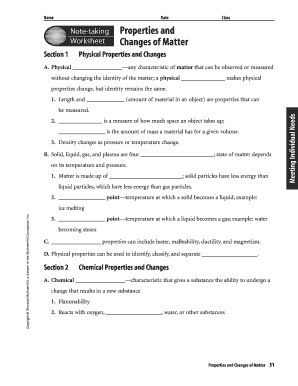
The Power Point Worksheet is a specialized educational form tailored for classifying matter within various scientific contexts. Its primary function is to facilitate learning about pure substances and mixtures, making it an essential tool in science education. The worksheet includes fillable fields for essential user information, including student name and date, enhancing personalization and engagement in the classroom.
This worksheet covers critical topics in material classification, providing a structured approach for students to showcase their understanding. Keywords such as "power point worksheet" and "science worksheet" reflect its educational significance.
Purpose and Benefits of the Power Point Worksheet
The Power Point Worksheet serves as an invaluable learning tool in educational settings, particularly within science education. By engaging students with interactive elements, such as questions and flow charts, it promotes active learning and critical thinking.
In addition to benefiting students, this worksheet assists teachers in evaluating comprehension of key scientific concepts. Its design encourages a hands-on approach to learning, making it a pivotal component of any classroom activity.
Key Features of the Power Point Worksheet
This worksheet boasts several key features that enhance its effectiveness for users:
-
Customizable fillable fields that encourage user engagement and facilitate the collection of necessary information.
-
A variety of questions and flow charts that guide students through different topics related to matter classification.
-
Accessibility as a PDF worksheet, allowing for easy printing or online completion.
These features make the Power Point Worksheet a practical and user-friendly resource in educational contexts.
Who Should Use the Power Point Worksheet?
Target users of the Power Point Worksheet include students, teachers, and educational institutions focused on enhancing science education. This resource can be effectively integrated into lesson plans across both elementary and secondary education levels. By catering to a diverse audience, it ensures that all users can benefit from the structured approach to learning.
How to Fill Out the Power Point Worksheet Online (Step-by-Step)
To fill out the Power Point Worksheet online, follow these steps:
-
Access pdfFiller and locate the Power Point Worksheet.
-
Use the fillable fields to enter your name and date at the designated sections.
-
Complete the questions and flow charts by typing directly into the document.
-
Utilize features like eSigning to authenticate your submission, if required.
-
Share or download the completed worksheet for submission or future reference.
These instructions ensure a seamless experience for users, making the most out of the fillable fields available.
Common Errors and How to Avoid Them When Using the Power Point Worksheet
Users may encounter several common pitfalls when filling out the Power Point Worksheet:
-
Leaving fields blank can lead to incomplete submissions.
-
Using incorrect definitions may misunderstand key concepts in classification.
To prevent these errors, verify accuracy and completeness before submission. Reviewing the worksheet for clarity and consistency can further enhance quality.
How to Save and Share the Power Point Worksheet
Once you complete the Power Point Worksheet, saving and sharing it properly is crucial. Here’s how to do it:
-
Download the worksheet in various formats for flexibility.
-
Share the completed form via email for easy distribution among classmates or peers.
-
Opt for printing options when a physical copy is preferred for classroom use.
Always consider the security measures associated with sharing documents online, ensuring that your information remains protected.
Next Steps After Completing the Power Point Worksheet
After filling out the Power Point Worksheet, consider the following actions:
-
Teachers should assess completed worksheets to gauge understanding and provide feedback.
-
Students can review their answers and engage in discussion during class for deeper learning.
-
If any corrections or amendments are necessary, be prepared to address these promptly.
These next steps will help solidify the learning experience derived from the worksheet.
Unlock the Educational Potential with pdfFiller
Using pdfFiller greatly enhances the experience of filling out the Power Point Worksheet. It simplifies the process of managing forms and adds convenience for users, enabling them to edit, eSign, and organize documents with ease.
Moreover, pdfFiller prioritizes user security with features that protect data during document handling. Engage with the various tools available to streamline your educational form usage effectively.
How to fill out the Classifying Matter Power Point Worksheet
-
1.Access pdfFiller and log in or create an account if you don't have one.
-
2.Use the search bar to look for 'Power Point Worksheet' and select it from the results list.
-
3.Once the form is open, familiarize yourself with the layout and the fillable fields provided.
-
4.Gather necessary information such as your name, date, and any specific terms or definitions needed for completion.
-
5.Begin by clicking into the 'Name' field and type your name. Move to the 'Date' field and enter the current date.
-
6.Proceed to the questions and flow charts by clicking in each corresponding field. Follow provided instructions to complete each section.
-
7.Make sure to fill in all required fields accurately, referring to your notes or textbooks as needed.
-
8.Once you have filled in all sections, review the worksheet to ensure all answers are complete and correct.
-
9.To finalize, save your progress by clicking on the 'Save' option. Choose to download a copy if you prefer a local version.
-
10.You can also submit the form directly through pdfFiller if notified as an option by your instructor or educational institution.

Who can use the Power Point Worksheet?
The Power Point Worksheet is designed for students in science courses, particularly those studying matter classification. Teachers and parents can also utilize it to support student learning.
Is there a deadline for submitting the Power Point Worksheet?
Deadlines for submitting the Power Point Worksheet may vary based on your course syllabus or instructor's requirements. Always check with your educational institution for specific submission dates.
How do I submit the Power Point Worksheet?
You can submit the Power Point Worksheet directly via pdfFiller, or print it out and turn it in physically, as per your instructor's submission preferences.
What information do I need to complete the Power Point Worksheet?
You will need your full name, the current date, and knowledge about the classification of matter, including pure substances and mixtures, to accurately complete the worksheet.
What common mistakes should I avoid while filling out the worksheet?
Ensure all fields are filled out clearly and completely. Common mistakes include leaving blanks or misidentifying terms related to matter classification, which can affect your performance.
How long does it take to process and review the Power Point Worksheet?
Processing and reviewing times for the Power Point Worksheet typically depend on your instructor's schedule. Allow up to a week for feedback but confirm with your teacher for any specific timelines.
Related Forms




Related Catalogs
Get the latest insights from our blog



If you believe that this page should be taken down, please follow our DMCA take down process
here
.
This form may include fields for payment information. Data entered in these fields is not covered by PCI DSS compliance.