
Last updated on
Oct 31, 2026

Canada C774 2006 free printable template
We are not affiliated with any brand or entity on this form

Fill out
Complete the form online in a simple drag-and-drop editor.

eSign
Add your legally binding signature or send the form for signing.

Share
Share the form via a link, letting anyone fill it out from any device.

Export
Download, print, email, or move the form to your cloud storage.
Why pdfFiller is the best tool for your documents and forms


End-to-end document management
From editing and signing to collaboration and tracking, pdfFiller has everything you need to get your documents done quickly and efficiently.
Accessible from anywhere
pdfFiller is fully cloud-based. This means you can edit, sign, and share documents from anywhere using your computer, smartphone, or tablet.
Secure and compliant
pdfFiller lets you securely manage documents following global laws like ESIGN, CCPA, and GDPR. It's also HIPAA and SOC 2 compliant.
What is Canada C774
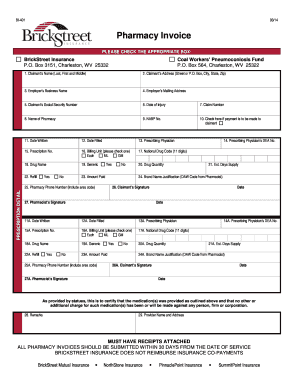
The Pharmacy Prescription Invoice is a business form used by pharmacies in Alberta, Canada, to bill the Workers' Compensation Board for prescription drugs dispensed to injured workers.
pdfFiller scores top ratings on review platforms




I'm able to edit PDF forms. I very happy and satisfied.
It does what I need it to, it saves others from having to read my very poor handwriting, and, since it saves the files, if I need to file them again next year, I just have to change a couple of dates, and "Voila!"
Who needs Canada C774?
Explore how professionals across industries use pdfFiller.

Canada C774 is needed by:
-
Pharmacies operating in Alberta
-
Workers' Compensation Board claimants
-
Healthcare providers billing WCB
-
Insurance claim processors
-
Pharmacy billing specialists
Comprehensive Guide to Canada C774
What is the Pharmacy Prescription Invoice?
The Pharmacy Prescription Invoice serves a critical purpose in Alberta, Canada, enabling pharmacies to bill the Workers' Compensation Board (WCB) for prescription drugs provided to injured workers. This invoice is essential for ensuring that healthcare providers are reimbursed for the medications dispensed under WCB claims. By using a pharmacy prescription invoice template, pharmacies can streamline their billing processes and maintain compliance with provincial regulations. For convenience, many providers utilize a prescription invoice template PDF format for effective submission.
Purpose and Benefits of the Pharmacy Prescription Invoice
The Pharmacy Prescription Invoice offers numerous advantages for both pharmacies and healthcare providers. This invoice helps simplify the billing process for prescription medications supplied to injured workers, ensuring prompt payment from the WCB. By adopting a Canadian pharmacy billing form, users benefit from standardized processes that reduce errors and enhance efficiency in claim submissions. The structured format of the Alberta WCB claim form allows for quick compilation of necessary details, thereby facilitating smoother operational workflows.
Key Features of the Pharmacy Prescription Invoice
Essential details required in the Pharmacy Prescription Invoice include the worker’s personal health number, date of birth, WCB claim number, and specifics of the prescribed drugs. This fillable form is designed for ease of use, allowing for electronic editing and signatures. The pharmacy prescription invoice template ensures that all necessary fields are completed correctly, minimizing delays in processing claims. Many users prefer utilizing a prescription invoice template PDF for its convenience and accessibility.
How to Fill Out the Pharmacy Prescription Invoice Online (Step-by-Step)
To complete the Pharmacy Prescription Invoice online using pdfFiller, follow these steps:
-
Access the form on pdfFiller’s platform.
-
Input the worker’s personal information, including their health number and date of birth.
-
Fill in the WCB claim number, making sure it is accurate.
-
Provide detailed descriptions and quantities for the prescribed drugs.
-
Review all entries for accuracy before submission.
Pay particular attention to the drug description and amounts, as these are critical for successful billing.
Common Errors and How to Avoid Them
When filling out the Pharmacy Prescription Invoice, common mistakes include inaccuracies in the worker's personal details and unlawful drug descriptions. To ensure high accuracy, independently verify each detail, particularly the WCB claim number and prescribed medications. Using the pharmacy prescription invoice template can significantly reduce these errors, as it provides a well-structured format to follow. Familiarizing oneself with how to fill out the pharmacy prescription invoice will also promote accuracy in future submissions.
Who Needs the Pharmacy Prescription Invoice?
The Pharmacy Prescription Invoice is essential for various stakeholders, including pharmacies, healthcare providers, and injured workers seeking to claim medication costs. Healthcare providers must complete and sign the form, as their verification ensures the legitimacy of the claim. Understanding who needs the pharmacy prescription invoice helps in maintaining compliance and efficient billing processes while navigating the Alberta WCB claim form.
When and How to Submit the Pharmacy Prescription Invoice
Submission methods for the Pharmacy Prescription Invoice vary, with electronic submission being the most common. It's crucial to adhere to timelines to avoid delays in claim processing. Familiarize yourself with any associated fees and ensure that the invoice reaches the WCB by critical deadlines. Knowing how to submit the pharmacy prescription invoice correctly can streamline your billing processes and enhance the chance for prompt reimbursement.
Security and Compliance for the Pharmacy Prescription Invoice
Security is paramount when handling sensitive information contained within the Pharmacy Prescription Invoice. pdfFiller employs measures like 256-bit encryption to safeguard your data while maintaining compliance with regulations such as HIPAA and GDPR. Ensuring strong security for the pharmacy prescription invoice not only protects providers but also reassures injured workers that their information is handled with utmost confidentiality.
How to Download or Print the Pharmacy Prescription Invoice
Users can easily download or print the filled-out Pharmacy Prescription Invoice using pdfFiller by following these steps:
-
Complete the invoice online.
-
Select the download or print option from the platform.
-
Choose your preferred format (e.g., PDF) for saving or printing.
The convenience of accessing the form from any device enhances user experience, allowing for seamless management of documentation without the need for downloads.
Effective Management of Your Pharmacy Prescription Invoice
Retaining copies of submitted invoices is crucial for record-keeping. Users should adopt best practices such as saving electronic copies and utilizing pdfFiller’s features for tracking submission status. If any errors occur post-filing, knowing how to amend those mistakes promptly can help avoid payment delays and improve accountability.
Empower Your Workflow with pdfFiller
Taking advantage of pdfFiller’s capabilities can greatly enhance your experience in managing the Pharmacy Prescription Invoice. The platform simplifies the process of filling out forms, eSigning, and managing paperwork. With robust security standards and user-friendly features, pdfFiller ensures that you can efficiently handle your invoices and focus on providing quality care.
How to fill out the Canada C774
-
1.To access the Pharmacy Prescription Invoice on pdfFiller, navigate to the website and use the search bar to locate the form by entering its name.
-
2.Open the form in the pdfFiller interface. Familiarize yourself with the various fields for information input before proceeding.
-
3.Gather all necessary details before starting, including the worker's personal health number, date of birth, date of accident, drug descriptions, quantities, amounts, and the WCB claim number.
-
4.Using pdfFiller’s fillable fields, start entering the gathered information in the corresponding input sections. Use the available checkboxes if applicable and follow the form instructions carefully.
-
5.Once all fields are completed, carefully review your entries for accuracy and completeness, ensuring that all required items are filled in correctly.
-
6.After reviewing, use the 'Save' or 'Download' option to save your work. You can also submit the form directly through pdfFiller if that option is available.
-
7.If you choose to save the form, ensure you download it in the desired format, and retain a copy for your records or necessary submission to WCB.

Who is eligible to use the Pharmacy Prescription Invoice?
The Pharmacy Prescription Invoice is intended for pharmacies in Alberta that are billing the Workers' Compensation Board for prescription medications dispensed to workers who have been injured on the job.
What information do I need to fill out the form?
You’ll need the worker's personal health number, date of birth, date of accident, detailed drug descriptions, quantities dispensed, the total amount billed, and the corresponding WCB claim number to complete the form.
How do I submit the Pharmacy Prescription Invoice?
The form can be submitted electronically if using pdfFiller, or you can print it to submit physically. Ensure that it is signed by the provider before submission to the WCB.
What are the common mistakes to avoid when filling out this invoice?
Common mistakes include omitting required fields, providing inaccurate claim details, and failing to include the provider’s signature and date. Double-check all information before submission.
Is there a deadline for submitting the Pharmacy Prescription Invoice?
While specific deadlines may vary, it's important to submit the invoice promptly to ensure timely processing by the Workers' Compensation Board. Check their guidelines for exact timelines.
What type of supporting documents do I need?
Typically, you may need to include prior authorization approvals, detailed receipts of the medications provided, and any other documentation required by the Workers' Compensation Board accompanying the form.
How often is the Pharmacy Prescription Invoice updated?
The Pharmacy Prescription Invoice has not been revised since 2006. Always check with the Workers' Compensation Board for any new guidelines or changes to the submission process.
Canada C774 Form Versions
Related Forms




Related Catalogs
Get the latest insights from our blog


If you believe that this page should be taken down, please follow our DMCA take down process
here
.
This form may include fields for payment information. Data entered in these fields is not covered by PCI DSS compliance.