
Last updated on
Oct 31, 2026

Get the free Anxiety Situations and Thoughts Log
We are not affiliated with any brand or entity on this form

Fill out
Complete the form online in a simple drag-and-drop editor.

eSign
Add your legally binding signature or send the form for signing.

Share
Share the form via a link, letting anyone fill it out from any device.

Export
Download, print, email, or move the form to your cloud storage.
Why pdfFiller is the best tool for your documents and forms


End-to-end document management
From editing and signing to collaboration and tracking, pdfFiller has everything you need to get your documents done quickly and efficiently.
Accessible from anywhere
pdfFiller is fully cloud-based. This means you can edit, sign, and share documents from anywhere using your computer, smartphone, or tablet.
Secure and compliant
pdfFiller lets you securely manage documents following global laws like ESIGN, CCPA, and GDPR. It's also HIPAA and SOC 2 compliant.
What is Anxiety Log
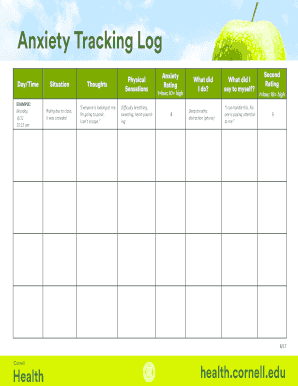
The Anxiety Situations and Thoughts Log is a healthcare form used by individuals to track and rate anxiety levels in various situations or thoughts as part of cognitive-behavioral treatment.
pdfFiller scores top ratings on review platforms




Who needs Anxiety Log?
Explore how professionals across industries use pdfFiller.

Anxiety Log is needed by:
-
Individuals seeking to understand their anxiety patterns
-
Mental health professionals requiring documentation for therapy
-
Patients undergoing cognitive-behavioral treatment for anxiety
-
Support groups for alcohol-related issues
-
Caregivers assisting those managing anxiety
Comprehensive Guide to Anxiety Log
What is the Anxiety Situations and Thoughts Log?
The Anxiety Situations and Thoughts Log serves as a valuable tool for tracking and rating anxiety levels across various situations and thoughts. This log is beneficial in managing anxiety as it helps individuals recognize patterns and triggers that exacerbate their condition. Logging thoughts and situations is vital for cognitive-behavioral therapy, allowing for a more structured approach to understanding and addressing anxiety.
Purpose and Benefits of Using the Anxiety Situations and Thoughts Log
This specific log offers numerous advantages for individuals grappling with anxiety. By tracking anxiety levels, users can develop more effective management strategies tailored to their needs. Furthermore, the log plays a pivotal role in therapeutic settings, particularly for those overcoming alcohol problems, as it aids therapists in crafting personalized cognitive-behavioral treatment plans.
Key Features of the Anxiety Situations and Thoughts Log
The log includes essential components that simplify the logging process. Users will find fields for:
-
Date
-
Time
-
Situation
-
Thought
-
Anxiety level rating from 0 to 10
Additionally, the user-friendly design ensures cloud accessibility and ease of use, empowering users to engage consistently with their tracking efforts.
Who Can Benefit from the Anxiety Situations and Thoughts Log?
The Anxiety Situations and Thoughts Log is designed to assist various users, including:
-
Individuals experiencing anxiety
-
Therapists looking for effective tools to aid clients
-
Healthcare providers seeking to monitor patient progress
This log is particularly crucial for those participating in cognitive-behavioral treatment for alcohol issues, offering a structured means to track both anxiety and recovery progress.
How to Fill Out the Anxiety Situations and Thoughts Log Online
Filling out the log online through pdfFiller is straightforward. Follow these steps to complete the form:
-
Access the Anxiety Situations and Thoughts Log on pdfFiller.
-
Fill in the date and time of each entry.
-
Detail the situation you faced and the corresponding thoughts.
-
Rate your anxiety level on a scale from 0 to 10.
-
Review and save your entries for future reference.
Effectively annotating situations and thoughts can enhance the log's usefulness in your therapeutic journey.
Common Errors and How to Avoid Them
While using the log, users may encounter several common mistakes. To ensure accuracy, consider these tips:
-
Double-check the date and time entries to avoid confusion.
-
Ensure that anxiety levels are rated based on your feelings at the moment.
-
Review all entries before submission to confirm they reflect your experiences accurately.
By validating your entries, you can optimize the log's effectiveness in supporting your treatment.
Security and Privacy When Using the Anxiety Situations and Thoughts Log
Users can feel confident about the security measures surrounding the Anxiety Situations and Thoughts Log. The platform employs 256-bit encryption and adheres to HIPAA and GDPR regulations, ensuring that sensitive health information remains private. This commitment to data protection is crucial, as it allows individuals to share their experiences without fear of unauthorized access.
How to Download, Save, and Print the Anxiety Situations and Thoughts Log
Once you've completed the log, managing your entries is simple. To download, save, and print your log, follow these steps:
-
Navigate to the download option available on pdfFiller.
-
Select the PDF format for your completed log.
-
Save the file to your device for personal reference.
-
If needed, choose the print option to have a physical copy.
These steps will ensure that you have access to your log whenever necessary.
What Happens After You Submit the Anxiety Situations and Thoughts Log?
After submitting the Anxiety Situations and Thoughts Log, various follow-up actions may occur. Potential steps include:
-
Reviewing your log with your therapist or healthcare provider.
-
Incorporating feedback into your ongoing treatment plan.
-
Continuing to track your anxiety levels for adjustments in therapy.
Consistent logging is vital for adapting therapeutic strategies and improving your overall mental health.
Transform Your Anxiety Management with pdfFiller
Utilizing pdfFiller for your logging needs makes anxiety management significantly more accessible. With features that allow for easy access, editing, and cloud-based storage, users can keep their logs organized and secure. Start your journey towards better anxiety management today by taking advantage of this innovative platform.
How to fill out the Anxiety Log
-
1.Access pdfFiller and log in or create an account if you don't have one.
-
2.Locate the search bar and enter 'Anxiety Situations and Thoughts Log' to find the form.
-
3.Click on the form title to open it in the editor.
-
4.Before starting, gather information about recent situations triggering your anxiety, including dates, times, and specific thoughts associated with those instances.
-
5.Begin filling out the form by entering the date and time of the situation you wish to log.
-
6.In the 'Situation' field, describe the event or circumstance that prompted your anxiety.
-
7.In the 'Thought' field, note down any thoughts that occurred in relation to the situation.
-
8.Use the anxiety level rating field to assign a score from 0 to 10 based on how anxious the situation made you feel.
-
9.Review your entries to ensure clarity and accuracy before moving on to the next line.
-
10.Once all relevant situations have been logged, double-check the form for any missing information.
-
11.Save your progress regularly to prevent any loss of data.
-
12.When everything is completed to your satisfaction, click the download or submit button to save or send the form to your therapist or health professional.

Who is eligible to use the Anxiety Situations and Thoughts Log?
Anyone aiming to manage their anxiety effectively, including individuals undergoing cognitive-behavioral therapy, can use this log. It's particularly helpful for those addressing anxiety due to alcohol problems.
How often should I fill out the Anxiety Situations and Thoughts Log?
It's recommended to fill out the log regularly, ideally after experiencing significant anxiety triggers or thoughts, to track patterns over time effectively.
What should I do with my completed log?
Once you complete the log, you can review it with your mental health professional during therapy sessions or keep it for personal reflection on your anxiety management progress.
Are there any common mistakes to avoid when filling out this log?
Common mistakes include leaving fields blank, not accurately rating anxiety levels, or failing to provide specific details about situations and thoughts that triggered anxiety.
How does this form assist in cognitive-behavioral therapy?
This form helps individuals identify and document triggering situations and thoughts, which is essential for discussing therapeutic strategies and personal progress during cognitive-behavioral therapy.
Can I use the log for multiple situations in one entry?
No, it's recommended to use separate entries for different situations to ensure clarity and allow for precise analysis of each anxiety trigger.
What should I do if I encounter issues while filling out the form on pdfFiller?
If you face any technical issues, refer to the pdfFiller support page for troubleshooting tips or contact their customer support for assistance.
Related Forms





Get the latest insights from our blog


If you believe that this page should be taken down, please follow our DMCA take down process
here
.
This form may include fields for payment information. Data entered in these fields is not covered by PCI DSS compliance.