
Last updated on
Nov 9, 2026

TN Sevier County School System Overnight free printable template
pdfFiller is not affiliated with any government organization

Fill out
Complete the form online in a simple drag-and-drop editor.

eSign
Add your legally binding signature or send the form for signing.

Share
Share the form via a link, letting anyone fill it out from any device.

Export
Download, print, email, or move the form to your cloud storage.
Why pdfFiller is the best tool for your documents and forms


End-to-end document management
From editing and signing to collaboration and tracking, pdfFiller has everything you need to get your documents done quickly and efficiently.
Accessible from anywhere
pdfFiller is fully cloud-based. This means you can edit, sign, and share documents from anywhere using your computer, smartphone, or tablet.
Secure and compliant
pdfFiller lets you securely manage documents following global laws like ESIGN, CCPA, and GDPR. It's also HIPAA and SOC 2 compliant.
What is TN Sevier County School System Overnight
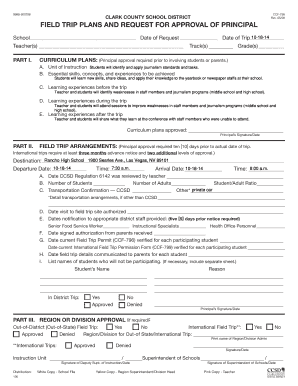
The School Field Trip Request Form is a document used by teachers and school administrators to obtain approval for field trips.
pdfFiller scores top ratings on review platforms




Who needs TN Sevier County School System Overnight?
Explore how professionals across industries use pdfFiller.

TN Sevier County School System Overnight is needed by:
-
School Principals requiring trip approval
-
Teachers planning educational excursions
-
CO Coordinators overseeing student activities
-
Cafeteria Managers coordinating meals
-
Superintendents approving school events
Comprehensive Guide to TN Sevier County School System Overnight
What is the School Field Trip Request Form?
The School Field Trip Request Form is a critical document designed to facilitate the planning and approval of educational field trips. Its primary purpose is to ensure that all necessary information regarding the trip—such as destination, transportation, and number of participants—is collected and reviewed. This form serves as a vital tool for teachers and school administrators who initiate field trips, aligning their educational goals with organizational needs.
This form requires signatures from multiple roles, including the principal, teacher, CO coordinator, cafeteria manager, and superintendent, each playing a pivotal role in the approval process. Understanding each participant's responsibility is essential for a smooth approval workflow.
Purpose and Benefits of the School Field Trip Request Form
The necessity of the School Field Trip Request Form extends beyond mere protocol; it streamlines the planning process for field trips. Using this form provides several advantages for teachers and school administrators, offering clarity and organization throughout the field trip approval process.
Implementing this form enhances safety and organization by ensuring that all relevant details are considered before the trip takes place. This thorough approach helps protect students while maximizing the educational value of each outing.
Key Features of the School Field Trip Request Form
The School Field Trip Request Form includes several essential features that aid in capturing crucial trip details. Key sections typically cover the destination, transportation methods, itinerary, and alignment with the curriculum.
Notable fields within the form include the 'Date School Notified' and 'Number of Field Trips Taken This Year', which serve to track planning and participation effectively. Each section is designed to provide comprehensive insights for the approvers involved.
Who Needs to Complete the School Field Trip Request Form?
Several key roles need to be involved in the completion and approval of the School Field Trip Request Form. These roles include:
-
Principal
-
Teacher
-
CO Coordinator
-
Cafeteria Manager
-
Superintendent
Each participant's involvement ensures a thorough review process, contributing to the safety and educational quality of the planned trips. Recognizing the importance of signatures from all required roles is crucial for compliance and smooth operation.
How to Fill Out the School Field Trip Request Form Online
Filling out the School Field Trip Request Form online is a straightforward process that can be completed using pdfFiller. Follow these steps to ensure completeness:
-
Access the form on the pdfFiller platform.
-
Enter relevant trip details such as destination and dates.
-
Provide the number of participants and select transportation options.
-
Review all entered information for accuracy.
-
Collect necessary signatures online using the eSigning feature.
Gathering required information beforehand will enhance efficiency when completing the form. Clear instructions assist users in navigating through each field effectively.
Common Errors and How to Avoid Them
Users often make several common mistakes while filling out the School Field Trip Request Form. To avoid these pitfalls, consider the following tips:
-
Ensure all required fields are completed accurately.
-
Double-check signature lines for necessary approvals.
-
Review and validate the entire form before submission to catch potential errors.
Taking the time to verify entries significantly reduces the likelihood of issues that could delay or hinder the trip approval process.
What Happens After You Submit the School Field Trip Request Form?
Once you submit the School Field Trip Request Form, you enter a review phase where the designated approvers evaluate the submission. Common follow-up actions include receiving confirmation and tracking the status of the application.
If corrections or amendments are needed, it is essential to know how to navigate these changes efficiently. Proper understanding of the review process facilitates timely updates and communication with approvers.
Security and Compliance for the School Field Trip Request Form
Handling sensitive information within the School Field Trip Request Form necessitates stringent security measures. pdfFiller leverages 256-bit encryption and ensures compliance with standards such as SOC 2 Type II, HIPAA, and GDPR.
These features guarantee user privacy and data protection, making it safe to process sensitive documents associated with school trips.
Utilizing pdfFiller for Your School Field Trip Request Form Needs
pdfFiller simplifies the process of filling and signing the School Field Trip Request Form, providing features that enhance usability. The platform supports eSigning, sharing, and saving forms, which streamlines overall document management.
Leveraging pdfFiller's capabilities can significantly improve the efficiency and organization of your field trip requests, making it a valuable resource for educational institutions.
How to fill out the TN Sevier County School System Overnight
-
1.Access the School Field Trip Request Form on pdfFiller by searching for its name in the search bar or navigating through the Education Forms category.
-
2.Open the form to view its structure, which includes fields for filling in trip details, checkboxes, and signature lines for authorized personnel.
-
3.Gather essential information such as the destination, transportation method, the number of students attending, and a brief description of the trip's educational relevance before you start.
-
4.Using pdfFiller's interface, click on each blank field to fill in the required information accurately. Be sure to indicate the date the school was notified and tick any relevant checkboxes.
-
5.Once all fields are completed, review your entries for accuracy and completeness, making sure all necessary details align with the requirements.
-
6.After finalizing the form, save your work by using pdfFiller’s download option, and choose the format you prefer for saving, such as PDF.
-
7.Submit the form through the designated method provided by your school's administration or save it for physical submission, ensuring all required signatures are obtained before sending.

Who is eligible to use the School Field Trip Request Form?
Teachers, principals, and school administrators are eligible to use the School Field Trip Request Form. It’s designed for those involved in planning and approving educational trips.
What should I do if I miss the submission deadline for the form?
If you miss the submission deadline, contact your school's administration as soon as possible. They may provide guidance on late submissions and potential approval for delayed requests.
How can I submit the completed School Field Trip Request Form?
You can submit the completed form electronically through pdfFiller or print it for manual submission. Ensure that all required signatures are included for approval.
Are there any supporting documents needed with the form?
While the form primarily requires trip details, it's advisable to include any additional relevant documents, such as curriculum links or transportation confirmations, to support your request.
What are common mistakes to avoid when completing this form?
Common mistakes include leaving fields blank, not providing a clear itinerary, and forgetting to collect all required signatures. Ensure each section is fully completed for approval.
How long does it take to process the School Field Trip Request Form?
Processing times vary but typically take between a few days to a week. Early submission is recommended to allow sufficient time for approval from all required parties.
What if I need to make changes after submitting the form?
If changes are necessary, contact the relevant approvers immediately. Depending on the school's policy, you may need to submit a revised form or an addendum.
Related Forms




Related Catalogs
Get the latest insights from our blog


If you believe that this page should be taken down, please follow our DMCA take down process
here
.
This form may include fields for payment information. Data entered in these fields is not covered by PCI DSS compliance.