
Last updated on
Oct 31, 2026

Navarro College Staff Performance Appraisal Form 2014-2026 free printable template
pdfFiller is not affiliated with any government organization

Fill out
Complete the form online in a simple drag-and-drop editor.

eSign
Add your legally binding signature or send the form for signing.

Share
Share the form via a link, letting anyone fill it out from any device.

Export
Download, print, email, or move the form to your cloud storage.
Why pdfFiller is the best tool for your documents and forms


End-to-end document management
From editing and signing to collaboration and tracking, pdfFiller has everything you need to get your documents done quickly and efficiently.
Accessible from anywhere
pdfFiller is fully cloud-based. This means you can edit, sign, and share documents from anywhere using your computer, smartphone, or tablet.
Secure and compliant
pdfFiller lets you securely manage documents following global laws like ESIGN, CCPA, and GDPR. It's also HIPAA and SOC 2 compliant.
What is Navarro College Staff Performance Appraisal Form
The Staff Appraisal Form 2014 is a performance evaluation document used by employers in North Carolina to assess staff performance effectively.
pdfFiller scores top ratings on review platforms




Who needs Navarro College Staff Performance Appraisal Form?
Explore how professionals across industries use pdfFiller.

Navarro College Staff Performance Appraisal Form is needed by:
-
Supervisors responsible for staff evaluations
-
Directors or Deans overseeing departmental performance reviews
-
Executive Officers managing employee assessments
-
Staff members undergoing performance evaluations
-
Human Resources personnel handling discrepancies
-
Department heads needing structured appraisal processes
Comprehensive Guide to Navarro College Staff Performance Appraisal Form
What is the Staff Appraisal Form 2014?
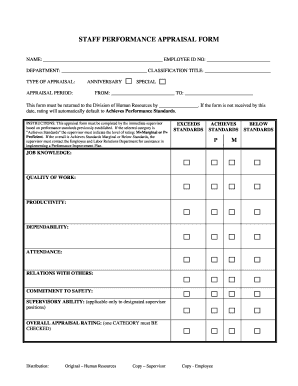
The Staff Appraisal Form 2014 serves as an essential tool for evaluating staff performance within North Carolina. It encompasses various sections that assess job requirements, professional skills, and interpersonal skills. The form utilizes a rating system where performance can be categorized as Exceeds Expectations, Meets Expectations, or Improvement Needed. This structured approach aids organizations in maintaining high standards of staff performance and offers clarity regarding individual contributions.
Key sections of this employee evaluation template include specific criteria that supervisors and staff should focus on during assessments. Each section aims to provide valuable insights into employee capabilities while highlighting areas for development.
Purpose and Benefits of the Staff Appraisal Form 2014
The primary purpose of the Staff Appraisal Form 2014 is to facilitate comprehensive assessments and foster improvement in staff performance. By utilizing this tool, organizations can improve communication between supervisors and employees, creating a more transparent evaluation process. This formal evaluation method also supports career development by identifying strengths and areas for professional growth.
Employing a structured staff assessment template allows organizations to standardize performance reviews, ensuring consistency and fairness across all evaluations.
Key Features of the Staff Appraisal Form 2014
The Staff Appraisal Form 2014 has several key features designed to enhance usability and functionality. First, it is a fillable form that allows for efficient data entry and completion. Key components include rating sections for evaluating employee performance and signature requirements from relevant parties involved in the appraisal process.
-
Integrated checkboxes for simplified responses
-
Comment sections for detailed feedback
-
Security features ensuring confidentiality of form data
These features collectively contribute to a seamless appraisal experience while maintaining data security and integrity.
Who Needs the Staff Appraisal Form 2014?
This form is essential for various roles involved in staff performance evaluations. The individuals who require the use of the form include Supervisors, Directors or Dean level Supervisors, Executive Officers, and Staff members being evaluated. Each role has specific responsibilities related to completing and signing the form, crucial for ensuring accurate and thorough evaluations.
How to Fill Out the Staff Appraisal Form 2014 Online (Step-by-Step)
To efficiently fill out the Staff Appraisal Form 2014 using pdfFiller, follow these guidelines:
-
Gather necessary information, including employee details and performance records.
-
Access the fillable form via pdfFiller.
-
Complete each section, providing accurate assessments and detailed feedback.
-
Review ratings based on collected observations.
By adhering to these steps, users can ensure a comprehensive evaluation process, leveraging the full capabilities of the staff assessment template.
How to Sign and Submit the Staff Appraisal Form 2014
After completing the form, users need to sign and submit it accurately. Understanding the difference between digital signatures and wet signatures is crucial:
-
Digital signatures can be completed using electronic signature tools in pdfFiller.
-
Wet signatures may be required for specific organizational policies.
To submit the completed form, follow the provided instructions on pdfFiller, ensuring to meet any specified deadlines for evaluations.
Common Errors and How to Avoid Them While Using the Staff Appraisal Form 2014
Every user should be aware of common pitfalls when using the Staff Appraisal Form 2014. Frequent mistakes during the evaluation process can lead to incomplete submissions or inaccuracies. Best practices include:
-
Ensuring all fields are filled out completely.
-
Verifying job descriptions before completing evaluations.
-
Providing detailed and constructive feedback to support employee development.
By following these guidelines, users can enhance the accuracy and effectiveness of the appraisal process.
Why Choose pdfFiller for Completing the Staff Appraisal Form 2014?
Choosing pdfFiller for managing the Staff Appraisal Form 2014 offers numerous advantages. Its cloud-based platform ensures users can access the form from any device without the need for downloads. Moreover, pdfFiller provides comprehensive security features compliant with data protection standards, safeguarding sensitive employee information.
-
Edit text and images directly on the form
-
Easily eSign and save documents securely
-
Utilize various tools for organizing and sharing completed forms
This combination of features promotes a user-friendly experience while maintaining confidentiality and compliance.
What Happens After You Submit the Staff Appraisal Form 2014?
After submitting the Staff Appraisal Form 2014, users can expect a series of follow-up actions. Processing timelines may vary depending on organizational policies, so it is wise to check the status of the submission proactively. If any issues arise, users should be prepared to address them promptly.
Furthermore, post-submission actions may include additional evaluations or discussions regarding performance outcomes, facilitating ongoing development and feedback loops within the organization.
Get Started with the Staff Appraisal Form 2014 Today!
To begin utilizing the Staff Appraisal Form 2014, users are encouraged to explore the capabilities of the pdfFiller platform. With a focus on user-friendly features and robust security measures, pdfFiller provides a reliable tool for completing employee evaluations effectively, promoting a culture of performance improvement within the workplace.
How to fill out the Navarro College Staff Performance Appraisal Form
-
1.Start by accessing pdfFiller and searching for the 'Staff Appraisal Form 2014' to locate the document.
-
2.Once opened, navigate through the fillable fields using your mouse or touchpad to click on each section.
-
3.Before filling in the form, gather necessary information, including job descriptions, performance data, and feedback from colleagues.
-
4.Complete each section by entering the relevant details, ensuring accurate information is provided for job requirements, professional skills, and interpersonal skills.
-
5.Use checkboxes for rating options such as Exceeds Expectations, Meets Expectations, and Improvement Needed.
-
6.Make sure to fill out signature lines for the supervisor, director or dean supervisor, executive officer, and the staff member being evaluated.
-
7.Once all fields are completed, review the form thoroughly to confirm all details are accurate and reflect the intended evaluation.
-
8.To save or download the completed form, click on the 'Save' option, and choose your preferred file format.
-
9.If required, utilize the 'Submit' button on pdfFiller to send the form electronically to the relevant parties.

Who is eligible to use the Staff Appraisal Form 2014?
The Staff Appraisal Form 2014 is designed for use by supervisors, directors, executive officers, and staff members in North Carolina involved in employee evaluations.
Are there any deadlines for submitting this appraisal form?
While specific deadlines can vary by organization, it is generally advisable to complete and submit the Staff Appraisal Form by the end of the performance review period defined by your HR department.
How do I submit the completed Staff Appraisal Form?
After completing the form on pdfFiller, you may submit it electronically through the platform or download it for manual submission to your HR department.
What supporting documents do I need for the staff appraisal process?
Typically, you may need job descriptions, previous performance evaluations, and feedback from peers. Consult your HR department for any specific requirements.
What are common mistakes to avoid when filling out the form?
Common mistakes include providing inaccurate ratings, missing signatures, and neglecting to review the form before submission. Ensure all sections are complete and accurate.
How long does it take to process the staff appraisal forms?
Processing times may vary based on your organization's HR practices. Generally, evaluations are reviewed within a few weeks of submission.
What should I do if there are discrepancies in job descriptions?
Any discrepancies in job descriptions should be promptly reported to your HR department to ensure accurate evaluations and align expectations.
Related Forms



Related Catalogs
Get the latest insights from our blog


If you believe that this page should be taken down, please follow our DMCA take down process
here
.
This form may include fields for payment information. Data entered in these fields is not covered by PCI DSS compliance.