
Last updated on
Oct 31, 2026

Get the free Lithium Battery Safety Document
We are not affiliated with any brand or entity on this form

Fill out
Complete the form online in a simple drag-and-drop editor.

eSign
Add your legally binding signature or send the form for signing.

Share
Share the form via a link, letting anyone fill it out from any device.

Export
Download, print, email, or move the form to your cloud storage.
Why pdfFiller is the best tool for your documents and forms


End-to-end document management
From editing and signing to collaboration and tracking, pdfFiller has everything you need to get your documents done quickly and efficiently.
Accessible from anywhere
pdfFiller is fully cloud-based. This means you can edit, sign, and share documents from anywhere using your computer, smartphone, or tablet.
Secure and compliant
pdfFiller lets you securely manage documents following global laws like ESIGN, CCPA, and GDPR. It's also HIPAA and SOC 2 compliant.
What is Lithium Battery Safety
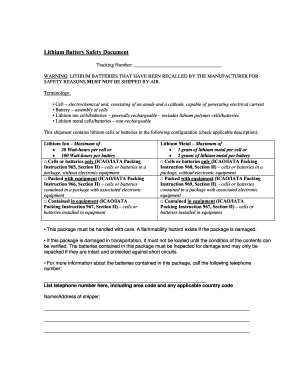
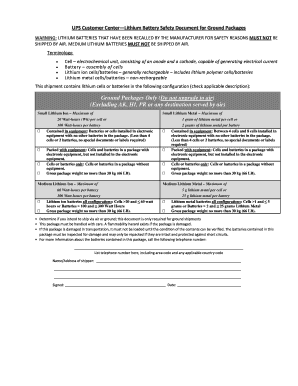
The Lithium Battery Safety Document is a delivery note used by shippers to ensure the safe transport of lithium batteries.
pdfFiller scores top ratings on review platforms




Who needs Lithium Battery Safety?
Explore how professionals across industries use pdfFiller.

Lithium Battery Safety is needed by:
-
Shipping companies handling lithium batteries
-
Businesses involved in battery production and distribution
-
Import/export agents specializing in hazardous materials
-
Logistics managers overseeing battery transportation
-
Compliance officers ensuring adherence to ICAO/IATA regulations
Comprehensive Guide to Lithium Battery Safety
What is the Lithium Battery Safety Document?
The Lithium Battery Safety Document serves as a critical form for shipping lithium batteries safely. It outlines essential safety regulations and ensures compliance with shipping standards. By adhering to these regulations, shippers help mitigate potential risks associated with transporting lithium batteries.
This document is often referred to as the lithium battery shipping form and is vital for anyone involved in the shipment of such items. Understanding its purpose is key for maintaining safety during transport.
Purpose and Benefits of the Lithium Battery Safety Document
The Lithium Battery Safety Document is essential for shippers as it aligns with ICAO and IATA battery shipping regulations. Compliance with these regulations not only fulfills legal obligations but also enhances safety throughout the shipping process.
Utilizing this form offers several benefits:
-
Ensures that shipments meet industry standards
-
Minimizes risks associated with improper handling
-
Provides clear guidelines for safe transport
These advantages contribute significantly to the overall security of lithium battery shipments.
Key Features of the Lithium Battery Safety Document
The form includes various fillable fields designed to capture critical shipment information. Important fields encompass:
-
UPS Tracking Number/MAWB
-
Name and address of the shipper
-
Confirmation of the shipment date and signature
Additionally, the document specifies safety regulations and handling instructions, including limits on weight and watt-hours necessary for shipping batteries. Its structured layout facilitates ease of completion while ensuring all necessary data is collected.
Who Needs the Lithium Battery Safety Document?
This document is required for specific roles, particularly shippers involved in transporting lithium batteries. Various industries, including electronics and automotive sectors, frequently engage in shipping such batteries.
Any organization handling lithium batteries should be aware of the shipping requirements and ensure the use of the lithium battery safety document for compliance and safety.
How to Fill Out the Lithium Battery Safety Document Online
Completing the Lithium Battery Safety Document online using pdfFiller involves the following steps:
-
Access the document on pdfFiller's platform.
-
Fill in required fields including tracking number and shipper’s information.
-
Review safety regulations and handling instructions detailed in the form.
-
eSign the document to confirm compliance.
Users should be mindful of common errors, such as leaving fields incomplete or providing incorrect information, to avoid delays in processing.
Submission Methods and Delivery of the Lithium Battery Safety Document
Once filled out, the completed Lithium Battery Safety Document can be submitted through various methods. Common options include:
-
Emailing the document
-
In-person delivery to the designated shipping facility
Shippers should be aware of important guidelines for shipping, including tracking requirements and any relevant deadlines to ensure timely submission.
What Happens After You Submit the Lithium Battery Safety Document?
After submission, users typically receive a confirmation acknowledging the receipt of the Lithium Battery Safety Document. This confirmation process is crucial for tracking the status of the shipment.
Additionally, users can check the status of their submitted document at any time. If adjustments or corrections are necessary post-submission, guidelines are provided to facilitate these changes efficiently.
Security and Compliance for the Lithium Battery Safety Document
When handling the Lithium Battery Safety Document, users can trust in robust security measures. pdfFiller employs 256-bit encryption and maintains compliance with HIPAA and GDPR, ensuring that all sensitive information is protected.
Understanding the importance of privacy is essential when submitting this document, as it contains sensitive data related to battery shipments.
How pdfFiller Can Streamline Your Experience with the Lithium Battery Safety Document
pdfFiller enhances the user experience by offering a platform that simplifies filling out and managing the Lithium Battery Safety Document. Notable capabilities include:
-
Editing and modifying text or images in the form
-
eSigning and sharing completed documents seamlessly
-
Creating editable fillable forms
By utilizing pdfFiller's user-friendly features, shippers can significantly improve the efficiency of their document management processes.
How to fill out the Lithium Battery Safety
-
1.To access the Lithium Battery Safety Document on pdfFiller, start by navigating to the pdfFiller website and logging in to your account. Use the search bar or browse the forms section to locate the Lithium Battery Safety Document.
-
2.Once you have opened the document, familiarize yourself with the layout. You will see form fields where you need to fill in necessary information such as the UPS Tracking Number/MAWB, and the Name/Address of the shipper.
-
3.Before you start filling out the form, gather all required information. This includes your shipping details, tracking numbers, and any pertinent regulations you need to adhere to. Ensure that you have a clear understanding of weight and watt-hour limits.
-
4.Begin filling in the form fields using pdfFiller's interactive interface. Click on the fields to enter information. Utilize the toolbar options to add signatures where necessary, ensuring that all required fields are completed accurately.
-
5.After entering all necessary information, take a moment to review the form. Check for any missing data or errors that could cause issues during processing. Use pdfFiller's built-in tools to edit or make corrections as needed.
-
6.Once you are satisfied with the completed form, save your progress by clicking the save option. You can also download the form to your device or choose to submit it directly through pdfFiller, depending on your needs.

Who is eligible to fill out the Lithium Battery Safety Document?
Any shipper involved in the transportation of lithium batteries is eligible to complete the Lithium Battery Safety Document. This includes businesses and individual shippers adhering to ICAO/IATA regulations.
What information is needed to complete the form?
To complete the Lithium Battery Safety Document, you will need basic shipping information such as the UPS Tracking Number/MAWB, your name and address, and specific details about the lithium batteries being shipped, including their weight and watt-hour ratings.
How do I submit the completed form?
The completed Lithium Battery Safety Document can be submitted electronically through pdfFiller, or you can download it and send it via your preferred mailing method. Ensure that all required signatures are present before submission.
What are common mistakes to avoid when filling out the form?
Common mistakes include leaving required fields blank, entering incorrect shipping details, and failing to sign the document. Ensure all information is accurate and up-to-date to avoid delays.
How long does it take to process the Lithium Battery Safety Document?
Processing times may vary depending on the shipping company or regulatory body involved. Typically, submissions are reviewed within a few business days, but check with your shipping provider for specific timelines.
Are there any fees associated with submitting the Lithium Battery Safety Document?
Generally, there are no fees specific to filling out the Lithium Battery Safety Document itself. However, standard shipping fees apply based on the carrier's rates and policies.
What should I do if I make an error on the form?
If you make an error on the Lithium Battery Safety Document, you can edit the form directly in pdfFiller. If it's submitted already, contact your shipping provider to inquire about necessary corrections or re-submission.
Related Forms




Related Catalogs
Get the latest insights from our blog


If you believe that this page should be taken down, please follow our DMCA take down process
here
.
This form may include fields for payment information. Data entered in these fields is not covered by PCI DSS compliance.