
Last updated on
Oct 31, 2026

Get the free Earthquakes 2 – Determination of Epicenter
We are not affiliated with any brand or entity on this form

Fill out
Complete the form online in a simple drag-and-drop editor.

eSign
Add your legally binding signature or send the form for signing.

Share
Share the form via a link, letting anyone fill it out from any device.

Export
Download, print, email, or move the form to your cloud storage.
Why pdfFiller is the best tool for your documents and forms


End-to-end document management
From editing and signing to collaboration and tracking, pdfFiller has everything you need to get your documents done quickly and efficiently.
Accessible from anywhere
pdfFiller is fully cloud-based. This means you can edit, sign, and share documents from anywhere using your computer, smartphone, or tablet.
Secure and compliant
pdfFiller lets you securely manage documents following global laws like ESIGN, CCPA, and GDPR. It's also HIPAA and SOC 2 compliant.
What is Earthquakes Epicenter
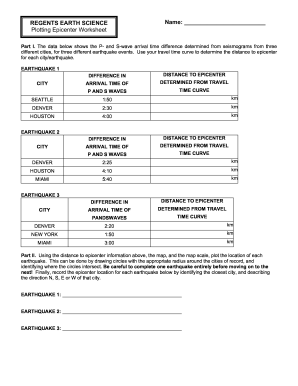
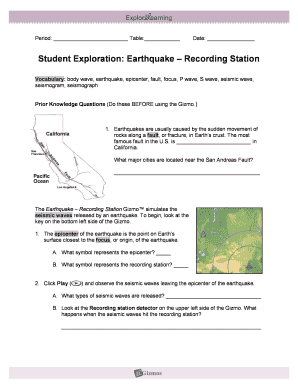
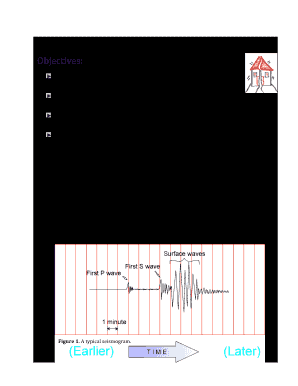
The Earthquakes 2 – Determination of Epicenter form is a student exploration document used by educators to teach students how to determine the epicenter of an earthquake using data from seismic recording stations.
pdfFiller scores top ratings on review platforms




Brilliant! And amazing customer service!
I have found PDFfiller user friendly and a great tool.
Who needs Earthquakes Epicenter?
Explore how professionals across industries use pdfFiller.

Earthquakes Epicenter is needed by:
-
Earth science teachers looking for hands-on activities
-
High school students engaged in geology studies
-
Educational institutions focusing on natural disasters
-
Curriculum developers seeking relevant educational materials
-
Parents assisting their children with science homework
-
Tutors specializing in earth science or geology
-
Science education coordinators creating assessment tools
Comprehensive Guide to Earthquakes Epicenter
What is the Earthquakes 2 – Determination of Epicenter?
The Earthquakes 2 form serves as an educational resource for teaching students how to determine the epicenter of an earthquake, enhancing their understanding of seismic events. This form plays a crucial role in the determination of epicenter activity by allowing students to engage with real data from recording stations, promoting active learning. The structure of the Earthquakes 2 form consists of fillable fields, including essential instructions for completion, thus ensuring clarity and focus in their learning journey.
Purpose and Benefits of the Earthquakes 2 Form
The Earthquakes 2 form is designed to support both students and educators in their exploration of seismic wave activity. By utilizing this form, students can engage in hands-on learning experiences that foster a deeper understanding of earthquake phenomena. Benefits of this form include the application of real-world data, skill development in scientific inquiry, and enhanced educational engagement among learners.
Key Features of the Earthquakes 2 Form
Several unique features of the Earthquakes 2 form improve user experience and learning outcomes. These include:
-
Inclusion of vocabulary definitions that provide clarity on key terms.
-
Prior knowledge questions that assess understanding before beginning the activity.
-
A structured activity guide that directs students through the epicenter location exercise.
Who Should Use the Earthquakes 2 Form?
This form caters to a diverse audience, including educators, students, and curriculum developers. It is particularly beneficial for:
-
Earth science teachers looking to enhance curriculum effectiveness.
-
Students exploring earthquakes at various educational levels.
-
Curriculum developers focused on incorporating experiential learning strategies.
How to Fill Out the Earthquakes 2 Form Online
Filling out the Earthquakes 2 form online is a straightforward process using pdfFiller. To complete the form, follow these steps:
-
Access the Earthquakes 2 form on the pdfFiller platform.
-
Utilize the fillable fields to enter your Name and Date.
-
Follow the instructions carefully to measure time intervals and distances for epicenter determination.
Common Errors and How to Avoid Them
While completing the Earthquakes 2 form, students may encounter several common pitfalls. To ensure accurate completion, it's essential to avoid:
-
Rushing through measurements without double-checking values.
-
Neglecting to read the instructions thoroughly before starting the activity.
Additionally, validating that the epicenter determination is accurate can be achieved by reviewing calculations with peers or instructors.
How to Submit the Earthquakes 2 Form
Submitting the completed Earthquakes 2 form can be done through various methods. Typical submission processes include:
-
Digital submission via pdfFiller for instant delivery.
-
Printed submission, if preferred, with proper handling instructions.
After submission, users can receive confirmation receipts to track their forms effectively.
Security and Compliance When Using the Earthquakes 2 Form
When using the Earthquakes 2 form through pdfFiller, data privacy and security are paramount. pdfFiller employs 256-bit encryption and is compliant with regulations such as HIPAA and GDPR, ensuring that all personal and educational data is handled responsibly. Users can feel reassured knowing that their sensitive information is protected during the submission process.
Sample of a Completed Earthquakes 2 Form
To assist users in understanding how to properly complete the Earthquakes 2 form, a sample filled-out form can be referenced. This example illustrates:
-
The various sections of the form and their respective requirements.
-
Specific entries that demonstrate correct use of the form.
Empower Your Learning Experience with pdfFiller
Using pdfFiller to fill out the Earthquakes 2 form enhances the overall learning experience. This platform enables seamless editing, signing, and submitting of forms online, providing robust document management capabilities. Students benefit significantly from utilizing pdfFiller, which simplifies the process of completing educational forms.
How to fill out the Earthquakes Epicenter
-
1.To access the Earthquakes 2 – Determination of Epicenter form on pdfFiller, visit the pdfFiller website and search for the form by its name.
-
2.Once you find the form, click on it to open it in pdfFiller’s editing interface where you can start filling it out.
-
3.Before completing the form, gather necessary information such as the data from three recording stations needed to determine the epicenter.
-
4.Navigate through the form by clicking on the fillable fields. Begin by entering your name and date in the provided spaces.
-
5.Carefully read any instructions included in the form to ensure accurate completion, especially before measuring time intervals and distances.
-
6.Input your calculated data, such as time intervals, into the designated fields to help in locating the epicenter.
-
7.Once all fields are filled and reviewed, take a moment to double-check your entries for accuracy.
-
8.When satisfied with your input, save your progress using the save button in the upper right corner.
-
9.You can choose to download a copy of the completed form to your device or submit it directly from pdfFiller if applicable.
-
10.If submitting directly, ensure any additional required documents are attached as per the submission guidelines.

Who can use the Earthquakes 2 – Determination of Epicenter form?
The form is primarily used by high school earth science teachers and students, but it can also be utilized by educational institutions and curriculum developers focused on teaching geology.
Is there a deadline for completing this form?
The Earthquakes 2 form does not have a strict deadline, but it's best to complete it timely according to your educational schedule or assignments given by teachers.
How can I submit the completed form?
Once completed, the form can be submitted either by downloading and printing it for manual submission or directly through pdfFiller if your institution supports electronic submission.
What information do I need before filling out the form?
Before starting, gather data from at least three seismic recording stations, and ensure you understand the vocabulary definitions and the activity steps outlined in the form.
What common mistakes should I avoid when using this form?
Ensure that you double-check your measurements and calculations. Misplacing data or skipping steps in the activity guide can lead to incorrect determinations of the earthquake epicenter.
How does processing time work for this form after submission?
Processing times vary depending on your submission method. If submitted through your school, refer to their specific timelines. Direct electronic submissions through pdfFiller typically receive quicker confirmations.
Am I required to notarize the Earthquakes 2 form?
No, the Earthquakes 2 – Determination of Epicenter form does not require notarization, making it easier for students to complete and submit.
Related Forms



Related Catalogs
Get the latest insights from our blog


If you believe that this page should be taken down, please follow our DMCA take down process
here
.
This form may include fields for payment information. Data entered in these fields is not covered by PCI DSS compliance.