
Last updated on
Nov 9, 2026
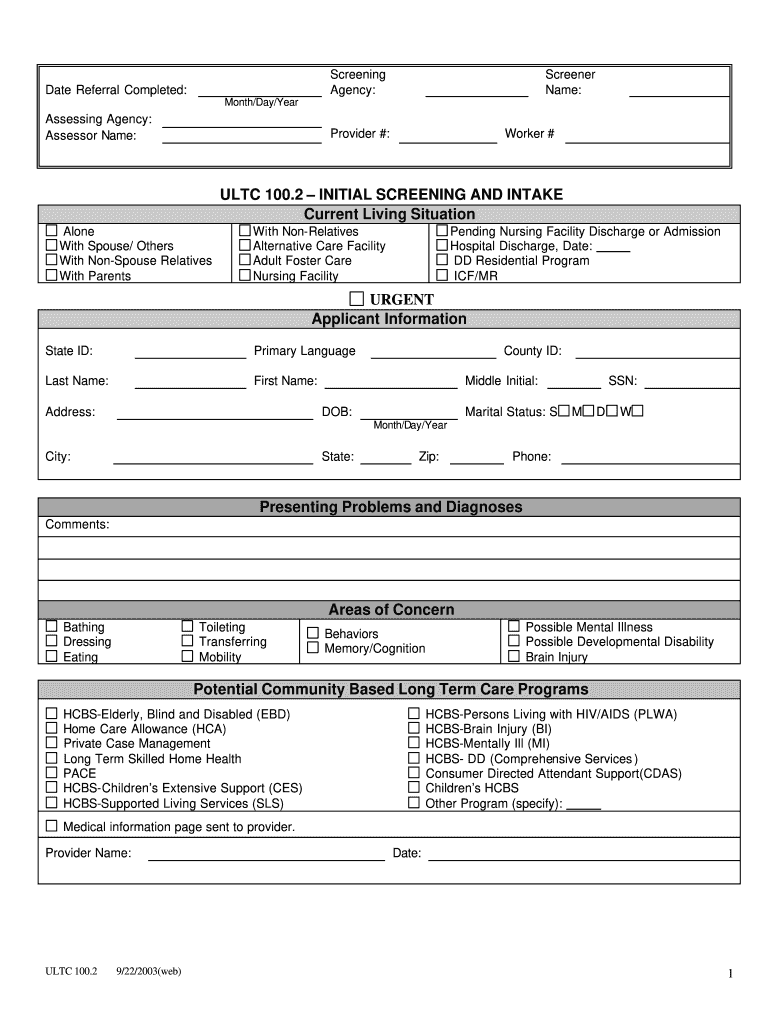
CO ULTC 100.2 2003 free printable template
pdfFiller is not affiliated with any government organization

Fill out
Complete the form online in a simple drag-and-drop editor.

eSign
Add your legally binding signature or send the form for signing.

Share
Share the form via a link, letting anyone fill it out from any device.

Export
Download, print, email, or move the form to your cloud storage.
Why pdfFiller is the best tool for your documents and forms


End-to-end document management
From editing and signing to collaboration and tracking, pdfFiller has everything you need to get your documents done quickly and efficiently.
Accessible from anywhere
pdfFiller is fully cloud-based. This means you can edit, sign, and share documents from anywhere using your computer, smartphone, or tablet.
Secure and compliant
pdfFiller lets you securely manage documents following global laws like ESIGN, CCPA, and GDPR. It's also HIPAA and SOC 2 compliant.
What is CO ULTC 100.2
The ULTC 100.2 Initial Screening Form is a medical history document used by applicants and healthcare providers to gather essential information for long-term care assessments.
pdfFiller scores top ratings on review platforms




Who needs CO ULTC 100.2?
Explore how professionals across industries use pdfFiller.

CO ULTC 100.2 is needed by:
-
Applicants seeking long-term care services
-
Medical providers conducting initial patient screenings
-
Facility or case managers overseeing patient intakes
-
Healthcare administrators managing patient documentation
-
Social workers assessing community-based program eligibility
Comprehensive Guide to CO ULTC 100.2
What is the ULTC 100.2 Initial Screening Form?
The ULTC 100.2 Initial Screening Form serves as a critical tool in long-term care services, primarily utilized to assess individuals seeking Medicaid eligibility. This form collects essential data related to the applicant's situation, medical history, and financial status to facilitate the initial screening process.
The ULTC 100.2 form plays a crucial role in long-term care assessments by systematically gathering information that directly informs care planning and service eligibility. Its timely completion can significantly impact the assessment outcome and ensure that individuals receive appropriate long-term care services based on their needs.
Purpose and Benefits of the ULTC 100.2 Initial Screening Form
Completing the ULTC 100.2 Initial Screening Form provides substantial benefits, especially in identifying patient needs and concerns. By accurately filling out this healthcare form template, users can ensure thorough communication of vital information that aids in effective care planning.
-
The form helps streamline access to long-term care services.
-
Timeliness in form completion can prevent delays in service initiation.
-
Providing detailed information fosters better healthcare outcomes.
Who Needs to Complete the ULTC 100.2 Initial Screening Form?
There are three primary roles involved in the ULTC 100.2 form submission process: Applicants, Medical Providers, and Facility or Case Managers. Each participant has specific responsibilities that are essential to the form's accurate completion.
-
Applicants: They are responsible for providing personal and medical information.
-
Medical Providers: They contribute necessary medical history details.
-
Facility/Case Managers: They ensure proper oversight and verify the form's completion.
Key Features of the ULTC 100.2 Initial Screening Form
The ULTC 100.2 Initial Screening Form contains several key components designed to collect comprehensive applicant data. Significant fields include information about the applicant, their living situation, pertinent medical history, and financial details.
This patient intake form is designed to be fillable, making it user-friendly and accessible for those completing it. Users can easily navigate through various sections, ensuring that all required information is captured efficiently.
How to Fill Out the ULTC 100.2 Initial Screening Form Online (Step-by-Step)
Filling out the ULTC 100.2 form online is straightforward. Here is a step-by-step guide for users:
-
Access the ULTC 100.2 form on pdfFiller's platform.
-
Carefully input all required fields, ensuring accuracy.
-
Review the completed form for completeness and correctness.
-
Submit the form electronically as per the provided guidelines.
Before starting, it's advisable to gather necessary information, such as identification details and medical records, to facilitate a smooth filling process.
Common Errors and How to Avoid Them When Filling Out the ULTC 100.2 Form
When completing the ULTC 100.2 form, users should be aware of common pitfalls that may cause delays in processing. These errors can significantly hinder the assessment process and must be handled with care.
-
Incomplete information in required fields.
-
Incorrect medical or financial details.
-
Failure to obtain necessary signatures from all parties involved.
To enhance accuracy, users should double-check information and ensure all sections are fully completed before submission.
Signature Requirements for the ULTC 100.2 Initial Screening Form
Completing the ULTC 100.2 form involves specific signature requirements that emphasize the importance of consent and verification. All parties involved—Applicants, Medical Providers, and Facility Managers—must provide their signatures to validate the information on the form.
The acceptance of digital signatures versus wet signatures is also an important consideration. Understanding the requirements for both types ensures compliance and facilitates smoother processing.
Submission Methods for the ULTC 100.2 Initial Screening Form
Completed ULTC 100.2 forms can be submitted using various methods, depending on procedural guidelines. Users have the option to submit the form online or through traditional mail, ensuring flexibility in the submission process.
It's essential to be mindful of any potential fees associated with processing and to adhere to specified deadlines to avoid issues with timely submission.
Security and Compliance Considerations for the ULTC 100.2 Form
When handling sensitive medical information, security, and compliance are paramount. Users must be aware of the importance of protecting their data during the submission of healthcare forms.
pdfFiller employs robust security features, including encryption, to safeguard user information. Compliance with regulations such as HIPAA and GDPR ensures that sensitive data is handled appropriately and remains confidential throughout the process.
Maximize Your Experience with pdfFiller for the ULTC 100.2 Form
Utilizing pdfFiller’s tools can enhance the experience of filling out the ULTC 100.2 Initial Screening Form. The cloud-based platform offers several advantages that streamline the form completion process.
-
E-signing features allow for quick and secure signature collection.
-
Form sharing capabilities facilitate collaboration among all parties.
-
Secure storage options help keep sensitive documents organized and accessible.
By leveraging these features, users can improve their efficiency and ensure that their submissions are handled accurately and promptly.
How to fill out the CO ULTC 100.2
-
1.Access and open the ULTC 100.2 Initial Screening Form on pdfFiller by visiting the platform and searching for the form in the template library.
-
2.Once the form is open, familiarize yourself with the layout. Navigate through the sections, identifying fields that require input, such as personal details and medical history.
-
3.Before completing the form, ensure you have all necessary information at hand, including the applicant's living situation, medical records, and financial data. This will streamline the filling process.
-
4.Proceed to fill in the blank fields with accurate and relevant information. Use pdfFiller’s features to select checkboxes and type responses into designated text areas, ensuring clarity and completeness.
-
5.Review each field thoroughly. Utilize the 'Preview' option to see how the completed form looks, ensuring there are no errors or omissions.
-
6.When satisfied with the input, finalize the form. Ensure all required signatures from the applicant, medical provider, and facility/case manager are included for authenticity.
-
7.Lastly, save your progress, download a complete copy, or submit the form directly through pdfFiller’s submission options. Make sure to choose appropriate formats based on your needs.

Who is eligible to use the ULTC 100.2 Initial Screening Form?
Any applicant seeking long-term care services, along with medical providers and facility managers involved in the intake process, can use the ULTC 100.2 form. All parties must provide necessary information and signatures.
What documents need to be submitted alongside the form?
Generally, along with the ULTC 100.2 form, applicants should provide relevant medical history documentation, identification, and any financial records. Specific requirements may vary by facility.
How do I submit the completed ULTC 100.2 form?
The completed form can be submitted through pdfFiller's platform by direct submission options or downloaded for print and manual submission to the designated facility or case manager.
Are there any deadlines for submitting this form?
While specific deadlines can vary based on individual circumstances or facility protocols, it is important to submit the ULTC 100.2 form promptly to avoid delays in your long-term care assessment.
What are common mistakes to avoid when filling out the form?
Common mistakes include leaving fields blank, providing incorrect information, or failing to gather required signatures. Always double-check entries for accuracy and completeness.
How long does processing of the ULTC 100.2 form take?
Processing times for the ULTC 100.2 form can vary by facility. Generally, expect a review period of a few days to a couple of weeks after submission, depending on the facility’s workflow.
What is the purpose of the ULTC 100.2 Initial Screening Form?
The ULTC 100.2 form is designed to perform an initial assessment of an applicant’s needs for long-term care services, including gathering personal, medical, and financial information for eligibility determination.
CO ULTC 100.2 Form Versions
Related Forms




Related Catalogs
Get the latest insights from our blog


If you believe that this page should be taken down, please follow our DMCA take down process
here
.
This form may include fields for payment information. Data entered in these fields is not covered by PCI DSS compliance.