
Last updated on
Oct 31, 2026

Get the free Quote Log Form
We are not affiliated with any brand or entity on this form

Fill out
Complete the form online in a simple drag-and-drop editor.

eSign
Add your legally binding signature or send the form for signing.

Share
Share the form via a link, letting anyone fill it out from any device.

Export
Download, print, email, or move the form to your cloud storage.
Why pdfFiller is the best tool for your documents and forms


End-to-end document management
From editing and signing to collaboration and tracking, pdfFiller has everything you need to get your documents done quickly and efficiently.
Accessible from anywhere
pdfFiller is fully cloud-based. This means you can edit, sign, and share documents from anywhere using your computer, smartphone, or tablet.
Secure and compliant
pdfFiller lets you securely manage documents following global laws like ESIGN, CCPA, and GDPR. It's also HIPAA and SOC 2 compliant.
What is Quote Log
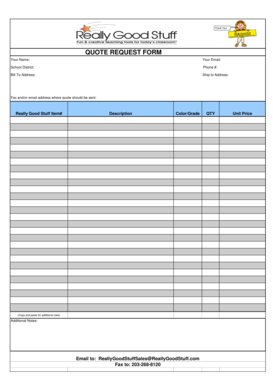
The Quote Log Form is a business document used by procurement professionals to record and compare quotes from various vendors for purchasing items.
pdfFiller scores top ratings on review platforms




Who needs Quote Log?
Explore how professionals across industries use pdfFiller.

Quote Log is needed by:
-
Procurement managers seeking to assess vendor quotes
-
Small business owners who need to document purchasing decisions
-
Accountants who manage procurement costs
-
Operations managers overseeing inventory purchases
-
Project managers requiring price comparisons for project materials
Comprehensive Guide to Quote Log
What is the Quote Log Form?
The Quote Log Form serves as a crucial tool in the procurement process, helping organizations effectively document and compare vendor quotes. It enables users to capture essential information, which typically includes vendor quotes, item descriptions, amounts, and shipping costs. This form is commonly used in scenarios requiring the evaluation of multiple vendor proposals.
Key information captured within the form includes:
-
Vendor quotes
-
Item details
-
Shipping costs
Purpose and Benefits of the Quote Log Form
This form is indispensable for users seeking to streamline their procurement processes. By utilizing a Quote Log Form, companies can ensure that all vendor quotes are systematically organized, which is vital for informed decision-making. Documenting vendor quotes allows stakeholders to compare offers effectively, ultimately leading to smarter purchasing choices.
The primary benefits include:
-
Organized comparisons of vendor offerings
-
Enhanced documentation for better decision-making
Key Features of the Quote Log Form
The effectiveness of the Quote Log Form can be attributed to its specific functionalities. Users will find that the form includes various fields designed for ease of use. Fields available in the form cover all necessary aspects of a quote, such as item descriptions, amounts, vendor information, and associated shipping costs.
Notable features of the form are:
-
Item descriptions
-
Amounts for each quote
-
Vendor information
-
Shipping costs
-
Fillable sections for easy input
Who Needs the Quote Log Form?
The Quote Log Form is tailored for both businesses and individuals engaged in the procurement and purchasing landscape. Individuals responsible for reviewing vendor quotes will significantly benefit from this organized approach, which aids in making better-informed decisions.
Target users include:
-
Procurement professionals
-
Business owners
-
Stakeholders evaluating vendor quotes
How to Fill Out the Quote Log Form Online (Step-by-Step)
Filling out the Quote Log Form is straightforward with the right guidance. Here’s a step-by-step breakdown of the process:
-
Access the form on pdfFiller.
-
Enter the 'Requisition #' to identify the request.
-
Fill in 'Quotes Gathered by' to note who collected the quotes.
-
Input item(s) amounts to reflect quoted prices.
-
Review each field for accuracy and completeness before submission.
Remember to gather all necessary information before you start filling the form to ensure a smooth experience.
Understanding Submission Methods for the Quote Log Form
Once the Quote Log Form is filled out, users have several options for submission. It's important to choose a method that aligns with organizational policies and deadlines.
Submission options include:
-
Emailing the completed form
-
Using online submission platforms
Be mindful of compliance considerations that may affect your submission timeline.
Common Errors and How to Avoid Them
While filling out the Quote Log Form, users may encounter typical mistakes that can hinder successful submission. Familiarizing yourself with these common errors is a crucial step in ensuring your form is submitted correctly.
Frequent pitfalls include:
-
Incomplete fields
-
Missing vendor information
To avoid these issues, double-check each field and validate the completeness of information before submission.
Security and Compliance Considerations
When using the Quote Log Form through pdfFiller, users can rest assured that their data is handled securely. pdfFiller employs advanced security measures, including 256-bit encryption, to protect sensitive information.
The platform adheres to compliance standards such as HIPAA and GDPR, ensuring that your submissions meet regulatory requirements.
Practical Examples of a Completed Quote Log Form
Having a visual reference can significantly aid users in filling out their forms correctly. Users can download a sample of a properly filled-out Quote Log Form that corresponds to real vendor quotes.
This example clearly illustrates how to complete the various sections of the form for maximum clarity.
Get Started with pdfFiller Today
Utilizing pdfFiller simplifies the process of completing and managing your Quote Log Form. The platform offers a range of tools aimed at enhancing your document management experience, including eSigning and form editing capabilities. Explore pdfFiller’s features to discover how easy it is to compile and manage your quotes, all while ensuring the security of your documents.
How to fill out the Quote Log
-
1.To access the Quote Log Form, navigate to pdfFiller's homepage and log in to your account or create a new one if you don't have it yet.
-
2.In the search bar, type 'Quote Log Form' and select the appropriate template from the listed results.
-
3.Once the form is open, use the sidebar to view the various fields including vendor information, item descriptions, amounts, and shipping costs.
-
4.Gather necessary information such as quotes from vendors, product details, and any other required documentation before completing the form.
-
5.Begin filling in the fields, entering the vendor's name, contact info, item descriptions, and respective amounts using your keyboard.
-
6.Utilize the fillable checkboxes for any additional options that apply to specific items, ensuring accuracy in your entries.
-
7.After filling in the required fields, review all sections for completeness and correctness, checking for any missing information.
-
8.Once completed, you can finalize the form using pdfFiller's options to save your progress, download a copy, or send it directly to a recipient through the submit feature.
-
9.Ensure to save the final version of the form to your pdfFiller account for future reference and record-keeping.

Who should use the Quote Log Form?
The Quote Log Form is ideal for procurement managers, small business owners, accountants, and operations managers who need to track and compare quotes for purchasing decisions.
Are there deadlines for submitting the Quote Log Form?
There are no specific deadlines associated with this form. However, it is advisable to complete it promptly to ensure timely purchasing and vendor management.
How can I submit the completed Quote Log Form?
Once you've filled out the form on pdfFiller, you can submit it directly through the platform by entering the recipient's email address or download it for physical submission.
What supporting documents are needed with the Quote Log Form?
Typically, you will need to gather quotes or price lists from vendors and any relevant purchasing policies that your organization follows.
What are common mistakes to avoid when filling out the form?
Ensure accuracy in item descriptions, amounts, and vendor details. Double-check for any missing fields to avoid complications in the procurement process.
How long does it take to process the Quote Log Form?
Processing time for the form varies depending on your internal procedures. Once completed, ensure it is reviewed promptly to avoid delays.
Can I edit the Quote Log Form after saving it?
Yes, pdfFiller allows you to edit the form any time you access it from your account. Just open it, make the necessary changes, and save again.
Related Forms





Related Catalogs
Get the latest insights from our blog


If you believe that this page should be taken down, please follow our DMCA take down process
here
.
This form may include fields for payment information. Data entered in these fields is not covered by PCI DSS compliance.