
Last updated on
Oct 2, 2026

Get the free Warranty Deed Template
We are not affiliated with any brand or entity on this form

Fill out
Complete the form online in a simple drag-and-drop editor.

eSign
Add your legally binding signature or send the form for signing.

Share
Share the form via a link, letting anyone fill it out from any device.

Export
Download, print, email, or move the form to your cloud storage.
Why pdfFiller is the best tool for your documents and forms


End-to-end document management
From editing and signing to collaboration and tracking, pdfFiller has everything you need to get your documents done quickly and efficiently.
Accessible from anywhere
pdfFiller is fully cloud-based. This means you can edit, sign, and share documents from anywhere using your computer, smartphone, or tablet.
Secure and compliant
pdfFiller lets you securely manage documents following global laws like ESIGN, CCPA, and GDPR. It's also HIPAA and SOC 2 compliant.
What is Warranty Deed Template
The Warranty Deed Template is a legal document used by property owners to transfer ownership of real estate from an individual to a Limited Liability Company (LLC) in Missouri.
pdfFiller scores top ratings on review platforms




Who needs Warranty Deed Template?
Explore how professionals across industries use pdfFiller.

Warranty Deed Template is needed by:
-
Individuals selling property in Missouri
-
Limited Liability Companies acquiring real estate
-
Real estate attorneys and agents
-
Estate planners managing property transfers
-
Investors involved in real estate transactions
Comprehensive Guide to Warranty Deed Template
What is the Warranty Deed Template?
A Warranty Deed Template is a property conveyance document essential for transferring property ownership. It provides a detailed legal framework, particularly important in transactions involving transferring property from an individual to a Limited Liability Company (LLC) in Missouri. The Warranty Deed establishes a legal guarantee that the property title is free from any defects, which is crucial in real estate transactions.
Purpose and Benefits of the Warranty Deed Template
The Warranty Deed Template facilitates a safe and legal transfer of property ownership. It offers significant protection for the grantee against title defects, ensuring that any issues related to the property are addressed. Furthermore, this form streamlines the property transfer process by ensuring compliance with Missouri's local laws, which simplifies the transaction for both the grantor and grantee.
Key Features of the Missouri Warranty Deed Template
-
Includes detailed fields for grantor and grantee information, such as names, addresses, and signatures.
-
Features a legal property description along with references to prior instruments.
-
Mandates notarization and provides instructions for proper completion.
Who Needs the Warranty Deed Template?
This template is essential for individuals selling property to an LLC in Missouri. It is also beneficial for real estate professionals and agents who facilitate transactions. Virtually anyone involved in the residential real estate market can benefit from utilizing this information-rich document.
How to Fill Out the Warranty Deed Template Online
-
Gather necessary information such as property details, grantor, and grantee.
-
Access the template on pdfFiller to begin filling out the form.
-
Review the completed form for accuracy before submitting.
Signing and Notarizing the Warranty Deed Template
Understanding the signing process is vital for the legality of the Warranty Deed Template. This involves knowing the differences between digital signatures and wet signatures, along with the notarization process. Ensuring the form is properly signed and notarized is crucial for its legal validity.
Where to Submit the Warranty Deed Template
Once completed, the Warranty Deed Template needs to be submitted to the appropriate county recorder’s office. Be aware of any associated filing fees and check for deadlines to ensure timely processing of the document.
The Security and Compliance of Using pdfFiller
pdfFiller prioritizes security and compliance, employing data encryption compliant with privacy regulations such as HIPAA and GDPR. This ensures that document handling is secure, making it a trusted platform for managing sensitive transactions related to real estate.
Realize Your Property Transactions Efficiently with pdfFiller
Utilizing pdfFiller for your Warranty Deed needs is advantageous due to its user-friendly features like eSigning and form editing. Many users have successfully completed their property transactions through pdfFiller, highlighting the platform's efficiency and ease of use for handling legal documents.
How to fill out the Warranty Deed Template
-
1.To begin, access pdfFiller and log in to your account. Use the search bar to find the 'Warranty Deed Template' and click on it to open.
-
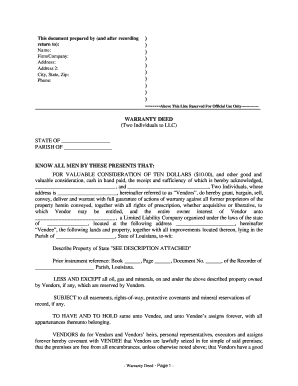
2.Once the template is open, familiarize yourself with the layout. The form has sections for grantor and grantee information, property details, and notarization.
-
3.Collect all necessary information before filling out the form. This includes the names, addresses, and signatures of both the grantor and grantee, as well as the legal description of the property.
-
4.Start filling in the grantor's section by entering their name and address. Confirm that the information is accurate and matches official identification.
-
5.Proceed to the grantee's section. Fill in the name of the LLC and its registered address. If required, consult company documentation to ensure precision.
-
6.Next, provide a detailed legal description of the property being transferred. This may include the lot number, block number, and any relevant surveys.
-
7.Once all the fields are completed, review the entire document for accuracy. Ensure that there are no missing signatures or required sections.
-
8.After finalizing the form, save your changes within pdfFiller. You can opt to download it as a PDF or keep it saved online for easy access.
-
9.If further actions are needed, you can submit the document as required through your local jurisdiction's guidelines via pdfFiller.

Who is the Grantor in the Warranty Deed Template?
The Grantor is the individual transferring ownership of the property, responsible for providing accurate information and signatures on the Warranty Deed Template.
Do I need to notarize the Warranty Deed?
Yes, the Warranty Deed Template requires notarization to be legally valid in Missouri. Ensure that you have a notary present when signing the document.
What information do I need to fill out the form?
You need the names and addresses of both the Grantor and Grantee, a legal description of the property, and any prior instrument reference details before completing the form.
How do I submit the completed Warranty Deed?
After completing and notarizing the Warranty Deed Template, submit it according to local county recording office procedures. This may involve filing it in person or online.
Are there any fees associated with filing the Warranty Deed?
Yes, filing a Warranty Deed typically incurs recording fees that vary by county. Check with your local recording office for specific fee amounts.
Can I use the Warranty Deed Template for commercial property?
The Warranty Deed Template can be adapted for various types of real estate transactions. However, ensure it meets the specific legal requirements for commercial properties.
What mistakes should I avoid when completing the Warranty Deed?
Common mistakes include incorrect property descriptions, missing signatures, and failing to notarize. Double-check all entries for accuracy before submission.
Related Content
Related Forms



Related Catalogs
Get the latest insights from our blog


If you believe that this page should be taken down, please follow our DMCA take down process
here
.
This form may include fields for payment information. Data entered in these fields is not covered by PCI DSS compliance.