
Last updated on
Oct 31, 2026

Get the free National School Deworming Day Checklist
We are not affiliated with any brand or entity on this form

Fill out
Complete the form online in a simple drag-and-drop editor.

eSign
Add your legally binding signature or send the form for signing.

Share
Share the form via a link, letting anyone fill it out from any device.

Export
Download, print, email, or move the form to your cloud storage.
Why pdfFiller is the best tool for your documents and forms


End-to-end document management
From editing and signing to collaboration and tracking, pdfFiller has everything you need to get your documents done quickly and efficiently.
Accessible from anywhere
pdfFiller is fully cloud-based. This means you can edit, sign, and share documents from anywhere using your computer, smartphone, or tablet.
Secure and compliant
pdfFiller lets you securely manage documents following global laws like ESIGN, CCPA, and GDPR. It's also HIPAA and SOC 2 compliant.
What is Deworming Checklist
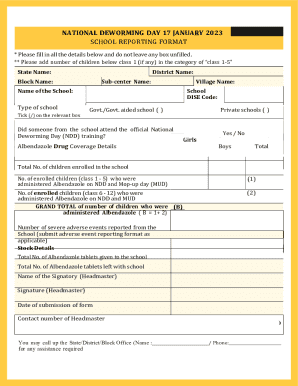
The National School Deworming Day Checklist is an educational form used by schools to track the deworming process for students, ensuring health and wellness.
pdfFiller scores top ratings on review platforms




Who needs Deworming Checklist?
Explore how professionals across industries use pdfFiller.

Deworming Checklist is needed by:
-
Class Advisers overseeing student health initiatives
-
Clinic Teachers managing student health records
-
School administrators coordinating health programs
-
Health coordinators implementing deworming campaigns
-
Parents interested in student wellness and health policies
Comprehensive Guide to Deworming Checklist
What is the National School Deworming Day Checklist?
The National School Deworming Day Checklist is a crucial form designed to track deworming efforts in schools. This checklist ensures that all necessary actions are documented, aiding in the management and execution of deworming campaigns. Key components included in the checklist are vital for comprehensive record-keeping, which supports the overall health of students.
Purpose and Benefits of the National School Deworming Day Checklist
The checklist serves multiple purposes that enhance the well-being of students. It provides a structured method for documenting deworming activities, ensuring compliance with health standards and regulations. By maintaining accurate records through the deworming checklist template, schools can effectively monitor student health and uphold safety protocols.
Key Features of the National School Deworming Day Checklist
The main features of the National School Deworming Day Checklist include:
-
School information fields, including province, division, and district
-
Space for student names and total enrollment details
-
Actions taken for each student
-
Signature requirements for both the Class Adviser and Clinic Teacher
These components ensure that all pertinent data is collected systematically, facilitating better management of health initiatives.
Who Needs the National School Deworming Day Checklist?
The primary stakeholders involved in the deworming process include Class Advisers and Clinic Teachers. Each of these roles is crucial in completing and signing off on the checklist. Class Advisers provide oversight, while Clinic Teachers contribute to the verification of student health interventions.
How to Fill Out the National School Deworming Day Checklist Online (Step-by-Step)
Completing the National School Deworming Day Checklist online is straightforward. Follow these steps for effective completion:
-
Access the checklist through pdfFiller.
-
Fill in the school information, including province and total enrollment.
-
Add student names and specify actions taken for each one.
-
Ensure required signatures are included from both Class Adviser and Clinic Teacher.
-
Review the completed checklist for accuracy before submission.
Common Errors and How to Avoid Them when Completing the Checklist
When filling out the checklist, certain common errors can hinder its effectiveness. To minimize mistakes:
-
Double-check all entered data for accuracy.
-
Ensure that all required signatures are present.
-
Review the specific actions taken for each student before finalizing the form.
By following these tips, schools can ensure smooth processing of the deworming checklist.
How to Save, Print, and Submit the National School Deworming Day Checklist PDF
Once the checklist is complete, saving and submitting the document is simple. Users can:
-
Download the completed checklist as a PDF.
-
Print the document for physical records.
-
Submit the checklist online or, if required, in person.
It’s essential to be aware of any submission deadlines to comply with health regulations.
Security and Compliance when Handling the National School Deworming Day Checklist
Handling sensitive student health data necessitates strict adherence to security measures. Compliance with regulations such as HIPAA and GDPR is ensured through the use of secure platforms like pdfFiller. This ensures that all data collected through the National School Deworming Day Checklist is protected from unauthorized access.
How pdfFiller Facilitates the National School Deworming Day Checklist Process
pdfFiller enhances the utility of the National School Deworming Day Checklist by offering features that streamline its creation and management. Key benefits include:
-
eSigning capabilities for quick approval.
-
Edit options to update information as needed.
-
An intuitive interface that simplifies completion.
These features collectively improve the user experience and efficiency in managing health documents.
Engage with pdfFiller for Your National School Deworming Day Checklist Needs
Utilizing pdfFiller for completing the National School Deworming Day Checklist empowers users to manage their forms with confidence. Resources and support are readily available to assist users as they navigate the checklist process.
How to fill out the Deworming Checklist
-
1.Access the National School Deworming Day Checklist on pdfFiller by searching the form name in the search bar.
-
2.Open the form by clicking on the relevant search result, which will launch the pdfFiller editor interface.
-
3.Before filling out the form, gather necessary information, such as school details, total enrollment, and student names.
-
4.Begin filling in the form by clicking into each specified field using your cursor.
-
5.Enter the required school information in the designated areas, including province, division, and district.
-
6.For student tracking, fill in the table with each student's name, grade level, and actions taken during the deworming process.
-
7.Ensure that all fields are accurately completed before reviewing the document for any errors or omissions.
-
8.Once you are satisfied with the information filled in, look for a review option in the interface to finalize your form.
-
9.After reviewing, save your progress to your pdfFiller account, ensuring you can access it later if needed.
-
10.To download or submit the form, locate the download icon or submission options on the pdfFiller interface and follow the prompts.

Who is eligible to use the National School Deworming Day Checklist?
The National School Deworming Day Checklist is designed for schools and educational institutions implementing deworming programs. Class Advisers and Clinic Teachers primarily use this form to ensure compliance.
When should the National School Deworming Day Checklist be completed?
This checklist should be filled out during the annual National School Deworming Day event to monitor student participation and track health outcomes effectively.
How do I submit the completed checklist?
After completing the checklist on pdfFiller, you can download it for your records or submit it according to your school's health compliance procedures. Make sure to follow any specific submission guidelines provided by local education authorities.
What supporting documents are required to accompany the checklist?
Typically, no additional documents are required with the checklist itself. However, schools may need to provide records of consent and deworming treatment results based on local health policies.
What common mistakes should I avoid when filling out this form?
Ensure that all entries are complete and accurate, particularly names and actions taken. Avoid leaving fields blank and double-check for any spelling errors to ensure clarity.
How long does it take to process the National School Deworming Day Checklist?
The processing time varies based on your school’s internal health review procedures. Typically, feedback is provided within a few days after submission.
Can I edit the National School Deworming Day Checklist after saving it?
Yes, once you save the checklist in pdfFiller, you can reopen and edit it anytime before your final submission to ensure all details are updated.
Related Forms




Related Catalogs
Get the latest insights from our blog


If you believe that this page should be taken down, please follow our DMCA take down process
here
.
This form may include fields for payment information. Data entered in these fields is not covered by PCI DSS compliance.