
Last updated on
Nov 9, 2026

ACS TSCA Declaration 2017-2026 free printable template
We are not affiliated with any brand or entity on this form

Fill out
Complete the form online in a simple drag-and-drop editor.

eSign
Add your legally binding signature or send the form for signing.

Share
Share the form via a link, letting anyone fill it out from any device.

Export
Download, print, email, or move the form to your cloud storage.
Why pdfFiller is the best tool for your documents and forms


End-to-end document management
From editing and signing to collaboration and tracking, pdfFiller has everything you need to get your documents done quickly and efficiently.
Accessible from anywhere
pdfFiller is fully cloud-based. This means you can edit, sign, and share documents from anywhere using your computer, smartphone, or tablet.
Secure and compliant
pdfFiller lets you securely manage documents following global laws like ESIGN, CCPA, and GDPR. It's also HIPAA and SOC 2 compliant.
What is ACS TSCA Declaration
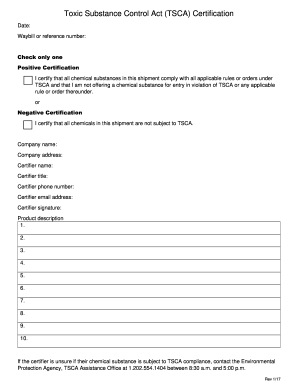
The TSCA Declaration Form is a legal document used by certifiers to ensure compliance with the Toxic Substances Control Act (TSCA) for chemical shipments.
pdfFiller scores top ratings on review platforms




Who needs ACS TSCA Declaration?
Explore how professionals across industries use pdfFiller.

ACS TSCA Declaration is needed by:
-
Manufacturers of chemical products
-
Importers of chemicals into the US
-
Exporters of toxic substances
-
Regulatory compliance officers
-
Supply chain managers in the chemical industry
-
Environmental health and safety professionals
Comprehensive Guide to ACS TSCA Declaration
What is the TSCA Declaration Form?
The TSCA Declaration Form is a crucial document for certifying compliance with the Toxic Substances Control Act (TSCA), which governs the handling of chemical substances. This form plays a significant role in ensuring that businesses involved in chemical shipment adhere to regulatory requirements, thus protecting public health and the environment. Compliance with TSCA is essential for all chemical substances that fall under its regulations, making this form pertinent to various industries engaged in chemical shipping.
Purpose and Benefits of the TSCA Declaration Form
Completing the TSCA Declaration Form accurately offers numerous advantages to businesses. First, adherence to TSCA regulations helps avoid potential fines linked to non-compliance. Secondly, the form contributes significantly to protecting public health and the environment by certifying that shipments are safe. Additionally, submitting this form instills confidence among clients and stakeholders regarding a company's commitment to compliance and safety standards.
Key Features of the TSCA Declaration Form
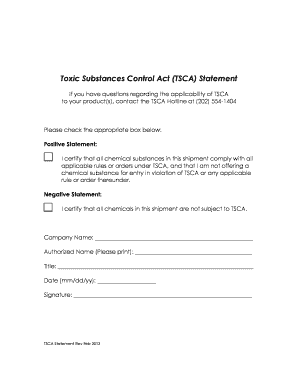
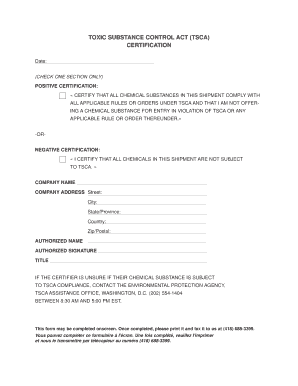
The TSCA Declaration Form contains several essential components necessary for accurate completion. Key fillable fields include 'Name', 'Date', 'Signature', 'Title', 'Phone', and 'E-Mail'. Each certification statement is coupled with a requirement for a signature, affirming the authenticity of the declaration. Moreover, the form's user-friendly design facilitates easier input, ensuring that users can complete it without confusion.
Who Needs the TSCA Declaration Form?
The TSCA Declaration Form is mandatory for specific users primarily in the chemical shipment industry. This includes manufacturers, importers, and exporters of chemicals who must ensure compliance with TSCA regulations. Additionally, businesses in sectors heavily regulated by TSCA should be particularly diligent in using the form to document their compliance status.
How to Fill Out the TSCA Declaration Form Online (Step-by-Step)
Filling out the TSCA Declaration Form online is straightforward if you follow these steps:
-
Access the TSCA Declaration Form through your preferred platform.
-
Complete each section, ensuring all information is accurate.
-
Double-check entries for common errors, such as typos or missing information.
-
Submit the form electronically, or print it for physical submission.
By adhering to these instructions, you can ensure that your form is completed accurately to prevent delays or rejections.
Submission Methods and Delivery of the TSCA Declaration Form
Once the TSCA Declaration Form is completed, you can choose from various submission methods:
-
Online submission through a designated platform.
-
Mailing a physical copy to the associated regulatory authority.
Each method has its advantages and disadvantages, so consider best practices for timely delivery and compliance. Tracking submissions can help you confirm that your form is received and processed appropriately.
Security and Privacy Considerations for the TSCA Declaration Form
When dealing with the TSCA Declaration Form, security and privacy of data are paramount. pdfFiller employs advanced security features to protect sensitive information, including 256-bit encryption. Furthermore, compliance with regulations like HIPAA and GDPR ensures that your data remains private and secure throughout the handling process, minimizing risks associated with data breaches.
Sample or Example of a Completed TSCA Declaration Form
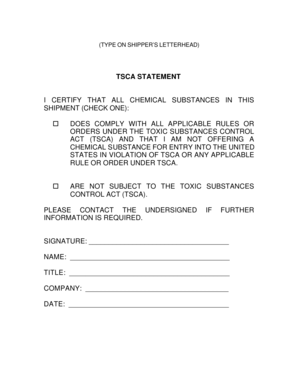
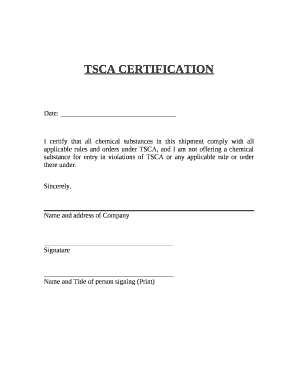
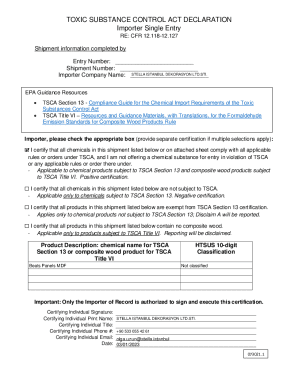
Examining a completed TSCA Declaration Form can offer valuable insights into its structure. Key sections to observe include properly filled fields such as the certification statement and signature area. Additionally, users can access templates or further examples on pdfFiller to enhance their understanding of accurate form completion.
Tracking Your TSCA Submission Status
After submitting your TSCA Declaration Form, you should follow specific steps to check the status of your submission:
-
Visit the appropriate regulatory website for tracking submission status.
-
Provide any required identifying information related to your submission.
Understanding potential reasons for delays or rejections can help you troubleshoot issues effectively and access additional resources for support if needed.
Experience the Ease of Filling Out the TSCA Declaration Form with pdfFiller
pdfFiller simplifies the process of completing the TSCA Declaration Form with its intuitive platform. Users can take advantage of functionalities such as eSigning and form management without needing any downloads. The user-friendly interface ensures that you can create TSCA Declaration Forms online easily, enhancing your workflow and productivity.
How to fill out the ACS TSCA Declaration
-
1.To access the TSCA Declaration Form on pdfFiller, visit the pdfFiller website and log in or create an account if you don’t have one.
-
2.Once logged in, use the search bar to find the 'TSCA Declaration Form' or navigate through the legal forms category until you locate it.
-
3.Open the form by clicking on it, and the pdfFiller interface will display the document, allowing you to begin filling it out.
-
4.Before you start completing the form, gather all the necessary information including your name, title, company name, contact details, and the specifics about the chemical shipment.
-
5.Begin filling in the form by clicking on the respective fields. Enter your name, date, and signature in the designated sections.
-
6.Complete additional fields, such as your title, phone number, email, and company name and address, ensuring all information is accurate.
-
7.If there are checkboxes for certification statements, review the statements carefully and check only those that apply to your shipment.
-
8.After filling out all necessary fields, review the form for accuracy. Ensure there are no spelling errors and all required information is complete.
-
9.Once satisfied, you can save your progress or finalize the form by clicking the 'Finish' button.
-
10.To save or download the completed form, select the 'Download' option, choose your preferred format, and follow the prompts.
-
11.If you need to submit the form, check your company's submission procedures or email the completed document as recommended.

Who is eligible to complete the TSCA Declaration Form?
Any certifier, such as a manufacturer or importer of chemicals, is eligible to complete the TSCA Declaration Form. It is essential that they have knowledge of the chemical substances being shipped.
What is the deadline for submitting the TSCA Declaration Form?
While there is no specific deadline for the form, it must be submitted before the shipment of chemicals to ensure compliance with TSCA regulations at the time of shipment.
How should the TSCA Declaration Form be submitted?
The TSCA Declaration Form can typically be submitted electronically via email or included with the shipping documentation. Verify your company's specific submission methods for compliance.
What supporting documents are needed with the TSCA Declaration Form?
Supporting documents may include safety data sheets of the chemicals being shipped, any relevant compliance certifications, and invoices outlining the shipment details to provide context.
What common mistakes should be avoided when completing the form?
Ensure that all fields are filled correctly and avoid missing signatures or dates. Double-check the certification statements to confirm your selections are accurate.
How long does it take to process the TSCA Declaration Form?
Processing times can vary depending on the shipping methods and compliance checks; generally, ensure documentation is prepared well in advance of the shipment.
Are there any fees associated with submitting the TSCA Declaration Form?
Typically, there are no fees specifically for submitting the TSCA Declaration Form. However, companies may incur costs related to compliance evaluations or shipping itself.
Related Forms




Related Catalogs
Get the latest insights from our blog


If you believe that this page should be taken down, please follow our DMCA take down process
here
.
This form may include fields for payment information. Data entered in these fields is not covered by PCI DSS compliance.