
Last updated on
Oct 31, 2026

Get the free Integrated Science 2 Worksheet
We are not affiliated with any brand or entity on this form

Fill out
Complete the form online in a simple drag-and-drop editor.

eSign
Add your legally binding signature or send the form for signing.

Share
Share the form via a link, letting anyone fill it out from any device.

Export
Download, print, email, or move the form to your cloud storage.
Why pdfFiller is the best tool for your documents and forms


End-to-end document management
From editing and signing to collaboration and tracking, pdfFiller has everything you need to get your documents done quickly and efficiently.
Accessible from anywhere
pdfFiller is fully cloud-based. This means you can edit, sign, and share documents from anywhere using your computer, smartphone, or tablet.
Secure and compliant
pdfFiller lets you securely manage documents following global laws like ESIGN, CCPA, and GDPR. It's also HIPAA and SOC 2 compliant.
What is Darwin Worksheet
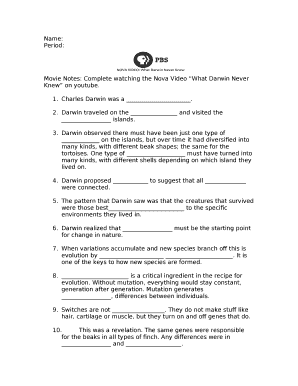
The Integrated Science 2 Worksheet is an educational form used by educators to assess students' understanding of evolution through 'What Darwin Never Knew.'
pdfFiller scores top ratings on review platforms




Who needs Darwin Worksheet?
Explore how professionals across industries use pdfFiller.

Darwin Worksheet is needed by:
-
Teachers in Integrated Science courses
-
Students studying evolution and Darwin's principles
-
Educational professionals developing assessment tools
-
Schools implementing science curriculum evaluations
-
Parents assisting children with homework
Comprehensive Guide to Darwin Worksheet
What is the Integrated Science 2 Worksheet?
The Integrated Science 2 Worksheet serves as a significant educational tool in the context of evaluating students' understanding of evolution. This worksheet is designed to assess knowledge related to Charles Darwin and his contributions, particularly in reference to the NOVA video "What Darwin Never Knew." It is crucial for measuring students’ comprehension of evolution, ensuring they grasp fundamental principles.
This evolution worksheet aids teachers in facilitating an engaging learning environment by providing structured content that corresponds to course objectives.
Purpose and Benefits of the Integrated Science 2 Worksheet
The worksheet is vital for students as it not only assesses their knowledge on Charles Darwin but also bolsters their understanding of evolutionary principles. By utilizing an education worksheet template, it enhances comprehension through structured questions that promote critical thinking.
Furthermore, this interactive learning tool encourages student engagement, making complex concepts more accessible and enjoyable.
Key Features of the Integrated Science 2 Worksheet
One of the standout features of the Integrated Science 2 Worksheet is its user-friendly design. It includes:
-
Fillable fields and checkboxes for student responses
-
Sample questions that stimulate critical thinking, such as "Charles Darwin was born ____________ years ago"
-
Compatibility with digital tools for ease of use
This makes the worksheet both practical and adaptable for various educational settings.
Who Needs the Integrated Science 2 Worksheet?
The Integrated Science 2 Worksheet is designed for a varied audience, ensuring it meets the needs of:
-
Teachers and educators within science education
-
Students enrolled in Integrated Science 2 classes
-
Parents who aid in their children's homework and learning
This diverse applicability reinforces its importance in enhancing educational outcomes.
How to Fill Out the Integrated Science 2 Worksheet Online (Step-by-Step)
Filling out the Integrated Science 2 Worksheet online is straightforward. Here’s a step-by-step guide:
-
Access the worksheet via the pdfFiller platform.
-
Read each question carefully before providing an answer.
-
Use the fillable fields to complete the worksheet, ensuring clarity and accuracy.
-
Review your answers thoroughly before submitting.
By following these steps, students can efficiently complete the worksheet while ensuring high-quality responses.
Common Errors and How to Avoid Them
When filling out the worksheet, students may encounter common errors. To avoid these mistakes, consider the following tips:
-
Double-check answers for accuracy and relevance.
-
Clarify any misunderstandings of question prompts.
-
Review the completed worksheet prior to submission to ensure completeness.
These practices help improve the quality of submissions and enhance learning outcomes.
How to Download and Save the Integrated Science 2 Worksheet PDF
After completing the Integrated Science 2 Worksheet, downloading and saving it is essential. Follow these steps:
-
Locate the download option on the pdfFiller platform.
-
Select your preferred format (PDF, DOCX, etc.).
-
Save the document securely on your device.
Moreover, pdfFiller offers various security features to manage your documents effectively.
Where to Submit the Integrated Science 2 Worksheet
Upon completing the worksheet, students or teachers should ensure they know the submission processes, which may include:
-
Consulting school or educational institution guidelines for submission.
-
Adhering to any deadlines specified by instructors or educational policies.
-
Being aware of submission requirements, including formats and additional documents.
This knowledge is crucial for successful academic performance.
What Happens After You Submit the Integrated Science 2 Worksheet
Following submission, several evaluation and feedback processes are initiated. Students should be prepared for:
-
Receiving feedback regarding their performance and understanding of the material.
-
Tracking submission status to ensure it has been processed accordingly.
-
Maintaining a copy of the submitted worksheet for future reference.
Understanding these steps helps students stay informed about their progress.
Enhance Your Experience with pdfFiller
Utilizing pdfFiller enriches the educational experience by offering a suite of features advantageous for educators and students alike, including:
-
Tools for filling, editing, and managing PDF documents easily
-
eSign capability for added convenience
-
Data security measures that comply with regulations
With over 100 million users, pdfFiller is a reliable platform for handling your form needs effectively.
How to fill out the Darwin Worksheet
-
1.Access the Integrated Science 2 Worksheet on pdfFiller by searching for the document in the search bar.
-
2.Once located, click on the worksheet to open it in the editing interface.
-
3.Familiarize yourself with the layout of the worksheet, noting the sections that require responses from students.
-
4.Before starting, gather all necessary information about Charles Darwin's life and evolutionary principles to ensure accurate completion.
-
5.Begin filling in the worksheet by typing answers into the provided blank fields.
-
6.Use the checkboxes for multiple-choice questions or statements that need selection.
-
7.Regularly save your progress to avoid losing any entered information using the save feature available in pdfFiller.
-
8.Once all fields are completed, review the worksheet for accuracy and completeness.
-
9.Utilize the preview option to see the final version of the worksheet before submission.
-
10.When satisfied with your responses, save or download the completed worksheet to share with the educator, or use the submit feature if required.

Who can use the Integrated Science 2 Worksheet?
The worksheet is designed for use by teachers and students involved in an Integrated Science 2 course focusing on evolution.
Are there any specific deadlines for completing the worksheet?
While there are no specific deadlines mentioned, students should complete the worksheet promptly to align with their course schedule.
How can I submit the completed Integrated Science 2 Worksheet?
You can submit the completed worksheet by downloading it and emailing it to your teacher or using the submission feature in pdfFiller if directed by your educator.
What supporting documents do I need to complete this worksheet?
You don't need any supporting documents to fill out the worksheet, but it’s beneficial to refer to lessons or resources about Charles Darwin and evolution.
What common mistakes should I avoid when filling out the worksheet?
Avoid leaving blank fields and ensure that answers are relevant to the questions asked, specifically addressing the concepts of Darwin's theories.
How long does it take to complete the Integrated Science 2 Worksheet?
The time required to complete the worksheet can vary, but students should allocate at least 30-60 minutes to thoroughly answer all questions.
What if I encounter technical issues on pdfFiller while filling out the worksheet?
If you encounter technical issues, check the pdfFiller help section or contact their support team for assistance with specific problems.
Related Forms




Related Catalogs
Get the latest insights from our blog


If you believe that this page should be taken down, please follow our DMCA take down process
here
.
This form may include fields for payment information. Data entered in these fields is not covered by PCI DSS compliance.