
Last updated on
Oct 31, 2026

Get the free Signposts Notice and Note Tracking Sheet
We are not affiliated with any brand or entity on this form

Fill out
Complete the form online in a simple drag-and-drop editor.

eSign
Add your legally binding signature or send the form for signing.

Share
Share the form via a link, letting anyone fill it out from any device.

Export
Download, print, email, or move the form to your cloud storage.
Why pdfFiller is the best tool for your documents and forms


End-to-end document management
From editing and signing to collaboration and tracking, pdfFiller has everything you need to get your documents done quickly and efficiently.
Accessible from anywhere
pdfFiller is fully cloud-based. This means you can edit, sign, and share documents from anywhere using your computer, smartphone, or tablet.
Secure and compliant
pdfFiller lets you securely manage documents following global laws like ESIGN, CCPA, and GDPR. It's also HIPAA and SOC 2 compliant.
What is Signposts Tracking Sheet
The Signposts Notice and Note Tracking Sheet is an educational document used by students to track and analyze key moments in books, enhancing their literary comprehension.
pdfFiller scores top ratings on review platforms




Who needs Signposts Tracking Sheet?
Explore how professionals across industries use pdfFiller.

Signposts Tracking Sheet is needed by:
-
Teachers looking for a structured way to guide students in literary analysis.
-
Students seeking tools for effective reading comprehension and engagement.
-
Parents wanting to support their children’s academic progress.
-
Tutors providing assistance in developing critical thinking skills.
-
Literature clubs aiming to enhance discussion and understanding of texts.
Comprehensive Guide to Signposts Tracking Sheet
What is the Signposts Notice and Note Tracking Sheet?
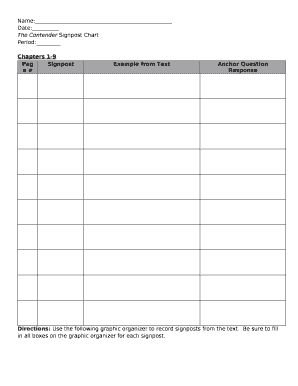
The Signposts Notice and Note Tracking Sheet is an essential tool for tracking key literary elements within texts. This educational worksheet aids students in identifying and analyzing critical moments in literature, such as memory moments and aha moments. By utilizing this tracking sheet, learners can enhance their literary analysis skills while engaging more thoughtfully with reading materials.
Purpose and Benefits of the Signposts Notice and Note Tracking Sheet
The primary purpose of the Signposts Notice and Note Tracking Sheet is to improve reading comprehension among users. This educational tracking sheet not only encourages students to reflect on their readings but also helps them analyze the themes and characters present in the text. By documenting significant moments, students can foster deeper understanding and connection with the literature they study.
Key Features of the Signposts Notice and Note Tracking Sheet
This tracking sheet includes multiple fillable fields, allowing users to enter direct quotes and corresponding page numbers. Additionally, it emphasizes the importance of reflecting on the significance of the moments captured, which enhances the overall learning experience. The detailed structure of the Signposts Notice and Note Tracking Sheet makes it an effective educational resource.
Who Can Benefit from the Signposts Notice and Note Tracking Sheet?
Students, teachers, and educators are the primary beneficiaries of the Signposts Notice and Note Tracking Sheet. Each group can utilize this tool to enhance their learning and teaching experiences. For students, it facilitates a deeper engagement with texts, while educators can promote analytical skills within their curriculums.
How to Fill Out the Signposts Notice and Note Tracking Sheet Online
Completing the Signposts Notice and Note Tracking Sheet online is a straightforward process. Follow these steps to effectively fill out the form:
-
Access the form on pdfFiller.
-
Begin by entering your name in the designated field.
-
Fill out the period and other relevant details.
-
Enter direct quotes and page numbers in the respective sections.
-
Reflect on each moment by answering the provided prompts.
Field-by-Field Instructions for Completing the Form
To ensure accurate completion of the Signposts Notice and Note Tracking Sheet, it is essential to understand each field's purpose. Key fields include:
-
Name: Record your name for identification.
-
Pd: Indicate your class period.
-
Date fields: Enter relevant dates as requested.
Additionally, pay close attention to reflection prompts that ask about the significance of tracked moments, guiding users in their analysis.
Common Errors and How to Avoid Them When Using the Signposts Notice and Note Tracking Sheet
Avoiding common mistakes can enhance the effectiveness of your entries. Frequent errors include:
-
Inadequate reflections on significance.
-
Missing direct quotes or page numbers.
-
Leaving fields blank.
To ensure accuracy, double-check your entries before finalizing the form to maintain thoroughness in your analysis.
Downloading, Saving, and Printing the Signposts Notice and Note Tracking Sheet
After filling out the tracking sheet, users can easily download the completed PDF. Follow these tips:
-
Click the download button to save your document.
-
Ensure all sections are completed before downloading.
-
Use the print option to obtain physical copies for classroom use.
Maintaining Security and Compliance When Using the Signposts Notice and Note Tracking Sheet
When using the Signposts Notice and Note Tracking Sheet, document security is paramount. pdfFiller employs robust 256-bit encryption and adheres to privacy standards including HIPAA and GDPR compliance, ensuring that user data remains protected throughout the form completion process.
Get Started with the Signposts Notice and Note Tracking Sheet Using pdfFiller
To begin utilizing the Signposts Notice and Note Tracking Sheet, simply access pdfFiller's platform. The intuitive design simplifies the form completion process, enabling users to manage their documents effectively while gathering valuable insights from their literary analysis.
How to fill out the Signposts Tracking Sheet
-
1.To start, visit pdfFiller and log in to your account or create a new one if you haven't yet.
-
2.Use the search bar to find the ‘Signposts Notice and Note Tracking Sheet’ and click on the document to open it.
-
3.Familiarize yourself with the form layout, noting the fillable fields designated for your inputs.
-
4.Before filling the form, gather essential information including quotes, page numbers, and your reflections on the book.
-
5.Begin filling in your personal information in the designated ‘Name’ field, along with the ‘Pd’ and date fields.
-
6.Proceed to each section, reflecting on key moments from your reading, and inputting direct quotes and page references.
-
7.Answer prompts like 'Stop and Ask Yourself' by adding your thoughts to the reflection areas provided.
-
8.Once all fields are completed, go through the form to review your entries for any mistakes or incomplete information.
-
9.After finalizing your entries, save your work by clicking on the ‘Save’ button, choosing your preferred file format.
-
10.If you need to download, click on the ‘Download’ option, or use the ‘Submit’ function for online sharing or submission if applicable.

Who can use the Signposts Notice and Note Tracking Sheet?
The Signposts Notice and Note Tracking Sheet is designed for students, teachers, parents, and tutors. Anyone involved in literary education can benefit from using this form to enhance reading comprehension.
Are there deadlines for submitting this form?
There are no specific deadlines for the Signposts Notice and Note Tracking Sheet since it is often used as a personal study guide. However, it's advisable to align its use with class assignments or reading schedules.
How can I submit my completed tracking sheet?
You can submit your completed Signposts Notice and Note Tracking Sheet through your school's submission guidelines, or share it digitally via email or through an educational platform if required by your instructor.
What kind of information do I need to fill out?
You'll need direct quotes from the text, page numbers, and your reflections on significant moments within the story, including memory moments, aha moments, and tough questions.
What are common mistakes to avoid when using this form?
Common mistakes include leaving sections incomplete, neglecting to check page references for accuracy, and overlooking the reflective questions that enhance comprehension.
Can I edit the form after saving it?
Yes, you can return to pdfFiller to access and edit your stored copy of the Signposts Notice and Note Tracking Sheet at any time, ensuring all information is accurate before final submission.
Is there a fee associated with using this form on pdfFiller?
Using pdfFiller may involve a subscription or usage fee, depending on your account type. It's best to check their pricing plans for details on any fees associated with document access.
Related Forms



Related Catalogs
Get the latest insights from our blog


If you believe that this page should be taken down, please follow our DMCA take down process
here
.
This form may include fields for payment information. Data entered in these fields is not covered by PCI DSS compliance.