
Last updated on
Oct 31, 2026
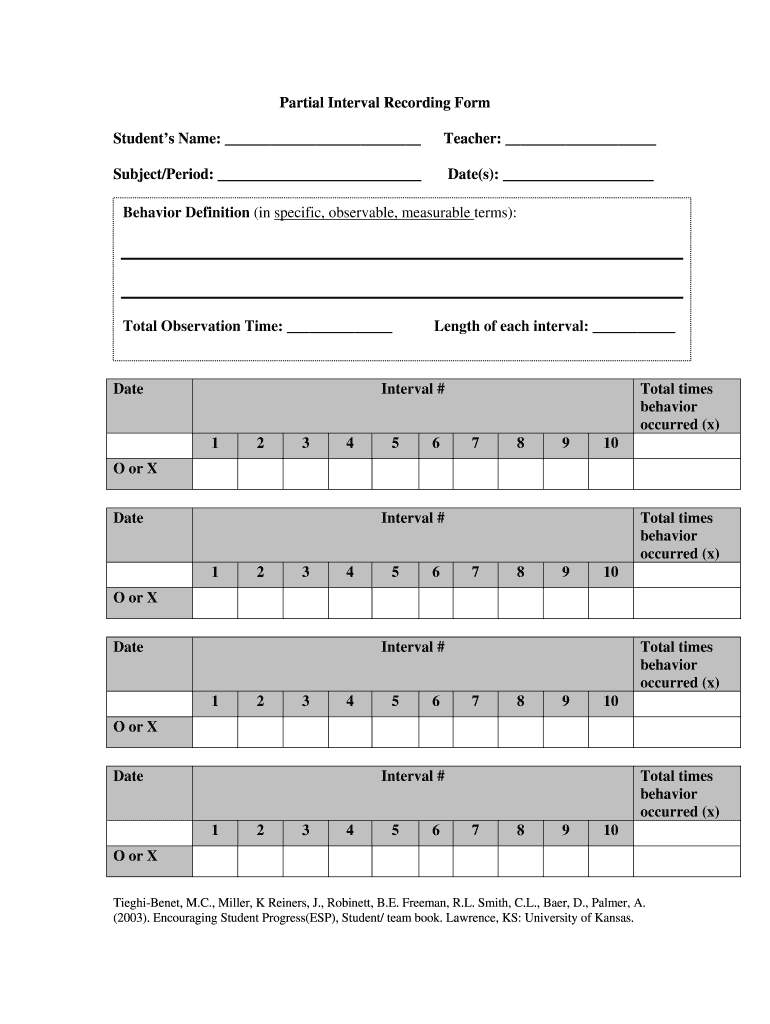
NC WSFCS Partial Interval Recording Form free printable template
pdfFiller is not affiliated with any government organization

Fill out
Complete the form online in a simple drag-and-drop editor.

eSign
Add your legally binding signature or send the form for signing.

Share
Share the form via a link, letting anyone fill it out from any device.

Export
Download, print, email, or move the form to your cloud storage.
Why pdfFiller is the best tool for your documents and forms


End-to-end document management
From editing and signing to collaboration and tracking, pdfFiller has everything you need to get your documents done quickly and efficiently.
Accessible from anywhere
pdfFiller is fully cloud-based. This means you can edit, sign, and share documents from anywhere using your computer, smartphone, or tablet.
Secure and compliant
pdfFiller lets you securely manage documents following global laws like ESIGN, CCPA, and GDPR. It's also HIPAA and SOC 2 compliant.
What is NC WSFCS Partial Interval Recording Form
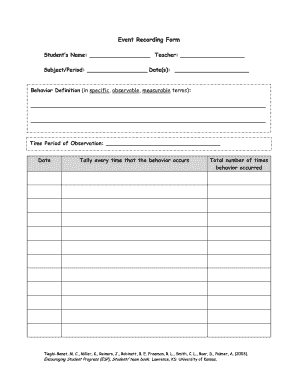
The Partial Interval Recording Form is a document used by educators to track and record student behavior during specific observation intervals.
pdfFiller scores top ratings on review platforms




Who needs NC WSFCS Partial Interval Recording Form?
Explore how professionals across industries use pdfFiller.

NC WSFCS Partial Interval Recording Form is needed by:
-
Teachers observing student behavior
-
Special education staff assessing progress
-
School psychologists conducting evaluations
-
Behavior analysts developing intervention strategies
-
Administrators monitoring classroom management
-
Parents tracking student behavioral growth
Comprehensive Guide to NC WSFCS Partial Interval Recording Form
What is the Partial Interval Recording Form?
The Partial Interval Recording Form is a vital tool for educators to track and record student behavior in measurable ways. This form serves a crucial role in documenting behavioral observations during specified intervals, ensuring that information is captured accurately. It includes essential fields such as the student's name, teacher, subject, date, and clear behavior definitions.
Measurable behavior observation is fundamental in education as it allows educators to collect data objectively, facilitating targeted interventions and support.
Benefits of Using the Partial Interval Recording Form
The advantages of utilizing the Partial Interval Recording Form are significant for both teachers and schools. This form enhances the accuracy of student behavior tracking, allowing educators to monitor patterns over time effectively. Additionally, it serves as a communication bridge with parents regarding student progress, fostering transparency and collaboration.
Furthermore, the insights garnered from this form can lead to actionable strategies for teacher interventions, improving overall classroom management.
How to Fill Out the Partial Interval Recording Form (Step-by-Step)
Filling out the Partial Interval Recording Form requires attention to detail to ensure accurate data collection. Here are the steps to complete the form:
-
Begin by entering the student’s name and the observing teacher's details.
-
Specify the subject or period during which the behavior is being observed.
-
Include the date of observation and clearly define the behaviors to be recorded.
-
Track and record the behaviors during designated observation intervals systematically.
-
Utilize pdfFiller to complete the form digitally for ease of use and accessibility.
By following these steps, educators can ensure a thorough and effective documentation process.
Key Features of the Partial Interval Recording Form
This form boasts several essential features that make it effective for behavior tracking in education. Its user-friendly design simplifies the observation process, making it accessible for all educators, regardless of their technical expertise. Additionally, the form enables electronic storage and management of records, improving accessibility for ongoing evaluations.
Moreover, sensitive student information is securely handled through cloud storage, ensuring confidentiality and compliance with data protection standards.
Who Needs the Partial Interval Recording Form?
The Partial Interval Recording Form is beneficial to a variety of stakeholders in the educational field. Teachers, educational psychologists, and behavior specialists utilize this form to track student progress effectively. School administrators also find it instrumental for overseeing academic evaluations and monitoring student behavior.
Additionally, parents can benefit from understanding their child’s behavior tracking, supporting their involvement in the educational process.
Common Mistakes and How to Avoid Them
While filling out the Partial Interval Recording Form, common errors may arise that can affect the accuracy of the data collected. Understanding these potential pitfalls can help users avoid them:
-
Misinterpreting fields or definitions may lead to inaccurate data recording.
-
Missing intervals can skew the observation results; always ensure all required intervals are recorded.
-
Validation of entries is crucial before submission to maintain data integrity.
-
Clearly defining behaviors will reduce ambiguity and ensure consistency in observations.
When and How to Submit the Partial Interval Recording Form
Submissions of the Partial Interval Recording Form can be completed through multiple methods, increasing flexibility for educators. Users can submit the form digitally via pdfFiller or choose to print and submit physical copies, depending on their preference and requirements.
For best practices, it’s recommended to adhere to established timelines for filling out and submitting the form. After submission, tracking and confirming receipt of the form can help ensure that all procedural steps are completed successfully.
Security and Compliance Considerations
Security is a critical consideration when handling the Partial Interval Recording Form, and pdfFiller takes this seriously. The platform employs 256-bit encryption to protect sensitive student data, maintaining high standards of privacy and security. Additionally, pdfFiller adheres to both HIPAA and GDPR standards, ensuring compliance with regulations that safeguard personal information.
Users can expect a secure environment throughout the form-filling process, reassuring them about the safety of their data.
Exploring Additional Resources and Support
For users seeking further assistance, pdfFiller offers a variety of resources to enhance their experience with the Partial Interval Recording Form. Access to tutorials and guides related to using pdfFiller for similar forms can significantly improve user proficiency.
Additionally, customer support is readily available for unique queries, ensuring users have the knowledge they need to navigate any challenges. Relevant documentation on behavior tracking also serves as a beneficial reference for users.
Why Choose pdfFiller for Your Partial Interval Recording Form Needs?
Choosing pdfFiller for filling out the Partial Interval Recording Form presents several key advantages. Its ease of use simplifies the online process for educators, making the task efficient and manageable. The platform offers comprehensive tools to edit, share, and eSign forms as necessary, catering to the diverse needs of users.
With over 100 million users in the educational field, pdfFiller is a trusted choice, ensuring reliability and ongoing support for educators as they work to document student behavior effectively.
How to fill out the NC WSFCS Partial Interval Recording Form
-
1.Access the Partial Interval Recording Form by visiting pdfFiller and searching for the form name.
-
2.Open the form within the pdfFiller interface to start filling it out.
-
3.Before you begin, gather all necessary information such as student’s name, teacher's name, subject or period, date, and behavior definition.
-
4.Click on the appropriate fields to input the student's name, teacher, and subject/period.
-
5.Fill in the date of observation in the designated field.
-
6.Clearly define the behavior that you will be observing in the behavior definition section.
-
7.Record the total observation time for your intervals in the specified field.
-
8.Determine the length of each interval and enter it as required.
-
9.During the observation, input the total times that the defined behavior occurred in each observed interval.
-
10.After completing all fields, review your inputs for accuracy and completeness.
-
11.Finalize the form by clicking the save or submit button, depending on your intended action.
-
12.Download a copy of the completed form for your records by choosing the download option in pdfFiller.

Who is eligible to use the Partial Interval Recording Form?
The Partial Interval Recording Form can be utilized by teachers, special education staff, and any professionals assessing student behavior and progress.
Is there a deadline for submitting the completed form?
While there isn't a strict deadline, it's advisable to complete and submit the form promptly after the observation to ensure accuracy in tracking student behavior.
How can I submit the Partial Interval Recording Form once it's filled out?
You can submit the form electronically through pdfFiller via email or download it for print submission. Ensure to follow your institution's preferred submission method.
What information do I need before filling out the form?
You will need the student’s name, teacher’s name, subject or period, date, behavior definition, and total observation time before starting to complete the form.
What common mistakes should I avoid when using this form?
Avoid leaving fields blank, ensure accurate behavior definitions, and double-check the observation times to prevent errors in data collection.
How long does it take to process the information recorded on this form?
Processing times will vary depending on how this form is used within your institution; however, feedback or data analysis could typically take a few weeks.
Are there any fees associated with using this form?
There are no specific fees for using the Partial Interval Recording Form itself, but if printed submissions incur costs, check with your school or organization.
Related Forms


Get the latest insights from our blog


If you believe that this page should be taken down, please follow our DMCA take down process
here
.
This form may include fields for payment information. Data entered in these fields is not covered by PCI DSS compliance.