
Last updated on
Oct 31, 2026

Get the free Social Worker Self-Assessment Form
We are not affiliated with any brand or entity on this form

Fill out
Complete the form online in a simple drag-and-drop editor.

eSign
Add your legally binding signature or send the form for signing.

Share
Share the form via a link, letting anyone fill it out from any device.

Export
Download, print, email, or move the form to your cloud storage.
Why pdfFiller is the best tool for your documents and forms


End-to-end document management
From editing and signing to collaboration and tracking, pdfFiller has everything you need to get your documents done quickly and efficiently.
Accessible from anywhere
pdfFiller is fully cloud-based. This means you can edit, sign, and share documents from anywhere using your computer, smartphone, or tablet.
Secure and compliant
pdfFiller lets you securely manage documents following global laws like ESIGN, CCPA, and GDPR. It's also HIPAA and SOC 2 compliant.
What is Social Worker Assessment
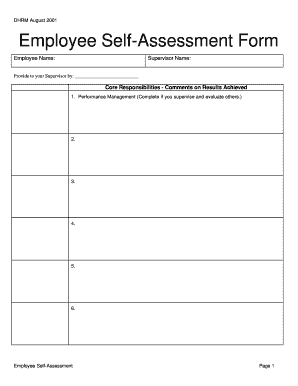
The Social Worker Self-Assessment Form is a document used by educational institutions to evaluate the performance of social workers in school settings.
pdfFiller scores top ratings on review platforms




Who needs Social Worker Assessment?
Explore how professionals across industries use pdfFiller.

Social Worker Assessment is needed by:
-
Social workers seeking to assess their own performance
-
Educational administrators evaluating staff effectiveness
-
School psychologists conducting team reviews
-
Teachers collaborating with social services
-
Curriculum developers in educational programs
-
Human resources departments for employee evaluations
Comprehensive Guide to Social Worker Assessment
What is the Social Worker Self-Assessment Form?
The Social Worker Self-Assessment Form is a vital tool for assessing the performance of social workers within educational environments. This form is designed to evaluate various aspects of a school social worker's role, particularly focusing on planning and preparation, service delivery, and professional responsibilities. Utilizing this form is significant for school social workers as it fosters continuous improvement and accountability in their practice.
Purpose and Benefits of the Social Worker Self-Assessment Form
This form plays a critical role in enhancing the effectiveness of social workers by promoting a respectful and productive school environment. Regular self-assessment helps educators and social workers recognize their strengths and areas for improvement, thus supporting their professional growth. Additionally, the social worker performance evaluation mechanism helps meet necessary accountability standards, making it an essential component of education social work assessment.
Key Features of the Social Worker Self-Assessment Form
The Social Worker Self-Assessment Form includes detailed sections that facilitate a comprehensive evaluation of knowledge, interactions, and overall performance. Below are some notable features:
-
Blank fields for personalized input to cater to individual assessments.
-
Clear instructions designed to encourage thorough and reflective evaluations.
-
Sections addressing various competencies relevant to social work within education.
Who Needs the Social Worker Self-Assessment Form?
The audiences that can benefit from this self-assessment form include school social workers, educators, and administrators across diverse educational settings. Its relevance extends to ongoing training and development, ensuring that all stakeholders are equipped to provide effective support within their roles.
How to Fill Out the Social Worker Self-Assessment Form Online
To efficiently complete the form using pdfFiller, follow these step-by-step instructions:
-
Access the Social Worker Self-Assessment Form via pdfFiller.
-
Enter evaluations in the designated fields for planning and preparation, service delivery, and professional responsibilities.
-
Review your inputs for accuracy before submission.
Common Errors and How to Avoid Them When Completing the Form
While filling out the Social Worker Self-Assessment Form, some common mistakes can occur. To avoid these issues, consider the following tips:
-
Double-check all entries for accuracy.
-
Ensure that all required fields are completed.
-
Review instructions carefully to avoid misinterpretation.
How to Sign and Submit the Social Worker Self-Assessment Form
Once the Social Worker Self-Assessment Form is completed, signing can be done through various methods. Users can opt for digital signatures via pdfFiller or traditional wet signatures. Following signing, timely submission to the appropriate bodies is crucial to ensure adherence to deadlines.
What Happens After You Submit the Social Worker Self-Assessment Form?
After submitting the form, there is a review process that takes place to evaluate the provided assessments. The results from this review work towards informing professional development plans. Tracking and confirmation processes are essential to keep a record of submitted forms and follow through with any additional requirements.
Security and Privacy of your Social Worker Self-Assessment Form
pdfFiller prioritizes the security of sensitive documents with measures such as 256-bit encryption and HIPAA compliance. Users can feel secure when filling out and storing their Social Worker Self-Assessment Form online, knowing that their privacy is protected throughout the process.
Make Your Self-Assessment Process Seamless with pdfFiller
Utilizing pdfFiller's features can significantly enhance your experience with the Social Worker Self-Assessment Form. Its capabilities allow for easy editing, filling, and secure signing of documents online, ensuring a streamlined process without the need for additional software. User satisfaction and security are at the forefront of pdfFiller's commitment.
How to fill out the Social Worker Assessment
-
1.Access pdfFiller by navigating to the website and logging into your account.
-
2.Use the search bar to find the 'Social Worker Self-Assessment Form'.
-
3.Open the form to view all sections available for completion.
-
4.Before filling in the form, gather necessary information including your name, evaluator details, and performance metrics.
-
5.In the first section, fill in your name and the evaluator's name along with the date.
-
6.Move through the sections dedicated to planning, preparation, service delivery, and professional responsibilities, ensuring to provide detailed assessments.
-
7.Utilize pdfFiller's features to add comments or notes where necessary, enhancing your evaluations with specific examples.
-
8.After completing the form, review all entries for accuracy and completeness, correcting any errors found.
-
9.Once finalized, use the save option to keep a copy for your records.
-
10.Download or submit the document directly from pdfFiller, following on-screen instructions for submission options.

Who is eligible to use the Social Worker Self-Assessment Form?
The form is designed for social workers in educational settings, particularly for those seeking performance evaluations from supervisors or self-assessments.
Are there deadlines associated with submitting the Social Worker Self-Assessment Form?
While the form does not specify deadlines, it is typically recommended to complete and submit it during performance review periods or at designated evaluation times set by the school or district.
What methods can be used to submit the completed form?
You can either submit the Social Worker Self-Assessment Form electronically via pdfFiller or print it out and deliver it personally to your evaluator or administrative office.
What supporting documents may be required when using this form?
Generally, no additional documents are required; however, it may be beneficial to attach past performance data or feedback to enhance your assessments where relevant.
What are some common mistakes to avoid when completing the form?
Ensure that all sections are completely filled out, avoid vague comments, and double-check your name and evaluator information for accuracy.
How long does it take to process the Social Worker Self-Assessment Form once submitted?
Processing times may vary depending on the institution's review process, but expect feedback within a few weeks following submission.
What if I have additional questions about the form?
For inquiries not addressed in the provided documentation, reach out to your educational institution’s administration or human resources for detailed assistance.
Related Forms




Related Catalogs
Get the latest insights from our blog


If you believe that this page should be taken down, please follow our DMCA take down process
here
.
This form may include fields for payment information. Data entered in these fields is not covered by PCI DSS compliance.