
Last updated on
Oct 31, 2026

Get the free Research Project Works Cited Form
We are not affiliated with any brand or entity on this form

Fill out
Complete the form online in a simple drag-and-drop editor.

eSign
Add your legally binding signature or send the form for signing.

Share
Share the form via a link, letting anyone fill it out from any device.

Export
Download, print, email, or move the form to your cloud storage.
Why pdfFiller is the best tool for your documents and forms


End-to-end document management
From editing and signing to collaboration and tracking, pdfFiller has everything you need to get your documents done quickly and efficiently.
Accessible from anywhere
pdfFiller is fully cloud-based. This means you can edit, sign, and share documents from anywhere using your computer, smartphone, or tablet.
Secure and compliant
pdfFiller lets you securely manage documents following global laws like ESIGN, CCPA, and GDPR. It's also HIPAA and SOC 2 compliant.
What is Research Tracking Form
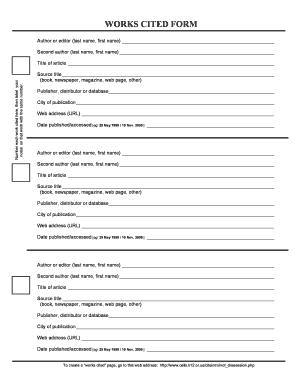
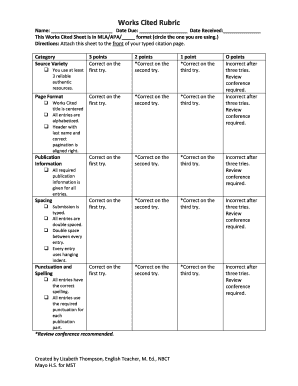
The Research Project Works Cited Form is an educational document used by students to record and organize resources for research projects.
pdfFiller scores top ratings on review platforms




Who needs Research Tracking Form?
Explore how professionals across industries use pdfFiller.

Research Tracking Form is needed by:
-
High school students conducting research
-
College students working on academic projects
-
Teachers assigning research topics
-
Librarians assisting with resource organization
-
Educational institutions focusing on academic integrity
-
Tutors helping students create bibliographies
Comprehensive Guide to Research Tracking Form
What is the Research Project Works Cited Form?
The Research Project Works Cited Form serves to organize resources effectively for students engaged in academic research projects. This form is pivotal for students as it streamlines the bibliographic information necessary for compiling sources. By using this academic research form, students can ensure their work meets scholarly standards and proper citation protocols.
Purpose and Benefits of Using the Research Project Works Cited Form
This form assists students in accurately compiling bibliographic information, which is essential for any research endeavor. Utilizing a works cited template can lead to improved organization and ease when generating citations. Students find that keeping track of their sources becomes simpler, ultimately enhancing their research efficiency.
Key Features of the Research Project Works Cited Form
The structure of the Research Project Works Cited Form includes essential fields designed specifically for students. Users will find spaces to input their name, class, research topic, and period. The integrated instructions provide guidance to simplify the filling process, making it accessible for everyone. This easybib form is tailored for a smooth experience in academic documentation.
Who Should Use the Research Project Works Cited Form?
Primarily, students across various educational levels should utilize this form. The applicability extends to different subjects and research topics, making it a versatile tool for diverse academic needs. Regardless of the discipline, using the research project works cited form can help students maintain proper citation practices.
How to Fill Out the Research Project Works Cited Form Online (Step-by-Step)
-
Access pdfFiller and locate the Research Project Works Cited Form.
-
Begin by entering your name in the designated field.
-
Next, input your class and the specific research topic you are covering.
-
Fill in your class period accurately.
-
Follow the integrated instructions to ensure thorough completion of all fields.
-
Review your entries for accuracy before submission.
Common Errors and Tips for Avoidance When Using the Research Project Works Cited Form
Common mistakes students often make include misplacing bibliographic entries and overlooking essential details. To avoid these pitfalls, double-check every entry for accuracy. Utilizing available resources and keeping the format consistent will help mitigate errors, ensuring that each citation is correctly captured in the research project works cited form.
What Happens After You Submit the Research Project Works Cited Form?
After submission, students can expect a confirmation of their entries, and it's important to anticipate any potential follow-ups from instructors. Keeping a record of submitted forms is crucial for future reference, as it aids students in maintaining their academic documentation efficiently, particularly when using the student bibliography template.
Security and Compliance When Using the Research Project Works Cited Form
pdfFiller ensures user security through comprehensive measures, including encryption and adherence to regulations such as GDPR. Students can trust that their personal and academic information remains protected during the form-filling process, reinforcing the reliability of this academic research form.
Why Choose pdfFiller for Your Research Project Works Cited Form?
Choosing pdfFiller provides numerous advantages for creating and managing works cited forms. The platform offers an intuitive interface that simplifies both the editing and completion processes. With features like cloud accessibility and collaboration tools, students can efficiently manage their academic documentation.
Get Started with the Research Project Works Cited Form Today!
Utilizing pdfFiller for the Research Project Works Cited Form helps you complete your documentation with ease. The user-friendly interface encourages students to dive into their projects without hassle. Leverage the platform’s quick tips to save time as you embark on your academic research journey.
How to fill out the Research Tracking Form
-
1.To access the Research Project Works Cited Form, go to pdfFiller's homepage and search for the form name in the search bar. Click on the form to open it in the editor.
-
2.Once the form is loaded, you'll see various blank fields designated for different information. Familiarize yourself with the layout to ensure a smooth filling process.
-
3.Before starting, gather all necessary information pertaining to your research project, such as the title of your project, your name, the class you're in, and the research topic that you've selected.
-
4.Begin filling out the form by clicking on the first blank field and entering your name. Then, navigate to the subsequent fields and fill out the requested details such as your class and the research topic.
-
5.As you complete each section, take your time to input accurate information. You may also refer to the instructions provided in the form that guide you on where to place specific details.
-
6.Once you have completed filling in all fields, review your entries carefully to ensure that all information is correct and complete, which is crucial for accurately creating your bibliography.
-
7.After reviewing, you can save the form by clicking on the save icon at the top of the pdfFiller interface. You may also download the completed form or submit it directly if required.
-
8.If you choose to download, select the appropriate format from the download options and follow the prompts to save it to your device.

Who is eligible to use the Research Project Works Cited Form?
The form is designed for students in high school and college who are required to compile resources for their research projects. It is suited for any individual undertaking academic work that involves bibliography creation.
Is there a deadline for submitting the completed form?
While the Research Project Works Cited Form does not specify deadlines, it is advised to complete and submit it by the due date of your research project to ensure that your bibliography is correctly organized and formatted.
What are the methods for submitting the completed form?
You can submit the Research Project Works Cited Form via email to your instructor or print it out and hand it in during class. If your school requires electronic submission, ensure you follow their process for uploading.
Are there any required documents to accompany this form?
Generally, there are no specific documents required with the Research Project Works Cited Form. However, make sure you keep copies of the sources you used for your research to assist in creating a bibliography.
What common mistakes should I avoid when filling out the form?
Common mistakes include forgetting to fill in all required fields, providing incorrect information, or not double-checking citations against your sources. Always ensure you follow the guidelines for formatting your bibliography.
What is the typical processing time for the completed form?
There is no processing time for the Research Project Works Cited Form itself, as it is primarily an organizational tool for students. However, ensure you submit it ahead of deadlines for its intended use.
Can I edit the form after filling it out?
Yes, if you save your progress in pdfFiller, you can return to the form at any time to make edits or updates before final submission.
Related Forms



Related Catalogs
Get the latest insights from our blog


If you believe that this page should be taken down, please follow our DMCA take down process
here
.
This form may include fields for payment information. Data entered in these fields is not covered by PCI DSS compliance.