
Last updated on
Nov 6, 2026

Get the free Training Certificate
We are not affiliated with any brand or entity on this form

Fill out
Complete the form online in a simple drag-and-drop editor.

eSign
Add your legally binding signature or send the form for signing.

Share
Share the form via a link, letting anyone fill it out from any device.

Export
Download, print, email, or move the form to your cloud storage.
Why pdfFiller is the best tool for your documents and forms


End-to-end document management
From editing and signing to collaboration and tracking, pdfFiller has everything you need to get your documents done quickly and efficiently.
Accessible from anywhere
pdfFiller is fully cloud-based. This means you can edit, sign, and share documents from anywhere using your computer, smartphone, or tablet.
Secure and compliant
pdfFiller lets you securely manage documents following global laws like ESIGN, CCPA, and GDPR. It's also HIPAA and SOC 2 compliant.
What is Apprenticeship Certificate
The Training Certificate is an official document used by apprentices and employers to certify the completion of vocational training under the Apprentices Act 1973 & 1986.
pdfFiller scores top ratings on review platforms




Love that its so easy to use. I wish it was free/cheaper since I am only using it to apply for jobs. Would be cool if there was a discount code for people in the market looking for jobs if they took a survey for market research.
I appreciate the ability to get documents signed virtually.
Who needs Apprenticeship Certificate?
Explore how professionals across industries use pdfFiller.

Apprenticeship Certificate is needed by:
-
Apprentices looking to validate their training experience
-
Employers issuing certificates for completed apprenticeship programs
-
Authorized personnel from educational institutions
-
Vocational training centers requiring official certifications
-
Government agencies overseeing apprenticeship regulations
Comprehensive Guide to Apprenticeship Certificate
What is a Training Certificate?
A Training Certificate serves as an official document that validates the completion of vocational training. Its significance is rooted in the Apprentices Act, which establishes the legal framework governing apprenticeship programs in India. The Act, enacted in 1973 and amended in 1986, outlines the requirements and standards for training that apprentices must meet.
This certificate plays a crucial role in ensuring that candidates have successfully acquired the necessary skills and competencies required by various industries. Candidates should consider using a training certificate template to facilitate the documentation process. Similarly, vocational training certificates are also essential for acknowledging the achievements of trained individuals.
Purpose and Benefits of a Training Certificate
Obtaining a Training Certificate can greatly enhance career advancement opportunities for candidates by validating their acquired skills. This certification is highly regarded by employers, as it signifies that an individual has completed a structured training program.
Employers benefit from recognizing completed training as it encourages a skilled workforce, ensuring that employees are better prepared to contribute effectively to their roles. Furthermore, possessing a government of India training certificate can meet institutional and regulatory requirements that may govern hiring practices within certain sectors.
Who Needs a Training Certificate?
A Training Certificate is essential for various stakeholders, including candidates who have completed their training programs, employers who host apprentices, and authorized signatories who oversee certification processes. Candidates, in particular, need to understand eligibility criteria, which typically encompass the completion of specific training requirements as stipulated by the Apprentices Act.
The certificate is crucial in various scenarios, particularly for individuals seeking employment in vocational fields. Understanding who needs the training certificate ensures that all parties are compliant with job market standards.
How to Fill Out the Training Certificate Online (Step-by-Step)
Filling out the Training Certificate online can be done efficiently through platforms like pdfFiller. Begin by accessing the fillable training certificate template, which is designed for ease of use.
-
Open the online form and review the instructions carefully.
-
Enter the required information in each section, including the candidate’s name, address, and training period.
-
Ensure that employer details are accurately filled out.
-
Complete the sections designated for signatures and verify compliance.
-
Save the changes and prepare for submission.
Required Documents for the Training Certificate
When applying for a Training Certificate, several documents are necessary to support the application process. These typically include:
-
Proof of identity for the candidate.
-
Employer confirmation of training completion.
-
Documentation from the authorized signatory validating the training program.
-
Any additional attachments that may be specified by the certifying authority.
Having the required documents ready helps streamline the certification process.
Signing the Training Certificate
The signing process for the Training Certificate involves several key roles. The candidate must sign to confirm their completion of training, while the employer’s signature attests to their oversight of the training program. Additionally, an authorized signatory’s validation is required to render the certificate official.
It is essential to understand the difference between digital signatures and wet signatures. Digital signatures provide security features, while wet signatures are traditional handwritten signatures.
Submission Methods and Delivery of the Training Certificate
Once the Training Certificate is completed, users have multiple submission methods available. These include:
-
Online submission through designated portals.
-
Mailing the completed form to the appropriate office.
-
In-person submission at specified locations.
After submission, tracking the status of the application is crucial to ensure proper processing.
Common Mistakes to Avoid When Filing the Training Certificate
When filing a Training Certificate, candidates and employers should be cautious of common errors that can delay processing. Frequent mistakes include:
-
Incomplete sections of the form.
-
Missing signatures from required parties.
-
Incorrect or insufficient documentation attached to the application.
To avoid these pitfalls, candidates should review the form thoroughly before submission.
Why Choose pdfFiller for Your Training Certificate Needs
Using pdfFiller for managing your Training Certificate offers numerous advantages. The platform provides robust editing capabilities, allowing users to fill and eSign documents securely. With its 256-bit encryption and compliance with regulations such as HIPAA and GDPR, users can trust that their sensitive information is protected.
Utilizing pdfFiller simplifies the process of document management, ensuring a streamlined experience when creating a training certificate.
Next Steps After Submitting Your Training Certificate
Once you have submitted your Training Certificate, you can expect a confirmation of receipt from the relevant authority. The timeline for processing may vary, but it is essential to be patient and track your application status.
If you need to amend the submitted certificate or revisit it for any reason, know the specific protocols in place for making changes after submission.
How to fill out the Apprenticeship Certificate
-
1.Start by visiting pdfFiller and log in or create an account if you don’t have one yet.
-
2.Use the search feature to find the 'Training Certificate' form. Select it to open in the editor.
-
3.Familiarize yourself with the form layout, ensuring you understand where to input required details.
-
4.Before starting, gather all essential information needed, such as the candidate's name, address, training period, and employer details.
-
5.Begin filling out the form by clicking into each fillable field and entering the appropriate information.
-
6.If applicable, check the boxes for specific conditions or statements that are relevant to your situation.
-
7.Continue moving through the sections until all parts of the form are completed, taking care to double-check for accuracy.
-
8.Once you’ve filled in all necessary information, review each section carefully to ensure completeness and correctness.
-
9.Utilize the preview feature on pdfFiller to see a final layout of your filled form.
-
10.When satisfied, download the document or save it within your pdfFiller account for future access.
-
11.Finally, submit the form as required, whether electronically through pdfFiller or by printing it out for physical submission.

Who is eligible for the Training Certificate?
The Training Certificate is primarily for apprentices who have completed their formal training program, and for employers who are responsible for confirming the completion of that training.
What information is required to fill out the form?
You will need the candidate’s name, address, the duration of training, and various employer details such as company name and authorized signatory. Make sure to gather this before starting.
How do I submit the Training Certificate?
You can submit the Training Certificate electronically through pdfFiller’s submission options, or print it out to be delivered physically to the relevant authority or department.
Are there any deadlines for submitting the Training Certificate?
While deadlines may vary by institution or governmental agency, it’s generally advisable to submit the Training Certificate as soon as possible after completing the training to ensure timely processing.
What common mistakes should I avoid when filling out the form?
Common mistakes include omitting required signatures, misentering information, or neglecting to verify all details before submission. Always review the completed form carefully.
How long does it take to process the Training Certificate?
Processing times can vary depending on the issuing body but allow for at least a few working days. Always check with the specific institution for their timelines.
Do I need any supporting documents with the Training Certificate?
Typically, no additional documents are required, unless specified by the issuer. It’s wise to check the guidelines provided by your institution or workplace.
Related Forms

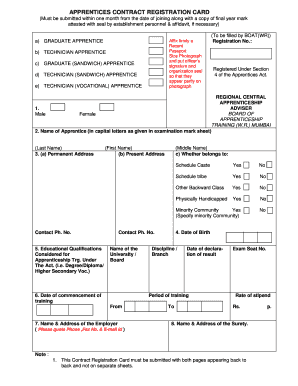

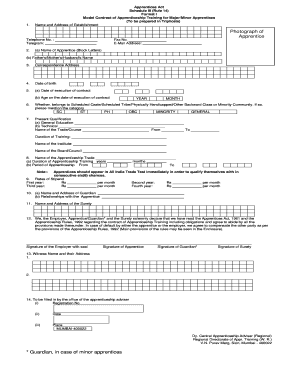



Related Catalogs
Get the latest insights from our blog


If you believe that this page should be taken down, please follow our DMCA take down process
here
.
This form may include fields for payment information. Data entered in these fields is not covered by PCI DSS compliance.