
Last updated on
Nov 7, 2026
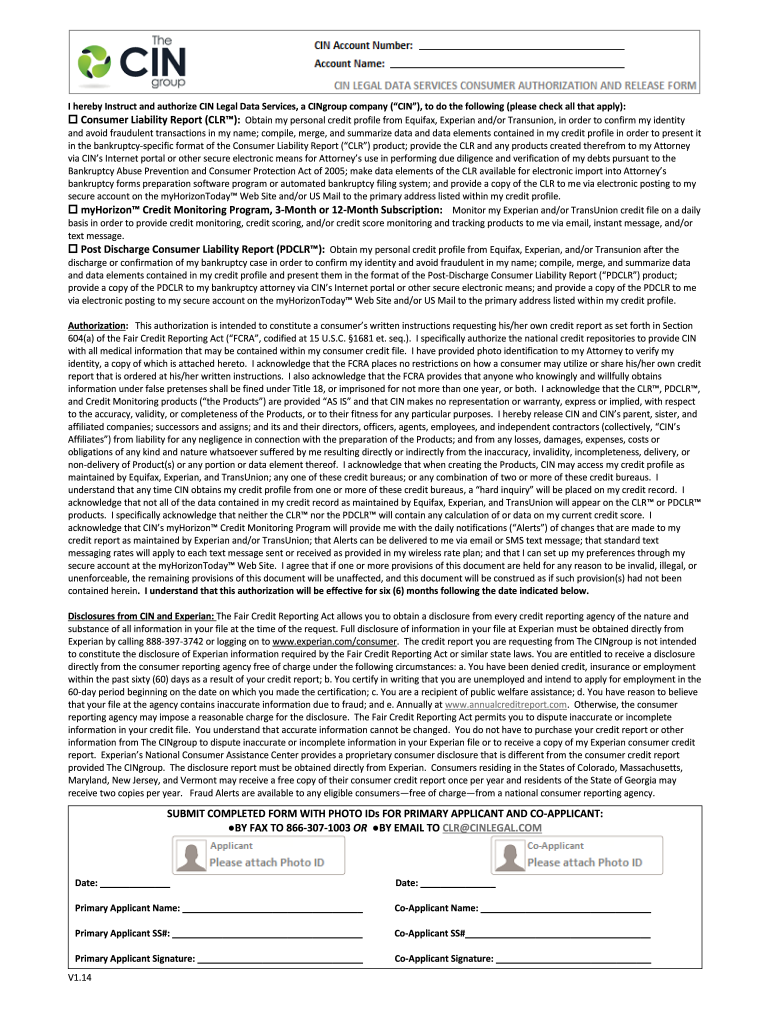
Get the free Consumer Liability Report Authorization
pdfFiller is not affiliated with any government organization

Fill out
Complete the form online in a simple drag-and-drop editor.

eSign
Add your legally binding signature or send the form for signing.

Share
Share the form via a link, letting anyone fill it out from any device.

Export
Download, print, email, or move the form to your cloud storage.
Why pdfFiller is the best tool for your documents and forms


End-to-end document management
From editing and signing to collaboration and tracking, pdfFiller has everything you need to get your documents done quickly and efficiently.
Accessible from anywhere
pdfFiller is fully cloud-based. This means you can edit, sign, and share documents from anywhere using your computer, smartphone, or tablet.
Secure and compliant
pdfFiller lets you securely manage documents following global laws like ESIGN, CCPA, and GDPR. It's also HIPAA and SOC 2 compliant.
What is CLR Authorization
The Consumer Liability Report Authorization is a legal form used by individuals to authorize CIN Legal Data Services to obtain a Consumer Liability Report for bankruptcy verification.
pdfFiller scores top ratings on review platforms




Who needs CLR Authorization?
Explore how professionals across industries use pdfFiller.

CLR Authorization is needed by:
-
Individuals filing for bankruptcy
-
Attorneys representing bankruptcy clients
-
Financial advisors assisting clients with credit reports
-
Credit monitoring service applicants
-
Consumers needing debt verification
-
Co-applicants involved in credit reporting
Comprehensive Guide to CLR Authorization
What is the Consumer Liability Report Authorization?
The Consumer Liability Report Authorization is a crucial legal form enabling authorized parties to access a Consumer Liability Report (CLR). This form is particularly important in bankruptcy situations as it facilitates the verification of debts. By authorizing credit monitoring services, applicants can safeguard their financial interests, ensuring the accuracy of the information that may impact their legal proceedings.
The CLR authorization form is essential for individuals facing bankruptcy, providing a structured way to gather and present debt-related data to their attorneys.
Purpose and Benefits of the Consumer Liability Report Authorization
The primary purpose of the CLR Authorization is to assist applicants in obtaining a comprehensive evaluation of their credit profile. It offers significant benefits, including:
-
Streamlining the verification of debts for legal proceedings.
-
Ensuring compliance with the Fair Credit Reporting Act (FCRA), which protects consumers.
-
Providing peace of mind through credit monitoring services, helping applicants stay informed about their financial status.
Key Features of the Consumer Liability Report Authorization Form
This form includes several critical fields that applicants must complete. Important sections consist of:
-
Primary and co-applicant names.
-
Social Security numbers for identifying and verifying individuals.
-
Signature fields for both the primary applicant and co-applicant, confirming their consent.
Additionally, the form may provide options for selecting specific services, making it adaptable to individual needs.
Who Needs the Consumer Liability Report Authorization?
The consumer liability report authorization is primarily designed for individuals undergoing bankruptcy or debt verification processes. Key roles include:
-
The primary applicant, who initiates the process.
-
The co-applicant, who may share responsibility for the debts being verified.
Often, this form is required in situations where debts need to be assessed for legal purposes, ensuring that all parties involved have a clear understanding of the financial liabilities.
How to Fill Out the Consumer Liability Report Authorization Online (Step-by-Step)
Filling out the CLR Authorization form online can be done efficiently by following these steps:
-
Access the form on the designated platform.
-
Enter the primary applicant's name and Social Security number in the respective fields.
-
Complete the co-applicant's information similarly.
-
Select the services required using the provided checkboxes.
-
Ensure both applicants sign the form where indicated.
This structured process helps ensure all necessary personal details and consents are accurately captured.
Required Documents and Supporting Materials
Applicants should prepare several essential documents to accompany their CLR Authorization. Required items often include:
-
A valid photo ID for the primary applicant.
-
A valid photo ID for the co-applicant.
-
Any additional supporting materials relevant to the bankruptcy verification process.
Ensuring completeness of these documents is crucial for a smooth submission process.
Submission Methods and Delivery
Once the Consumer Liability Report Authorization form is completed, it can be submitted through various methods, including:
-
Digital submission via email or online platforms.
-
Physical mail to the designated office.
Applicants should also be aware of any fees that may be associated with the submission method chosen.
Security and Compliance for the Consumer Liability Report Authorization
Security is paramount when dealing with sensitive documents like the CLR Authorization. Key measures include:
-
Utilization of 256-bit encryption to protect personal information.
-
Compliance with HIPAA and GDPR regulations to ensure data privacy.
-
Adherence to SOC standards to maintain the highest level of security practices.
This commitment to security reassures users about the protection of their information.
What Happens After You Submit the Consumer Liability Report Authorization?
After submission of the CLR Authorization, applicants can expect the following steps:
-
Processing of the authorization request, which may take a specified time frame.
-
Confirmation details sent to both the primary applicant and the co-applicant.
-
Tracking options to monitor the progress of the application.
Common outcomes may include receiving the CLR or further instructions based on the review of submitted documents.
Get Started with pdfFiller to Complete Your Consumer Liability Report Authorization
To enhance your experience with filling out the Consumer Liability Report Authorization, consider using pdfFiller. This user-friendly platform offers secure and efficient tools for editing, filling, and eSigning forms, ultimately simplifying the process.
How to fill out the CLR Authorization
-
1.Begin by accessing pdfFiller and logging into your account. Search for 'Consumer Liability Report Authorization' in the search bar to locate the form.
-
2.Once the form appears, click on it to open in the pdfFiller interface. Familiarize yourself with the available fillable fields and checkboxes.
-
3.Prepare your personal information before starting, including your name, Social Security number (SS#), and any details pertinent to your credit report request.
-
4.In the 'Primary Applicant' section, enter your name and SS#. Follow this by providing your signature in the designated field.
-
5.Next, complete the 'Co-Applicant' section similarly, entering your co-applicant's name and SS#, and obtain their signature on the form too.
-
6.Ensure you check the appropriate boxes selecting the credit monitoring services you wish to include. Review the services in the description to make informed choices.
-
7.Complete any additional required fields as prompted, paying special attention to instructions about submitting identification.
-
8.To finalize your application, carefully review all entered information for accuracy. Use the 'Review' function in pdfFiller to check for mistakes.
-
9.Once satisfied with the information, save your completed form within pdfFiller. You can download it directly to your device or submit it through the platform as indicated in the interface.
-
10.Be sure to submit the completed form along with the requested photo IDs for both the primary applicant and co-applicant, if required by your attorney or credit monitor.

Who is eligible to use the Consumer Liability Report Authorization?
The form is intended for individual consumers who need to authorize a credit report for bankruptcy proceedings, including both primary applicants and co-applicants.
What supporting documents are required to submit with this form?
You must submit photo identification documents for both the primary applicant and co-applicant along with the Consumer Liability Report Authorization.
How do I submit the completed form?
After filling out the Consumer Liability Report Authorization on pdfFiller, you have the option to save as a PDF or directly submit the form through pdfFiller's interface as instructed.
Is there a deadline for submitting the Consumer Liability Report Authorization?
While specific deadlines may vary, it is recommended to submit the form promptly to ensure timely processing for bankruptcy proceedings.
What common mistakes should I avoid when filling out this form?
Ensure all personal information is accurate, provide correct signatures in the designated spots, and remember to check all required fields are filled out before submitting.
How long does it take to process the Consumer Liability Report Authorization?
Processing times may vary depending on the service providers’ policies; however, it typically takes a few business days after submission for reports to be compiled.
Can I edit the form after submitting it on pdfFiller?
Once submitted, the form generally cannot be edited unless rescinded. Ensure all information is accurate before final submission.
Related Forms



Related Catalogs
Get the latest insights from our blog


If you believe that this page should be taken down, please follow our DMCA take down process
here
.
This form may include fields for payment information. Data entered in these fields is not covered by PCI DSS compliance.