
Last updated on
Oct 31, 2026

Get the free Chesapeake Bay Webquest Form
We are not affiliated with any brand or entity on this form

Fill out
Complete the form online in a simple drag-and-drop editor.

eSign
Add your legally binding signature or send the form for signing.

Share
Share the form via a link, letting anyone fill it out from any device.

Export
Download, print, email, or move the form to your cloud storage.
Why pdfFiller is the best tool for your documents and forms


End-to-end document management
From editing and signing to collaboration and tracking, pdfFiller has everything you need to get your documents done quickly and efficiently.
Accessible from anywhere
pdfFiller is fully cloud-based. This means you can edit, sign, and share documents from anywhere using your computer, smartphone, or tablet.
Secure and compliant
pdfFiller lets you securely manage documents following global laws like ESIGN, CCPA, and GDPR. It's also HIPAA and SOC 2 compliant.
What is Chesapeake Webquest
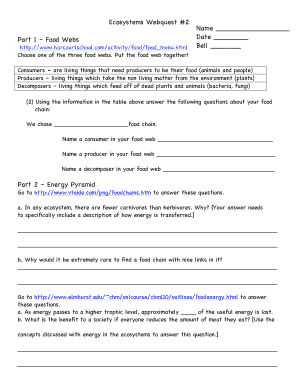
The Chesapeake Bay Webquest Form is an educational activity document used by students to engage in research about the Chesapeake Bay's ecosystem, history, and conservation efforts.
pdfFiller scores top ratings on review platforms




Who needs Chesapeake Webquest?
Explore how professionals across industries use pdfFiller.

Chesapeake Webquest is needed by:
-
Students studying environmental science and ecosystems
-
Teachers in Maryland aiming to enrich the education curriculum
-
Parents looking for educational activities for their children
-
Education administrators overseeing curriculum development
-
Environmental organizations conducting community programs
-
Researchers focused on the Chesapeake Bay area
Comprehensive Guide to Chesapeake Webquest
What is the Chesapeake Bay Webquest Form?
The Chesapeake Bay Webquest Form is an educational tool designed to enhance students' understanding of the Chesapeake Bay ecosystem. This form serves as an essential component of Maryland education activity, focusing on environmental science. It contains various fillable sections, including fields for the student's name and date, which play a crucial role in identifying and organizing the submissions.
This document is structured to achieve specific educational objectives, guiding students through key aspects of the bay's ecology while encouraging research and inquiry.
Purpose and Benefits of the Chesapeake Bay Webquest Form
Students and educators should use the Chesapeake Bay Webquest Form to enrich their learning experience about the Chesapeake Bay ecosystem. The form engages students in meaningful research, supporting conservation education and raising awareness about environmental issues.
By utilizing this form, students can enhance their collaborative learning skills and develop critical thinking abilities, as they work together to gather information and complete the activities.
Key Features of the Chesapeake Bay Webquest Form
The Chesapeake Bay Webquest Form offers several unique features that facilitate user engagement. Fillable fields make the form easy to use, allowing students to input information directly. Utilizing the pdfFiller platform streamlines the editing and completion processes, ensuring that students can navigate the document with ease.
Users benefit from strict safety measures in document handling, including security and compliance protocols, which ensure that sensitive information remains protected.
Eligibility Criteria for the Chesapeake Bay Webquest Form
This form targets students in Maryland, specifically designed for those engaged in environmental studies. It is suitable for a range of age groups and grade levels, allowing educators to introduce the form in various educational contexts.
While no prerequisites are strictly required, familiarity with basic research methods is beneficial for effectively filling out the form.
How to Fill Out the Chesapeake Bay Webquest Form Online (Step-by-Step)
Completing the Chesapeake Bay Webquest Form online is a straightforward process. Follow these instructions:
-
Access the form through the pdfFiller platform.
-
Gather relevant information regarding the Chesapeake Bay ecosystem before starting to fill out the form.
-
Complete the fillable fields by entering the required details, such as your name and date.
-
Utilize the digital signature feature to eSign, if required.
-
Review your entries for accuracy before submission.
Common Errors and How to Avoid Them When Completing the Form
While filling out the Chesapeake Bay Webquest Form, students may encounter several common errors. These include incomplete fields, inaccurate information, and submission of the form without review.
To avoid these mistakes, students should:
-
Double-check all entries for completeness.
-
Validate information against trusted sources.
-
Use tips provided within the form for guidance.
Where and How to Submit the Chesapeake Bay Webquest Form
Once the Chesapeake Bay Webquest Form is completed, students must follow specific submission methods. These include electronic submission options, which are recommended for convenience and speed.
It is crucial to be aware of any deadlines and jurisdiction-specific regulations that may apply to submissions within Maryland, ensuring compliance with local educational standards.
What Happens After You Submit the Chesapeake Bay Webquest Form
After submitting the Chesapeake Bay Webquest Form, users can expect a confirmation process where their submission is acknowledged. Typically, a timeframe for review is provided, guiding students on possible follow-up actions if needed.
Students may also be able to check the status of their submissions to stay informed about their application process.
Security and Compliance for the Chesapeake Bay Webquest Form
Users can rest assured regarding data protection while filling out the Chesapeake Bay Webquest Form. The pdfFiller platform employs 256-bit encryption and is compliant with HIPAA and GDPR standards, ensuring the safe handling of sensitive information.
Understanding the significance of data privacy, pdfFiller implements robust measures to safeguard user privacy throughout the form-filling process.
Get Started with Filling Out the Chesapeake Bay Webquest Form Today!
Utilizing pdfFiller for completing the Chesapeake Bay Webquest Form offers numerous advantages, including user-friendly features that streamline the completion process. Access the form online today to experience the ease of use that enhances educational engagement.
How to fill out the Chesapeake Webquest
-
1.To access the Chesapeake Bay Webquest Form on pdfFiller, go to the pdfFiller website and search for the form by its name.
-
2.Once the form is located, click on it to open the interactive PDF fillable interface provided by pdfFiller.
-
3.Before starting to fill out the form, gather necessary information about the Chesapeake Bay. This may include dimensions, historical data, and conservation efforts, which can be found via specified online resources.
-
4.Select each fillable field in the form, such as 'Name' and 'Date', and enter your details using the keyboard. Ensure that each entry is accurate and reflects the information you gathered.
-
5.As you navigate through the form, you can use the toolbar on pdfFiller to highlight, underline, or annotate important words or sections as needed.
-
6.After filling in all required and optional fields, review your answers for completeness and any potential errors to ensure accuracy.
-
7.Once you are satisfied with the information provided, you can save your work by selecting the appropriate option from the file menu in pdfFiller.
-
8.To download a copy of your completed form, choose the 'Download' option, or submit it directly through pdfFiller's submission features if applicable.

Who is eligible to use the Chesapeake Bay Webquest Form?
The Chesapeake Bay Webquest Form is primarily designed for students in educational settings, especially those engaged in environmental science activities. Teachers and parents can also facilitate its use.
What information do I need to complete the form?
Before starting, you'll need to gather information related to the Chesapeake Bay, such as its dimensions, history, ecosystem details, and conservation efforts. These can typically be found in online resources specified in class.
How do I submit the completed form?
After filling out the Chesapeake Bay Webquest Form on pdfFiller, you can either download it for personal records or submit it directly through pdfFiller's built-in submission options if required by your instructor.
Are there any common mistakes to avoid while completing the form?
Common mistakes include incomplete fields, spelling errors, and incorrect dates. Take your time to review the form and cross-reference with your gathered information to ensure accuracy before finalizing.
How long does it take to process the completion of this form?
Processing time primarily depends on the time you take to gather information and fill out the form. Plan accordingly and allow additional time if required for teacher review.
Is notarization required for the Chesapeake Bay Webquest Form?
No, notarization is not required for the Chesapeake Bay Webquest Form, making it straightforward for students to complete and submit without the need for additional legal steps.
Related Forms


Related Catalogs
Get the latest insights from our blog


If you believe that this page should be taken down, please follow our DMCA take down process
here
.
This form may include fields for payment information. Data entered in these fields is not covered by PCI DSS compliance.