
Last updated on
Nov 6, 2026

Holistic Home Health Care Hospice Personal free printable template
pdfFiller is not affiliated with any government organization

Fill out
Complete the form online in a simple drag-and-drop editor.

eSign
Add your legally binding signature or send the form for signing.

Share
Share the form via a link, letting anyone fill it out from any device.

Export
Download, print, email, or move the form to your cloud storage.
Why pdfFiller is the best tool for your documents and forms


End-to-end document management
From editing and signing to collaboration and tracking, pdfFiller has everything you need to get your documents done quickly and efficiently.
Accessible from anywhere
pdfFiller is fully cloud-based. This means you can edit, sign, and share documents from anywhere using your computer, smartphone, or tablet.
Secure and compliant
pdfFiller lets you securely manage documents following global laws like ESIGN, CCPA, and GDPR. It's also HIPAA and SOC 2 compliant.
What is Holistic Home Health Care Hospice Personal
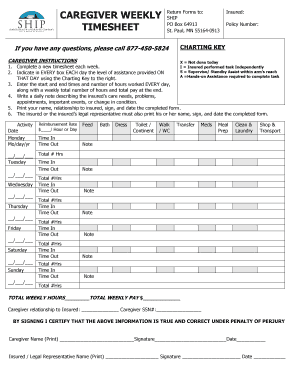
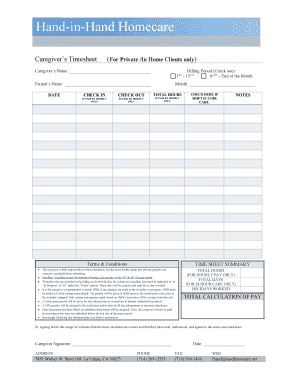
The Personal Care Worker Timesheet & Charting is a medical billing form used by healthcare employees to document the time and services provided during patient care.
pdfFiller scores top ratings on review platforms




The lady did an excellent job of correcting the problem
I found the program easy to use and easy to navigate. It had all the forms I needed.
Who needs Holistic Home Health Care Hospice Personal?
Explore how professionals across industries use pdfFiller.

Holistic Home Health Care Hospice Personal is needed by:
-
Personal care workers documenting care hours
-
Home health agencies for accurate billing
-
Clients receiving care to verify services
-
Healthcare administrators reviewing employee documentation
-
Insurance companies for claims processing
-
Healthcare organization compliance officers
Comprehensive Guide to Holistic Home Health Care Hospice Personal
What is the Personal Care Worker Timesheet & Charting?
The Personal Care Worker Timesheet & Charting form serves a critical role in healthcare billing and documentation. It is essential for accurately recording the services provided by healthcare employees, ensuring both transparency and accountability. Without this form, proper tracking of patient care hours and billing accuracy could be jeopardized, leading to financial discrepancies and compliance issues.
This healthcare timesheet template allows for precise recording of service details, which ultimately supports the integrity of medical service documentation. The importance of this form cannot be overstated, as it reflects the quality and reliability of care provided to clients.
Purpose and Benefits of the Personal Care Worker Timesheet & Charting
Accurate timesheet documentation is invaluable in patient care, enabling healthcare workers to detail every service rendered. This clarity brings multiple benefits, including increased transparency in healthcare processes and inherent challenges of billing accuracy.
Furthermore, a well-maintained record ensures compliance with legal and organizational guidelines. Employees benefit too, as properly documented hours can protect their interests, confirming that they are compensated fairly for their work.
Key Features of the Personal Care Worker Timesheet & Charting
This timesheet boasts several key components that enhance its functionality. These include:
-
Detailed fields for date, time, and services provided
-
Fillable design for easy digital completion
-
Clear instructions for accurate submissions
-
Signature fields for both employees and clients
The ease of digital handling underscores its role in home health care charting, allowing healthcare professionals to manage their responsibilities efficiently.
Who Needs the Personal Care Worker Timesheet & Charting?
The primary users of this form include healthcare employees and their clients. It is especially relevant for professionals involved in personal care services who need to document their activities formally.
Typical situations that necessitate filling out this form encompass regular patient care visits, where a record of the services provided is essential for billing and compliance with healthcare regulations. Eligibility can vary based on organizational policies and patient requirements.
How to Fill Out the Personal Care Worker Timesheet & Charting Online (Step-by-Step)
To complete the timesheet digitally, follow these detailed steps:
-
Access the online form using a secure device.
-
Enter the date of service and the corresponding hours worked.
-
Specify the type of services provided in the designated fields.
-
Review the information for accuracy before submission.
-
Ensure both the employee and patient signatures are included.
Completing the charting form healthcare accurately reduces errors during billing processes and guarantees clarity in patient service records.
Common Errors and How to Avoid Them
While completing the timesheet, common errors may arise, such as:
-
Omitting required signatures from either party
-
Incorrectly detailing the hours worked
-
Neglecting to specify the types of services rendered
To avoid these issues, double-check all entries before submission, especially concerning required signatures and completeness of the recorded activities. This preventative step can significantly reduce complications during billing.
How to Sign the Personal Care Worker Timesheet & Charting
Signing the timesheet is essential for both employees and clients, as it confirms that the information recorded is accurate. Both digital signatures and physical signatures are valid; however, the method chosen may depend on the submission process.
It is crucial for users to understand the requirements for their respective roles to ensure compliance and validity of the submitted forms, particularly in situations involving medical billing form requirements.
How to Download, Save, and Submit the Personal Care Worker Timesheet & Charting
Once the form is completed, users can download and save it as a PDF. Depending on organizational processes, submission methods may vary, including email delivery or direct uploads to a healthcare management system.
Saving a copy of the completed healthcare employee timesheet is advisable for personal records and to ensure that a backup exists in case of any discrepancies during the billing process.
What Happens After You Submit the Personal Care Worker Timesheet & Charting
After submission, users can expect a follow-up process that may involve confirmation notifications regarding the form's receipt. Tracking submitted timesheets is vital to ensure all documentation is accounted for and processed timely within medical billing systems.
Knowing what to expect can alleviate concerns and support employees in managing their submitted healthcare timesheet template more effectively.
Experience Seamless Form Management with pdfFiller
pdfFiller streamlines the process of filling, signing, and managing healthcare forms like the Personal Care Worker Timesheet & Charting. The platform's robust features allow users to edit, eSign, and share their forms securely, which is crucial when handling sensitive medical service documentation.
By leveraging pdfFiller, users can experience a more organized approach to form management, ensuring both ease and security throughout the process.
How to fill out the Holistic Home Health Care Hospice Personal
-
1.Begin by accessing pdfFiller and logging in to your account. If you don’t have an account, create one to open the form easily.
-
2.Once logged in, search for the 'Personal Care Worker Timesheet & Charting' form in the search bar. Click to open the form.
-
3.Before filling out the form, gather necessary information such as the dates of service, the type of care provided, and the hours worked. Ensure you have the patient’s details ready.
-
4.Use the navigation tools on pdfFiller to move between fillable fields. Click on each field to input relevant information such as dates, hours, and care descriptions.
-
5.Follow the provided instructions in the form to ensure all sections are completed. Pay special attention to required checkboxes and ensure accurate entry.
-
6.Once all information is filled out, review the form thoroughly. Double-check all entries for accuracy and completeness. Ensure both the employee and patient signatures are included where required.
-
7.After reviewing, save your progress and then download the completed form to your device. You can also directly submit it to your employer or relevant agency using the submit feature on pdfFiller.

Who is eligible to fill out this timesheet?
The timesheet can be filled out by personal care workers who provide care to patients in a healthcare setting and require documentation of services rendered.
What documents do I need before filling out the form?
You will need details regarding the dates of service, hours worked, types of services provided, and patient information to complete the timesheet accurately.
Can both the employee and client sign the form electronically?
Yes, pdfFiller allows both the employee and client to electronically sign the form, ensuring compliance and verification of the documented services.
How can I submit the completed timesheet?
You can submit the completed timesheet by downloading it from pdfFiller or using the direct submission option to send it to your employer or agency.
What common mistakes should I avoid when filling out the form?
Always ensure that all fields are filled out completely and accurately. Avoid skipping required fields, and check that both signatures are provided before submission.
Is there a specific deadline for submitting this timesheet?
Deadlines for submitting timesheets can vary by employer. It is advisable to check with your organization for specific submission timelines to ensure timely processing of your hours.
What happens if I forget to sign the timesheet?
If the timesheet is not signed by both the employee and client, it may be rejected. Always verify that all required signatures are included before submission.
Related Forms



Get the latest insights from our blog


If you believe that this page should be taken down, please follow our DMCA take down process
here
.
This form may include fields for payment information. Data entered in these fields is not covered by PCI DSS compliance.