
Last updated on
Nov 7, 2026
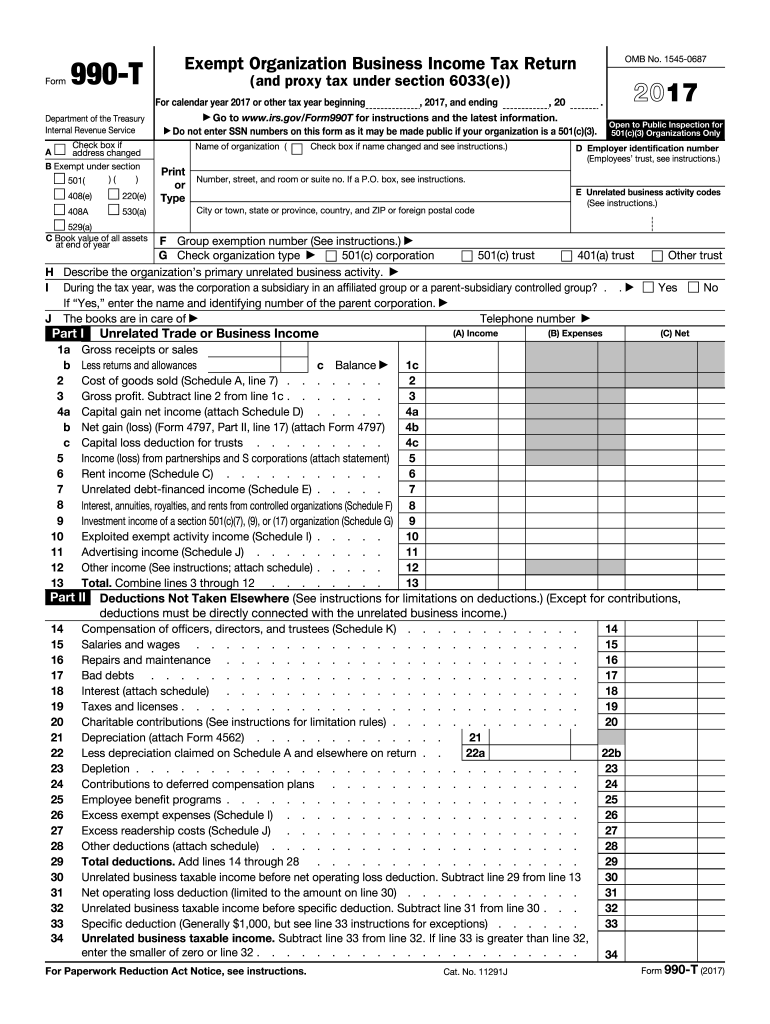
IRS 990-T 2017 free printable template
pdfFiller is not affiliated with IRS

Fill out
Complete the form online in a simple drag-and-drop editor.

eSign
Add your legally binding signature or send the form for signing.

Share
Share the form via a link, letting anyone fill it out from any device.

Export
Download, print, email, or move the form to your cloud storage.
Why pdfFiller is the best tool for your documents and forms


End-to-end document management
From editing and signing to collaboration and tracking, pdfFiller has everything you need to get your documents done quickly and efficiently.
Accessible from anywhere
pdfFiller is fully cloud-based. This means you can edit, sign, and share documents from anywhere using your computer, smartphone, or tablet.
Secure and compliant
pdfFiller lets you securely manage documents following global laws like ESIGN, CCPA, and GDPR. It's also HIPAA and SOC 2 compliant.
What is IRS 990-T
The Form 990-T 2017 is a federal tax form used by exempt organizations to report unrelated business income for the tax year 2017.
pdfFiller scores top ratings on review platforms




Who needs IRS 990-T?
Explore how professionals across industries use pdfFiller.

IRS 990-T is needed by:
-
501(c)(3) organizations reporting unrelated business income
-
Nonprofits with taxable activities in 2017
-
Charities needing to disclose financial information
-
Foundations with business income
-
Exempt organizations generating revenue from non-related activities
-
Tax professionals handling tax filings for nonprofits
Comprehensive Guide to IRS 990-T
What is Form 990-T 2017?
Form 990-T 2017 is a crucial US federal tax form required for exempt organizations to report unrelated business income. This tax return is essential for maintaining compliance and transparency within the nonprofit sector. It provides detailed information, such as the organization's name, address, and Employer Identification Number (EIN), which are vital for identification and reporting purposes.
The term 'unrelated business income' refers to income generated from activities that are not substantially related to the organization's charitable mission. Understanding this concept is essential for organizations as it impacts their tax obligations and can lead to penalties if not reported correctly.
Purpose and Importance of Form 990-T 2017
The Form 990-T is critical for exempt organizations as it serves to report any unrelated business income, ensuring compliance with IRS regulations. Failure to file this form can result in significant penalties, which may affect the organization's financial standing and operational viability.
By submitting Form 990-T, organizations demonstrate their commitment to transparency and compliance, which is essential for maintaining public trust and support. This form helps ensure that organizations are accountable for their financial activities, particularly income that may not align with their primary charitable purposes.
Who Needs to File Form 990-T 2017?
Various exempt organizations are required to file Form 990-T if they have unrelated business income. This includes charities, educational institutions, and other nonprofits engaged in activities that generate taxable income unrelated to their tax-exempt purpose.
Eligible filers must meet specific criteria defined by the IRS. It is crucial for organizations to determine their filing obligations accurately, which may include additional related forms that provide further context or information regarding their activities.
How to Fill Out Form 990-T 2017 Online
Filling out Form 990-T 2017 online involves a structured process that ensures accuracy and compliance. Begin by accessing the online platform equipped for tax form submissions.
-
Follow the navigation prompts to locate Form 990-T 2017.
-
Complete each section of the form as per the instructions provided.
-
Double-check entry fields to ensure no information is omitted.
-
Utilize validation tools offered by the platform to avoid common errors.
Key Information Required for Filing Form 990-T 2017
To accurately complete Form 990-T 2017, organizations need to gather specific key information. This includes details about income and expenses arising from unrelated business activities, which must be clearly outlined within the form.
-
List of all unrelated business income generated during the tax year.
-
Comprehensive details of related expenses incurred for generating that income.
-
Supporting documents that validate income and expenses, ensuring compliance during audits.
Submission and Filing Guidelines for Form 990-T 2017
Submitting Form 990-T 2017 requires attention to detail to meet the IRS standards. Organizations can submit the completed form electronically or via mail, adhering to specific submission methods outlined by the IRS.
Key deadlines for filing are critical to avoid penalties. It’s essential for organizations to be aware of their submission timelines and to rectify any late filings promptly to mitigate consequences.
Security and Compliance When Using Form 990-T 2017
Organizations handling Form 990-T 2017 must prioritize security, especially when dealing with sensitive information. pdfFiller employs robust security measures, including 256-bit encryption, to protect user data throughout the document handling process.
Maintaining compliance with regulations such as HIPAA and GDPR is imperative to safeguard privacy and data protection standards, ensuring that sensitive information remains confidential.
Common Mistakes to Avoid and Review Checklist
Organizations often encounter pitfalls when completing Form 990-T 2017. Common mistakes include providing incorrect figures or omitting critical information.
-
Ensure accurate reporting of all unrelated business income and related expenses.
-
Review the form thoroughly before submission to catch errors.
-
Utilize a validation checklist to confirm all necessary fields are completed and correct.
Utilizing pdfFiller for Form 990-T 2017
pdfFiller offers valuable features to streamline the process of filling out Form 990-T 2017. With capabilities for editing, eSigning, and document management, users can efficiently manage their tax forms online without the need for downloads.
This platform enhances user experience by providing a user-friendly interface that simplifies navigating tax forms and helps avoid common pitfalls associated with manual submissions.
How to Fill Out Small Business Tax Forms Online with pdfFiller
Struggling with your Schedule C or not sure how to file business taxes as a sole proprietor, LLC, or self-employed professional? This step-by-step pdfFiller tutorial walks you through completing IRS Schedule C quickly and accurately — no printing, no scanning, no stress. Whether you're handling small business tax deductions, tracking self-employed taxes, or preparing your full business tax return, pdfFiller makes it simple right in your browser.

How to fill out the IRS 990-T
-
1.Start by accessing the Form 990-T 2017 on pdfFiller website. Make sure you have a pdfFiller account to gain access.
-
2.Once you are logged in, navigate to the search bar and input 'Form 990-T 2017' to locate the document. Click on it to open in the editing interface.
-
3.Before completing the form, gather essential information such as your organization’s name, address, employer identification number, and details of unrelated business income and expenses.
-
4.In pdfFiller's interface, locate the first field and click the cursor to begin typing. Fill in your organization’s name and address accordingly.
-
5.Continue through the form by filling out each relevant field, ensuring to check boxes or fill in all necessary information based on your organization's financial details.
-
6.If you need guidance, refer to the instructions provided within the document; they will assist you with sections that may require additional clarification.
-
7.Once you’ve completed all fields, review your entries for accuracy against your financial records. Make sure the information is precise and complete.
-
8.Next, locate the signature field, click on it, and use pdfFiller’s tool to add your signature electronically. Ensure that an authorized officer of the organization signs the document.
-
9.After finalizing the form, look at the top right corner for options to save the document. You can choose to download it or save it directly to your pdfFiller account.
-
10.Lastly, if you're submitting this form to the IRS, follow the provided guidelines for either postal submission or electronic filing, ensuring that you send it before the deadline.

Who is required to file Form 990-T?
Exempt organizations that generate unrelated business income must file Form 990-T. This includes nonprofits and charities that operate businesses outside their primary exempt purpose.
What is the deadline for submitting Form 990-T?
The deadline for filing Form 990-T is the 15th day of the fifth month after the end of your organization’s tax year. For calendar year filers, this typically falls on May 15.
How do I submit Form 990-T after filling it out?
You can submit Form 990-T by mailing it to the IRS at the address specified in the form instructions. Some organizations may also have the option to file electronically, depending on their situation.
What supporting documents do I need when filing Form 990-T?
While filing Form 990-T, include any financial statements related to your unrelated business income. This may include profit and loss statements and documentation of any deductible expenses.
What are common mistakes to avoid when filling out Form 990-T?
Common mistakes include not accurately reporting unrelated business income, failing to sign the form, or submitting it late. Always verify that all information aligns with your organization’s financial records.
How long does it take to process Form 990-T?
Processing time for Form 990-T can vary, but it generally takes the IRS several weeks to process filed returns. Planning to submit well in advance of deadlines is advisable.
What happens if I miss the deadline for Form 990-T?
If you miss the Form 990-T deadline, the IRS may impose penalties for late filing. It's important to file as soon as possible to minimize penalties and avoid further complications.
IRS 990-T Form Versions
Related Forms




Get the latest insights from our blog


If you believe that this page should be taken down, please follow our DMCA take down process
here
.
This form may include fields for payment information. Data entered in these fields is not covered by PCI DSS compliance.