
Last updated on
Nov 9, 2026
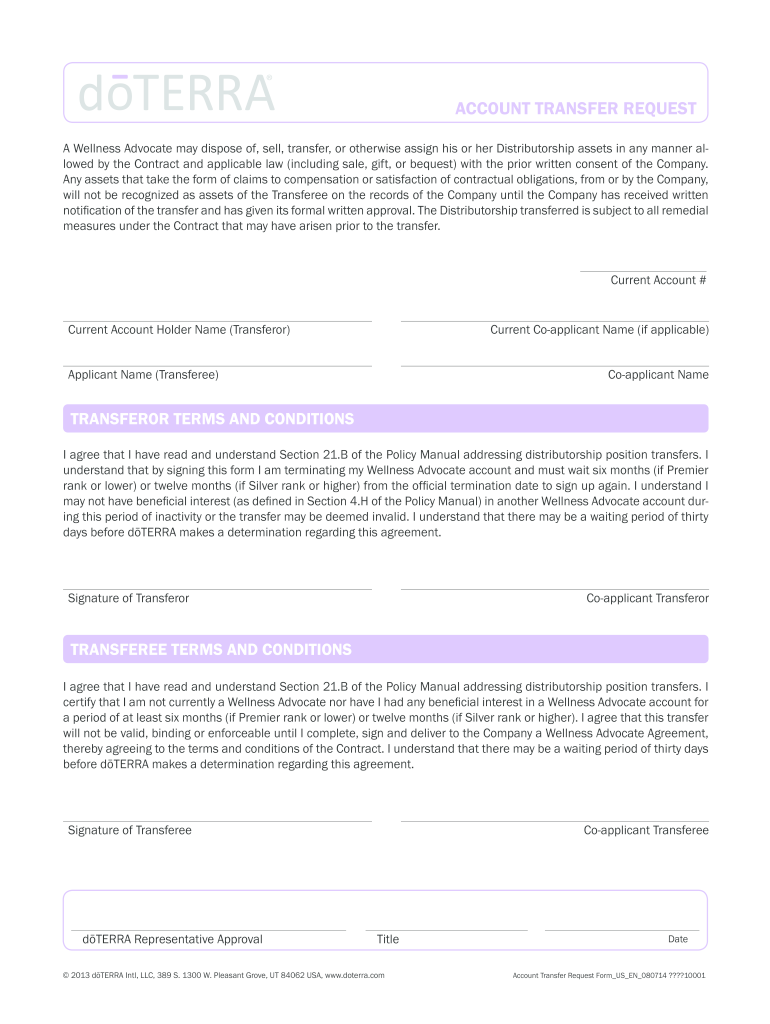
doTERRA Account Transfer Request Form 2014 free printable template
We are not affiliated with any brand or entity on this form

Fill out
Complete the form online in a simple drag-and-drop editor.

eSign
Add your legally binding signature or send the form for signing.

Share
Share the form via a link, letting anyone fill it out from any device.

Export
Download, print, email, or move the form to your cloud storage.
Why pdfFiller is the best tool for your documents and forms


End-to-end document management
From editing and signing to collaboration and tracking, pdfFiller has everything you need to get your documents done quickly and efficiently.
Accessible from anywhere
pdfFiller is fully cloud-based. This means you can edit, sign, and share documents from anywhere using your computer, smartphone, or tablet.
Secure and compliant
pdfFiller lets you securely manage documents following global laws like ESIGN, CCPA, and GDPR. It's also HIPAA and SOC 2 compliant.
What is doTERRA Account Transfer Request Form
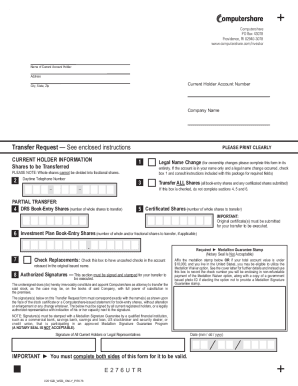
The Account Transfer Request Form is a business document used by Wellness Advocates to transfer their distributorship assets with the company's consent.
pdfFiller scores top ratings on review platforms




Who needs doTERRA Account Transfer Request Form?
Explore how professionals across industries use pdfFiller.

DoTERRA Account Transfer Request Form is needed by:
-
Wellness Advocates seeking to transfer ownership
-
Current account holders (Transferors) initiating the transfer
-
New account holders (Transferees) receiving the assets
-
dōTERRA Representatives facilitating the process
-
Business owners looking to change account ownership
-
Legal entities involved in account transfers
Comprehensive Guide to doTERRA Account Transfer Request Form
What is the Account Transfer Request Form?
The Account Transfer Request Form serves as a critical tool for Wellness Advocates aiming to transfer their distributorship assets. This form facilitates the official transfer process, ensuring both the Transferor and Transferee have the necessary consent from the dōTERRA company.
By utilizing this form, Wellness Advocates can formally document their account transfer and ensure compliance with company regulations. This procedural step is essential for maintaining the integrity of distributorship transfers.
Purpose and Benefits of the Account Transfer Request Form
Wellness Advocates require the Account Transfer Request Form to facilitate a smooth transition of ownership. The primary purpose of the form is to ensure legal compliance during the transfer process.
Key benefits of utilizing this form include safeguarding the rights of both parties and providing a clear framework for the transfer. This documentation formalizes the change in ownership, helping prevent disputes and misunderstandings post-transfer.
Key Features of the Account Transfer Request Form
The form includes several essential features to aid in its completion. Key sections consist of fillable fields such as the 'Current Account Number,' 'Current Account Holder Name,' and 'Applicant Name.'
Moreover, the form contains signature requirements along with checkboxes for agreement. To ensure proper processing, it also includes validations and instructions for each section. Additionally, users must attach documents like a W-9 form and a Business Addendum to complete the process efficiently.
Who Needs the Account Transfer Request Form?
The primary users of the Account Transfer Request Form include the Transferor, the Transferee, and dōTERRA Representatives. Each of these roles plays a vital part in the transfer process, ensuring that all parties are informed and consent to the transfer.
Scenarios necessitating this form involve changes in ownership due to various reasons, such as sales, gifting, or restructuring within the business. In any case, the form is essential for formalizing the distributorship transfer.
How to Fill Out the Account Transfer Request Form Online (Step-by-Step)
Filling out the Account Transfer Request Form can be completed effectively using pdfFiller. Follow these steps to ensure an accurate submission:
-
Access the form on the pdfFiller platform.
-
Enter your current account details in the designated fields.
-
Fill in the required information for the new account holder.
-
Review the terms and conditions, agreeing to them by checking the appropriate box.
-
Provide signatures for both Transferor and Transferee in the designated areas.
It is vital to double-check all information entered to avoid processing delays. Visual aids, such as screen captures, may be available to further assist during this process.
Common Errors and How to Avoid Them
When completing the Account Transfer Request Form, users often encounter various common mistakes that may hinder the process. Frequent errors include incomplete fields, incorrect signatures, and missing required documents.
To avoid these issues, consider the following tips:
-
Thoroughly review each section before submission.
-
Ensure all required documents are attached.
-
Double-check that signatures are placed correctly.
Reviewing the form prior to submission can greatly improve compliance and accelerate processing time.
Submission Methods and Delivery of the Account Transfer Request Form
Once the Account Transfer Request Form is completed, it can be submitted through several methods. Users should be aware of the specific delivery requirements based on their state.
Notably, there may be deadlines associated with submissions, which can vary by state. It is crucial to be informed about these processing timelines to ensure timely transfers.
Security and Compliance for the Account Transfer Request Form
Handling sensitive information within the Account Transfer Request Form necessitates stringent security measures. Using pdfFiller ensures compliance with vital industry standards such as HIPAA and GDPR, safeguarding user data.
The platform’s 256-bit encryption provides additional reassurance regarding the safety of form submissions. Users can confidently manage their Account Transfer Request Forms while maintaining privacy and data protection.
What Happens After You Submit the Account Transfer Request Form?
Upon submission of the Account Transfer Request Form, users can expect a series of next steps related to the processing of their request. Typically, users will receive confirmation acknowledging their submission.
Processing times may vary, and users should stay informed about how to track the status of their transfer. Keeping communication open with dōTERRA Representatives can provide additional clarity during this phase.
Utilize pdfFiller for Your Account Transfer Request Form Needs
Engaging with pdfFiller for your Account Transfer Request Form offers various advantages. Users will find the platform user-friendly, facilitating easy form completion and secure storage of vital documents.
In addition to filling out the form, features such as eSigning enhance the experience. Consider leveraging these benefits to streamline the ownership transfer process effectively.
How to fill out the doTERRA Account Transfer Request Form
-
1.To access the Account Transfer Request Form on pdfFiller, visit the website and use the search bar to find the form by its name.
-
2.Once you've opened the form, navigate through the various fields using your mouse or keyboard.
-
3.Gather all necessary information before starting, including details of the current account holder, the new account holder, and any supporting documents like a W-9 form.
-
4.Begin filling in the form by entering the 'Current Account #' and the 'Current Account Holder Name' in the designated fields.
-
5.Continue by providing the 'Applicant Name' and any other required information requested in the fillable fields.
-
6.Utilize the checkboxes and follow explicit instructions included in the form to ensure accuracy.
-
7.To review the filled form, scroll through all sections to confirm that all fields are completed correctly and all signatures are in place.
-
8.Once you are satisfied with the information, save your work and download the filled form directly from pdfFiller.
-
9.You may also submit the completed form via email or print it for physical delivery as instructed.

Who is eligible to use the Account Transfer Request Form?
Wellness Advocates with an active account wishing to transfer their distributorship assets need to use this form. Both the current and new account holders must sign it.
What supporting documents are required for the transfer?
Along with the Account Transfer Request Form, you will need to provide any necessary supporting documents, such as a W-9 form and possibly a Business Addendum, depending on the transfer specifics.
How can I submit the completed Account Transfer Request Form?
You can submit the completed form by emailing it to the appropriate dōTERRA representative or by delivering a physical copy, as per instructions provided on the form.
What are common mistakes to avoid when filling out the form?
Ensure all fields are completed accurately, especially signatures from both Transferor and Transferee. Avoid leaving any required sections blank to prevent processing delays.
Is there a deadline for submitting this form?
While specific deadlines can vary, it's best to submit your Account Transfer Request Form as soon as possible to ensure timely processing and avoid any disruption in your account services.
How long does it take to process the transfer once the form is submitted?
Processing times can vary based on company policy, but typically allow for several business days. Check with your dōTERRA representative for precise timeframes based on current demands.
Do I need to notarize the form?
No, the Account Transfer Request Form does not require notarization. However, both parties must sign the form for it to be valid.
doTERRA Account Transfer Request Form Form Versions
Related Content
Related Forms



Related Catalogs
Get the latest insights from our blog



If you believe that this page should be taken down, please follow our DMCA take down process
here
.
This form may include fields for payment information. Data entered in these fields is not covered by PCI DSS compliance.