
Last updated on
Oct 31, 2026

Get the free Retail Product Order Form
We are not affiliated with any brand or entity on this form

Fill out
Complete the form online in a simple drag-and-drop editor.

eSign
Add your legally binding signature or send the form for signing.

Share
Share the form via a link, letting anyone fill it out from any device.

Export
Download, print, email, or move the form to your cloud storage.
Why pdfFiller is the best tool for your documents and forms


End-to-end document management
From editing and signing to collaboration and tracking, pdfFiller has everything you need to get your documents done quickly and efficiently.
Accessible from anywhere
pdfFiller is fully cloud-based. This means you can edit, sign, and share documents from anywhere using your computer, smartphone, or tablet.
Secure and compliant
pdfFiller lets you securely manage documents following global laws like ESIGN, CCPA, and GDPR. It's also HIPAA and SOC 2 compliant.
What is Retail Order Form
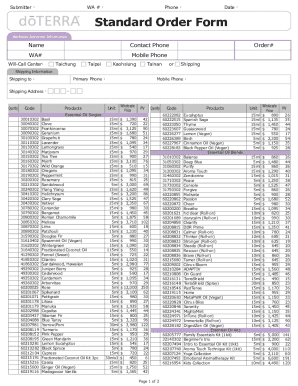
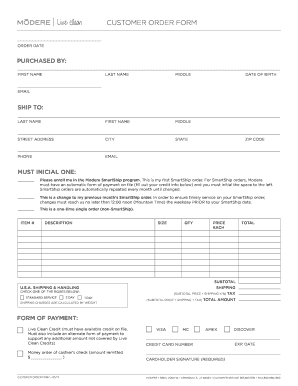
The Retail Product Order Form is a business document used by customers to order essential oils and wellness products from dōTERRA Europe LTD.
pdfFiller scores top ratings on review platforms




Who needs Retail Order Form?
Explore how professionals across industries use pdfFiller.

Retail Order Form is needed by:
-
Retail customers looking to purchase essential oils
-
Businesses needing a formal procurement document
-
Wellness practitioners ordering products for clients
-
Distributors managing product inventory
-
Individuals seeking high-quality wellness products
-
Corporate buyers engaged in bulk orders
-
Anyone involved in wellness and essential oils retail
Comprehensive Guide to Retail Order Form
What is the Retail Product Order Form?
The Retail Product Order Form is a crucial tool for customers to order essential oils and wellness products from dōTERRA Europe LTD. This form collects personal information and product selections, facilitating a smooth ordering process. Including complete details ensures accurate processing and timely delivery of orders.
The importance of this order form lies in its ability to streamline procurement for both individual customers and the retailer, enhancing the overall shopping experience.
Purpose and Benefits of the Retail Product Order Form
Utilizing the Retail Product Order Form offers numerous advantages. It simplifies the ordering process for essential oils and wellness products, ensuring that customers can easily navigate their purchases. By capturing accurate order details, it helps businesses process requests efficiently and effectively.
Furthermore, the form provides secure payment options, fostering trust and convenience for customers wishing to procure high-quality products.
Key Features of the Retail Product Order Form
This form includes several required fields to ensure orders are processed accurately. Key elements consist of the Applicant Name, Shipping Address, and Member Number. Payment options are clearly outlined to facilitate transactions, including both credit card and bank transfer methods.
An essential feature is the signature requirement, which validates the order and confirms the purchaser's commitment.
Who Needs the Retail Product Order Form?
The Retail Product Order Form is specifically designed for customers of dōTERRA Europe LTD who aim to purchase essential oils and wellness products. This encompasses both individual consumers and members who may be placing orders on behalf of others or businesses.
How to Fill Out the Retail Product Order Form Online (Step-by-Step)
-
Access the online form through the provided link.
-
Fill out the required fields, including your personal information and product selections.
-
Review each section to ensure accuracy.
-
Check for completeness before submission to avoid common mistakes.
-
Submit the form electronically for processing.
Submitting Your Retail Product Order Form
Submitting the Retail Product Order Form can be done in several ways. Users can choose to submit the form online or via email, depending on their preference. Upon submission, customers will receive a confirmation and tracking options to stay updated on their order status.
Understanding expected processing times is also essential to manage expectations regarding delivery.
Payment Methods for the Retail Product Order Form
Customers are presented with various payment options when using the Retail Product Order Form. Acceptable methods include credit card payments and bank transfers. It is important to complete the payment securely to protect sensitive information.
Additionally, privacy and data protection measures are in place during transactions to safeguard customer data.
Common Errors and How to Avoid Them
To complete the Retail Product Order Form correctly, users should be aware of common pitfalls. Frequent mistakes include missing required fields or providing inaccurate information. Ensuring all fields are completed accurately increases the chances of successful processing on the first attempt.
As a tip, double-checking all entries before submission can help catch potential errors.
The Role of pdfFiller in Completing the Retail Product Order Form
pdfFiller significantly enhances the experience of filling out the Retail Product Order Form. Its capabilities include editing, eSigning, and ensuring document security through advanced encryption and compliance with regulations like GDPR.
User testimonials highlight how pdfFiller simplifies the process, making it easier for customers to manage their forms effectively.
Next Steps After Submitting Your Retail Product Order Form
After submitting the Retail Product Order Form, customers can expect an order confirmation along with processing updates. Instructions for tracking the order status will be provided, ensuring transparency throughout the delivery process.
In the event of any issues or required corrections, guidance will be available to facilitate resolution.
How to fill out the Retail Order Form
-
1.Access pdfFiller and search for 'Retail Product Order Form' using the search bar to locate the form.
-
2.Open the form in the pdfFiller editor, where you'll see all available fields.
-
3.Before you start filling out, gather necessary information such as your personal details, shipping address, and product selections.
-
4.Begin entering your Applicant Name in the designated field at the top of the form.
-
5.Fill in your Post Code, City, and Country in the respective fields to ensure accurate shipping.
-
6.Provide your Member #, Phone #, and Email address in the specified fields for communication and verification purposes.
-
7.Select your desired products by checking the appropriate boxes and indicating quantities next to each item.
-
8.Choose your preferred payment method by checking the applicable checkbox for either credit card or bank transfer.
-
9.Review all filled fields carefully to make sure all information is accurate and complete.
-
10.Once everything is filled in correctly, sign the form in the signature line provided.
-
11.When satisfied with the order form, save your work by clicking the 'Save' button on pdfFiller.
-
12.You can download the completed form to your device by selecting 'Download' from the options menu.
-
13.Finally, submit your order through pdfFiller or follow additional instructions for emailing the form to dōTERRA.

Who is eligible to use the Retail Product Order Form?
Anyone interested in purchasing dōTERRA products, such as individuals or businesses, can use the Retail Product Order Form.
What is the deadline for submitting the Retail Product Order Form?
There are typically no strict deadlines for submitting this form, but prompt submissions may ensure timely processing of orders.
How do I submit my completed Retail Product Order Form?
You can submit your form through pdfFiller by using the submission options or by exporting it and emailing it directly to dōTERRA's support team.
Are there specific documents required to complete this form?
While no additional documents are required, having your personal information and product preferences ready is recommended.
What common mistakes should I avoid while filling out the form?
Make sure to double-check your entries for accuracy, especially your contact information and product quantities to avoid delays in processing.
How long does it take for orders to be processed?
Processing times may vary, but typically, orders are processed within a few business days, depending on availability.
Can I make changes to my order after submission?
If you need to change your order, contact dōTERRA customer service as soon as possible; changes may not be possible once processing begins.
Related Forms





Related Catalogs
Get the latest insights from our blog


If you believe that this page should be taken down, please follow our DMCA take down process
here
.
This form may include fields for payment information. Data entered in these fields is not covered by PCI DSS compliance.