
Last updated on
Oct 31, 2026

Get the free RTGS/NEFT Fund Transfer Form
We are not affiliated with any brand or entity on this form

Fill out
Complete the form online in a simple drag-and-drop editor.

eSign
Add your legally binding signature or send the form for signing.

Share
Share the form via a link, letting anyone fill it out from any device.

Export
Download, print, email, or move the form to your cloud storage.
Why pdfFiller is the best tool for your documents and forms


End-to-end document management
From editing and signing to collaboration and tracking, pdfFiller has everything you need to get your documents done quickly and efficiently.
Accessible from anywhere
pdfFiller is fully cloud-based. This means you can edit, sign, and share documents from anywhere using your computer, smartphone, or tablet.
Secure and compliant
pdfFiller lets you securely manage documents following global laws like ESIGN, CCPA, and GDPR. It's also HIPAA and SOC 2 compliant.
What is RTGS/NEFT Form
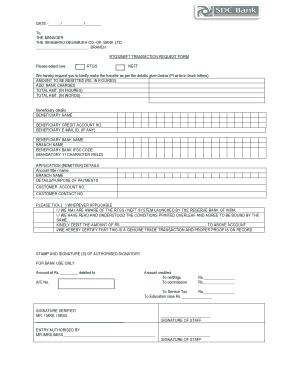
The RTGS/NEFT Fund Transfer Form is a financial document used by customers of Nidhi Co-Op. Bank Ltd. to electronically transfer funds to beneficiaries at other banks.
pdfFiller scores top ratings on review platforms




Easy to use
New experience
it was easy
Easy to use and does the job!
Seems to be working fine.
fast and easy
Who needs RTGS/NEFT Form?
Explore how professionals across industries use pdfFiller.

RTGS/NEFT Form is needed by:
-
Individuals transferring funds domestically
-
Small business owners handling payments
-
Account holders of Nidhi Co-Op. Bank Ltd.
-
Financial managers at companies
-
Parents managing children's education expenses
-
Freelancers receiving payments from clients
Comprehensive Guide to RTGS/NEFT Form
What is the RTGS/NEFT Fund Transfer Form?
The RTGS/NEFT Fund Transfer Form is essential for customers of Nidhi Co-Operative Bank seeking to perform electronic fund transfers. RTGS (Real Time Gross Settlement) and NEFT (National Electronic Funds Transfer) are reliable methods for transferring money between different banks. This form plays a crucial role in ensuring the accuracy of details submitted, which is vital for successful transaction processing.
Using this electronic fund transfer form, customers can avoid common issues typically associated with manual transfers, making it a significant tool for convenience and efficiency.
Purpose and Benefits of the RTGS/NEFT Fund Transfer Form
The RTGS/NEFT Fund Transfer Form offers numerous advantages to users. It allows for quick and secure transfer of funds without the need for physical bank visits and extensive paperwork. This ease of use is especially beneficial for customers located in Gujarat and other regions.
By facilitating electronic fund transfers, customers can manage their financial transactions from the comfort of their homes or offices, streamlining the entire process.
Who Needs the RTGS/NEFT Fund Transfer Form?
This form is intended for both individuals and businesses looking to make inter-bank transfers. Regular customers of Nidhi Co-Operative Bank, who need to send money to accounts in various banks, will find this form particularly useful. Scenarios may include personal remittances, business payments, and settling bills efficiently.
Key Features of the RTGS/NEFT Fund Transfer Form
The RTGS/NEFT Fund Transfer Form includes essential fields required for processing electronic transactions. Key fields encompass:
-
Account number
-
Name of the account holder
-
Beneficiary's account number
-
Amount of remittance
-
Signature of the customer
This user-friendly layout simplifies the completion of vital transaction details while ensuring that signatures are collected for processing action.
How to Fill Out the RTGS/NEFT Fund Transfer Form Online
Filling out the RTGS/NEFT Fund Transfer Form online is a straightforward process. To complete the form, follow these steps:
-
Access the RTGS/NEFT form on your device.
-
Enter details like your account number and beneficiary’s account information.
-
Verify the accuracy of all information entered.
-
Submit the completed form electronically.
Before submitting, double-check all entries to prevent any errors that could delay the transfer.
Security and Compliance for the RTGS/NEFT Fund Transfer Form
Ensuring the security of sensitive information during fund transfers is paramount. pdfFiller employs 256-bit encryption to safeguard users' data against breaches. Adhering to privacy standards and regulations such as HIPAA and GDPR assures users that their personal and financial information is well-protected.
Additionally, utilizing secure digital signatures enhances the protection of the RTGS/NEFT Fund Transfer Form.
Submission Methods for the RTGS/NEFT Fund Transfer Form
The RTGS/NEFT Fund Transfer Form can be submitted through various methods. Users have the option to submit the form online or in person at designated branches. It's important to review the specific submission guidelines and associated fees that may apply when submitting through either method.
Common Errors and How to Avoid Them
While completing the RTGS/NEFT Fund Transfer Form, users may encounter common errors that could hinder submission. Some typical mistakes include:
-
Incorrect account numbers
-
Missing beneficiary details
-
Illegible handwriting in physical submissions
To prevent these issues, always verify details carefully and maintain clarity whether filling out the form online or by hand.
What Happens After You Submit the RTGS/NEFT Fund Transfer Form?
After submission, users can typically expect a processing time that varies based on the bank's policies. Tracking your submission is important; most banks provide options for confirmation once the transfer has been initiated. In case of delays or issues, it is advised to reach out to your bank for assistance.
Maximize Your Efficiency with pdfFiller for the RTGS/NEFT Fund Transfer Form
pdfFiller enhances the experience of managing the RTGS/NEFT Fund Transfer Form through its intuitive platform. With capabilities for editing, filling, and securely signing documents, pdfFiller streamlines the process of completing forms. Users can also take advantage of its storage and organizational features to keep their financial documents in one secure location effortlessly.
How to fill out the RTGS/NEFT Form
-
1.Access the RTGS/NEFT Fund Transfer Form on pdfFiller by searching for the form title in the document library or using the direct link provided by your bank.
-
2.Once opened, familiarize yourself with the interface, which includes a toolbar with editing options and a navigation pane displaying form fields.
-
3.Before starting, gather necessary information such as your account number, the beneficiary's account number, their bank details, and the amount to be sent.
-
4.Begin filling out the required fields, including your account details, beneficiary information, and amount of remittance. Click on each field and type in the accurate information.
-
5.Ensure that you fill out all mandatory fields marked with an asterisk (*) to avoid any issues during processing.
-
6.Once completed, review each section of the form to ensure that all information is correct and matches your provided documents.
-
7.After confirming all details are accurate, use pdfFiller’s signing tool to add your signature at the designated line to validate the form.
-
8.To finalize the form, select the save option to download a copy or submit directly through pdfFiller by using the submit function, depending on your bank's requirements.

Who can use the RTGS/NEFT Fund Transfer Form?
This form is intended for customers of Nidhi Co-Op. Bank Ltd. wishing to transfer funds to other bank accounts within India.
Are there any eligibility requirements?
To use this form, you must have an active account with Nidhi Co-Op. Bank Ltd. and sufficient funds for the transfer.
What information do I need to complete the form?
You will need details such as your account number, the beneficiary's account number, their bank name, branch, and the remittance amount.
How do I submit the completed form?
Completed forms can be submitted directly through pdfFiller or printed and taken to your bank branch for processing.
Are there deadlines for submitting the form?
While there are no strict deadlines, ensure you submit the form during banking hours for same-day processing.
What common mistakes should I avoid?
Ensure all beneficiary details are accurate and match their bank records to avoid delays. Double-check your signature and contact details.
What is the processing time for transfers?
Processing times can vary, but RTGS transfers are usually completed on the same day, while NEFT transfers may take a few hours.
Related Forms





Get the latest insights from our blog


If you believe that this page should be taken down, please follow our DMCA take down process
here
.
This form may include fields for payment information. Data entered in these fields is not covered by PCI DSS compliance.