
Last updated on
Oct 31, 2026

Get the free Utility Verification Form
We are not affiliated with any brand or entity on this form

Fill out
Complete the form online in a simple drag-and-drop editor.

eSign
Add your legally binding signature or send the form for signing.

Share
Share the form via a link, letting anyone fill it out from any device.

Export
Download, print, email, or move the form to your cloud storage.
Why pdfFiller is the best tool for your documents and forms


End-to-end document management
From editing and signing to collaboration and tracking, pdfFiller has everything you need to get your documents done quickly and efficiently.
Accessible from anywhere
pdfFiller is fully cloud-based. This means you can edit, sign, and share documents from anywhere using your computer, smartphone, or tablet.
Secure and compliant
pdfFiller lets you securely manage documents following global laws like ESIGN, CCPA, and GDPR. It's also HIPAA and SOC 2 compliant.
What is Utility Verification Form
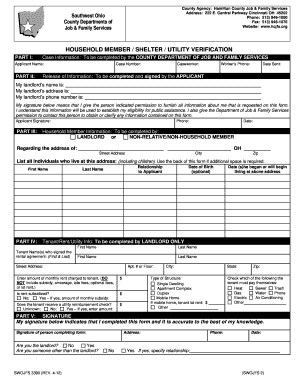
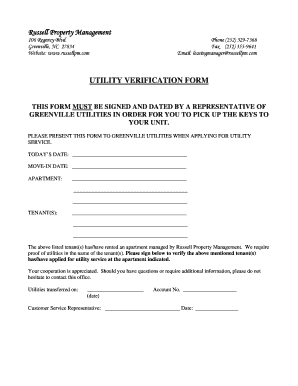
The Utility Verification Form is a real estate document used by housing authorities to verify an applicant's utility payment history.
pdfFiller scores top ratings on review platforms




Who needs Utility Verification Form?
Explore how professionals across industries use pdfFiller.

Utility Verification Form is needed by:
-
Housing authorities requiring tenant verification
-
Utility company representatives for confirmation of payment history
-
Applicants needing background checks for rental agreements
-
Property managers assessing tenant qualifications
-
Landlords seeking proof of utility management
Comprehensive Guide to Utility Verification Form
What is the Utility Verification Form?
The Utility Verification Form is a crucial document used in the process of verifying utility payment history for applicants. This form is especially significant in housing authority applications, where it plays a vital role in tenant screening processes.
Essentially, the form provides a structured way to assess an applicant’s payment history with utility companies, which can significantly impact their eligibility for housing. By utilizing a standardized form, the verification process becomes more efficient and reliable.
Purpose and Benefits of the Utility Verification Form
The Utility Verification Form serves multiple purposes and offers essential benefits to various stakeholders, including housing authorities, utility companies, and applicants. One of the primary advantages is the assurance of accurate utility payment history, which is critical in tenant evaluations.
Using a standardized form enhances the verification process, making it easier for housing officers to compare and assess applications. This not only streamlines the evaluations but also contributes to informed decision-making regarding tenant suitability.
Key Features of the Utility Verification Form
The Utility Verification Form is designed with user convenience in mind. It includes multiple fillable fields and checkboxes that cover essential areas, such as applicant information, utility supplier details, and payment history. Detailed instructions are provided for both utility company representatives and applicants.
Another important aspect is the requirement for signatures from both parties, validating the authenticity of the information provided. This feature is crucial in ensuring accountability throughout the tenant screening process.
Who Needs the Utility Verification Form?
This form is mainly targeted at several key users, including tenants applying for housing, landlords, and utility companies. Situations that typically require the completion of the Utility Verification Form include tenant applications for subsidized housing or rental agreements.
Moreover, the form is instrumental in complying with housing regulations and standards, ensuring that all necessary checks are conducted before granting tenancy. This compliance helps safeguard both landlords and tenants in the leasing process.
How to Fill Out the Utility Verification Form Online (Step-by-Step)
-
Access the Utility Verification Form through the appropriate online platform.
-
Begin filling out the applicant information, ensuring all fields are completed accurately.
-
Gather necessary documentation related to utility payments and history.
-
Review each section of the form for accuracy to prevent errors.
-
Submit the filled form online, along with any additional required documents.
It is crucial to follow these steps carefully to avoid common mistakes and ensure your application is processed without delays.
Digital Signature vs. Wet Signature Requirements for the Utility Verification Form
The signing requirements for the Utility Verification Form can vary, encompassing both digital and wet signatures. A digital signature holds legal standing and provides a secure method for signing documents online.
pdfFiller offers an intuitive way to eSign the Utility Verification Form, negating the need for printing. It's important to note the situations where notarization may be necessary, clarifying further during the signing process when there are legal implications.
Where to Submit the Utility Verification Form and Processing Timelines
Once completed, the Utility Verification Form can be submitted through various methods, including online submission, mailing, or in-person delivery to the relevant housing authority. Each method may have different processing times and expectations for applicants.
Applicants should also inquire about any associated fees for submission, ensuring all potential costs are accounted for early in the process.
Common Errors and How to Avoid Them When Using the Utility Verification Form
Filling out the Utility Verification Form can come with common pitfalls that applicants should be aware of. Some frequent mistakes include missing required fields, providing incorrect utility account details, and failing to review the form before submission.
To avoid these errors, it is advisable to double-check all entered information and consult any guidelines provided with the form. A thorough validation can save time and prevent unnecessary complications.
Ensuring Security and Compliance for the Utility Verification Form
Handling sensitive information securely is paramount when using the Utility Verification Form. Ensuring compliance with security standards, such as HIPAA and GDPR, protects both applicants and service providers.
pdfFiller employs robust measures, including 256-bit encryption, to safeguard personal data. Users should also take precautions to maintain their privacy when filling out the form, ensuring that the information remains confidential throughout the process.
Experience the Ease of Using pdfFiller for the Utility Verification Form
Utilizing pdfFiller allows users to experience the convenience of managing their Utility Verification Form seamlessly. The platform offers comprehensive capabilities, such as editing, filling, eSigning, and sharing, all directly from a web browser without any downloads required.
With user-friendly features designed for efficient document handling, pdfFiller significantly simplifies the process of completing the Utility Verification Form, making it an excellent choice for applicants and housing authorities alike.
How to fill out the Utility Verification Form
-
1.Access the Utility Verification Form on pdfFiller by searching in the template library or using the direct link provided.
-
2.Open the form in the pdfFiller interface where you can view the document and navigate through fillable fields.
-
3.Before completing the form, gather essential information such as your current address, utility supplier details, types of utilities provided, payment history, and any damages to utility equipment.
-
4.Use the cursor to click on each fillable field in the form. Provide the required details accurately by typing in the appropriate information based on the gathered data.
-
5.Check any applicable checkboxes to indicate whether certain services or conditions apply to your situation.
-
6.Review your completed form carefully for accuracy and completeness. Make sure all fields are filled out according to the instructions provided.
-
7.Once you are satisfied with the form, you can finalize it by selecting the option to save your progress, download a copy, or submit it directly through pdfFiller’s submission functionalities.

Who needs to sign the Utility Verification Form?
Both the utility company representative and the applicant are required to sign the Utility Verification Form for it to be valid.
What information do I need to complete this form?
You will need your current address, utility supplier details, types of utilities provided, payment histories, and any notes on damages to utility equipment.
Can I submit the Utility Verification Form online?
Yes, the Utility Verification Form can be submitted online through pdfFiller after completing and saving the form. Ensure all required fields are filled before submission.
Is there a deadline for submitting the Utility Verification Form?
While specific deadlines may vary based on the housing authority's requirements or leasing timelines, it is generally best to submit the form as soon as possible to avoid delays.
What are common mistakes to avoid when filling out this form?
Common mistakes include leaving fields blank, providing inaccurate utility information, and failing to secure necessary signatures. Double-check all details before submission.
How long does it take to process the Utility Verification Form?
Processing times can vary, but typically you can expect responses within a few business days once the form is submitted correctly.
Is notarization required for this form?
No, notarization is not required for the Utility Verification Form; signatures from both involved parties are sufficient.
Related Forms




Get the latest insights from our blog


If you believe that this page should be taken down, please follow our DMCA take down process
here
.
This form may include fields for payment information. Data entered in these fields is not covered by PCI DSS compliance.