
Last updated on
Nov 9, 2026
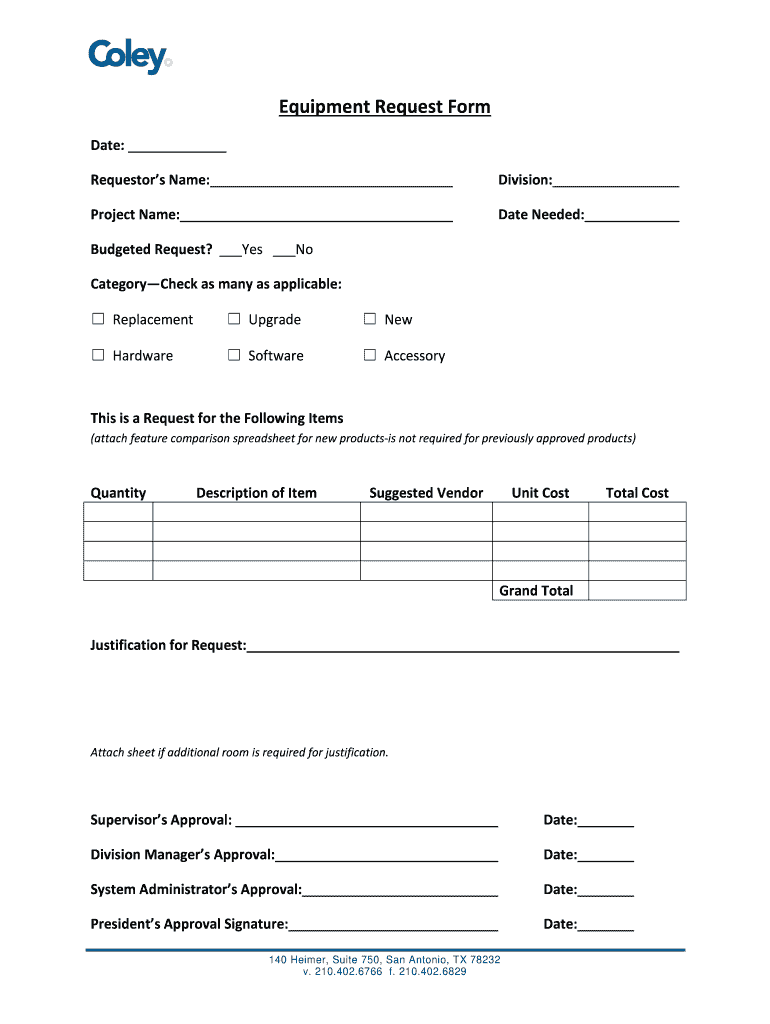
Coley Equipment Request Form free printable template
We are not affiliated with any brand or entity on this form

Fill out
Complete the form online in a simple drag-and-drop editor.

eSign
Add your legally binding signature or send the form for signing.

Share
Share the form via a link, letting anyone fill it out from any device.

Export
Download, print, email, or move the form to your cloud storage.
Why pdfFiller is the best tool for your documents and forms


End-to-end document management
From editing and signing to collaboration and tracking, pdfFiller has everything you need to get your documents done quickly and efficiently.
Accessible from anywhere
pdfFiller is fully cloud-based. This means you can edit, sign, and share documents from anywhere using your computer, smartphone, or tablet.
Secure and compliant
pdfFiller lets you securely manage documents following global laws like ESIGN, CCPA, and GDPR. It's also HIPAA and SOC 2 compliant.
What is Coley Equipment Request Form
The Equipment Request Form is a business document used by employees to formally request new, replacement, or upgraded equipment for projects.
pdfFiller scores top ratings on review platforms




This is a great tool! It allows me to get all of our business documents into an online document repository. It is going to save us time, money, paper, and the planet!
I love it for my business. It makes it so much easier to have a completely paperless office. We can just scan things into the computer and edit them or use as a document on PDFfiller.
Who needs Coley Equipment Request Form?
Explore how professionals across industries use pdfFiller.

Coley Equipment Request Form is needed by:
-
Project Managers seeking equipment for projects
-
Employees responsible for procurement
-
Supervisors approving equipment requests
-
Division Managers overseeing project budgets
-
System Administrators managing resources
-
Presidents authorizing large purchases
Comprehensive Guide to Coley Equipment Request Form
What is the Equipment Request Form?
The Equipment Request Form is a critical document utilized for requesting new, replacement, or upgraded equipment. Its primary purpose is to facilitate the project procurement process, especially within Texas companies. Key fields in the form include item description, quantity, vendor details, costs, and justification, ensuring all necessary information is captured effectively to support business equipment requests.
Purpose and Benefits of the Equipment Request Form
This form plays a vital role in streamlining procurement processes by enabling clear communication and documentation of requests. By obtaining necessary approvals, the form helps track requests and enhances overall project efficiency. Furthermore, it promotes transparency in equipment purchases, making it easier for stakeholders to understand expenditures and decisions associated with the purchase order template and vendor cost form.
Who Needs the Equipment Request Form?
Several key roles within an organization are required to utilize the Equipment Request Form, including:
-
Requestor: Initiates the request for equipment.
-
Supervisor: Reviews and provides approval for the request.
-
Division Manager: Ensures alignment with departmental needs.
-
System Administrator: Manages the submission process.
-
President: Final authority to approve significant expenditures.
Each role has specific responsibilities and eligibility criteria, particularly regarding the need for a supervisor approval form and division manager approval.
How to Fill Out the Equipment Request Form Online
To fill out the form using pdfFiller, follow these step-by-step instructions:
-
Access the Equipment Request Form on pdfFiller.
-
Complete the key sections including item description, quantity, vendor, and costs.
-
Provide a detailed justification for the equipment requested.
-
Ensure all required signatures, from the supervisor to the president, are obtained.
Pay special attention to the justification field, as it is critical for approval. An accurate submission enables effective tracking and management of your project equipment request.
Review and Validation Checklist for the Equipment Request Form
To avoid common errors when submitting the Equipment Request Form, consider the following validation tips:
-
Check all fields for completeness before submission.
-
Ensure proper approval signatures are obtained.
-
Review the justification for clarity and necessity.
This checklist not only helps in compliance but also enhances the likelihood of a smooth approval process without delays caused by common errors and miscommunications.
Submission Methods for the Equipment Request Form
There are multiple submission methods available for the Equipment Request Form, enhancing convenience for users:
-
Online submission through pdfFiller for efficiency.
-
In-person submission at designated offices.
Consider utilizing electronic submission, as it typically results in faster processing times. Make sure to comply with all submission requirements, including necessary approvals.
What Happens After You Submit the Equipment Request Form?
After submitting the form, the request undergoes a review process which may lead to one of the following outcomes:
-
Approval: Your request is granted, and you may proceed with the acquisition.
-
Rejection: Your request is denied, often requiring additional justification.
-
Additional Information: You may be asked to provide further details before a decision can be made.
Tracking the status of your application is crucial; ensure you know how to check your application status to stay updated on your request progress.
Security and Privacy Considerations for the Equipment Request Form
When handling sensitive documents such as the Equipment Request Form, security is paramount. pdfFiller employs advanced security features, including:
-
256-bit encryption for data protection.
-
Compliance with SOC 2 Type II, HIPAA, and GDPR regulations.
These measures ensure the confidentiality of all information provided during the procurement process, safeguarding against unauthorized access.
How pdfFiller Enhances the Equipment Request Process
pdfFiller’s features significantly streamline the Equipment Request Form process by providing a range of benefits:
-
Cloud-based document management for ease of access from anywhere.
-
Collaboration tools to work effectively with team members.
-
User-friendly interface for creating and filling out forms easily.
By leveraging pdfFiller, users can efficiently manage their forms, enhancing overall productivity and organization within procurement workflows.
Ready to Get Started?
Begin your journey towards a seamless Equipment Request Form submission today. With pdfFiller, users can experience the ease of filling out forms and streamlining their procurement processes effectively. Take advantage of the user-friendly features available and start your business equipment request process now.
How to fill out the Coley Equipment Request Form
-
1.Begin by accessing the Equipment Request Form on pdfFiller. Navigate to the platform and use the search function to locate the form easily.
-
2.Once you find the form, click on it to open in the pdfFiller interface. Familiarize yourself with the various fields and sections available.
-
3.Before completing the form, gather necessary information such as item descriptions, required quantities, suggested vendors, and associated costs for the equipment requested.
-
4.Start filling in the fields in the Equipment Request Form. Enter your name as the requestor, followed by filling in the item description and quantity.
-
5.Provide the suggested vendor along with the unit cost and total cost calculations. Be sure to check the accuracy of this information to prevent mistakes.
-
6.Incorporate a justification for your request in the designated section. Clearly articulate why the equipment is necessary for the project’s success.
-
7.After completing all fields, review your entries to ensure every section is filled out correctly to avoid any delays in the approval process.
-
8.Once you are satisfied with your submission, finalize the form. Check for the signature fields for supervisor, division manager, system administrator, and president.
-
9.If all necessary fields are filled out and signatures planned, save the document in pdfFiller. Utilize the save function to keep a copy for your records.
-
10.Finally, decide on your submission method. You can download the form and submit it via email or printing, or use pdfFiller's submission options to send it directly to the approvers.

Who is eligible to fill out the Equipment Request Form?
Any employee needing equipment for a project can fill out the Equipment Request Form, but it must be approved by the supervisor and other key managers.
What information do I need to complete the form?
You will need details about the equipment such as description, quantity, suggested vendor, unit cost, and justification for the request.
How do I submit the completed form?
After filling out the Equipment Request Form, you can submit it electronically via pdfFiller or print it for manual submission to your supervisor.
Are there any deadlines associated with submitting this form?
Deadlines may vary by project or department guidelines. It's advisable to submit your form as early as possible to ensure timely approvals.
What are common mistakes to avoid when completing this form?
Common mistakes include leaving fields blank, incorrect cost calculations, or failing to provide a thorough justification for the request.
How long does it take for the form to be processed?
Processing times can vary depending on the approvals needed. Generally, allow a few days for approvals from multiple roles.
What should I do if my request is denied?
If denied, review the feedback provided by approvals. You may revise your request based on their comments and re-submit the form.
Related Forms
Related Catalogs
Get the latest insights from our blog


If you believe that this page should be taken down, please follow our DMCA take down process
here
.
This form may include fields for payment information. Data entered in these fields is not covered by PCI DSS compliance.