
Last updated on
Nov 6, 2026

India Saraswat Co-Operative Bank Form 15H 2013-2026 free printable template
We are not affiliated with any brand or entity on this form

Fill out
Complete the form online in a simple drag-and-drop editor.

eSign
Add your legally binding signature or send the form for signing.

Share
Share the form via a link, letting anyone fill it out from any device.

Export
Download, print, email, or move the form to your cloud storage.
Why pdfFiller is the best tool for your documents and forms


End-to-end document management
From editing and signing to collaboration and tracking, pdfFiller has everything you need to get your documents done quickly and efficiently.
Accessible from anywhere
pdfFiller is fully cloud-based. This means you can edit, sign, and share documents from anywhere using your computer, smartphone, or tablet.
Secure and compliant
pdfFiller lets you securely manage documents following global laws like ESIGN, CCPA, and GDPR. It's also HIPAA and SOC 2 compliant.
What is India Saraswat Co-Operative Bank Form 15H
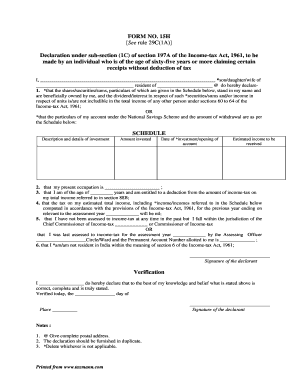
The Form 15H Declaration is a tax declaration document used by senior citizens in India to claim certain receipts without tax deductions.
pdfFiller scores top ratings on review platforms




Used once to extend lease. Plan to study further how I can use in my real estate rental business.
I love it! it makes it super helpful to use.
Who needs India Saraswat Co-Operative Bank Form 15H?
Explore how professionals across industries use pdfFiller.

India Saraswat Co-Operative Bank Form 15H is needed by:
-
Senior citizens aged 60 years or more
-
Individuals receiving interest income from banks
-
Taxpayers needing a refund on deducted taxes
-
Administrators managing tax obligations for seniors
-
Financial advisors assisting clients with tax planning
Comprehensive Guide to India Saraswat Co-Operative Bank Form 15H
What is the Form 15H Declaration?
The Form 15H Declaration is a crucial tax declaration tool in the Indian tax system, specifically designed for senior citizens aged 60 years and above. Under section 197A(1C) of the Income-tax Act, 1961, this form allows eligible individuals to claim exemption from tax deductions on their income, thereby ensuring they retain more of their earnings. Understanding this declaration's significance is essential for seniors to navigate their financial responsibilities effectively.
Purpose and Benefits of the Form 15H Declaration
Seniors should consider using Form 15H as it helps in avoiding unwanted tax deductions from their income. By submitting this declaration, eligible senior citizens can experience various financial benefits, including significant tax savings that positively impact their overall cash flow and personal finance. Utilizing this form not only simplifies the income tax process but also empowers seniors by optimizing their financial resources.
Eligibility Criteria for the Form 15H Declaration
To qualify for the Form 15H Declaration, individuals must meet several specific criteria:
-
Be aged 60 years or more.
-
Have an income level within the prescribed tax exemption limit.
-
Receive specific types of income, such as interest from savings accounts or fixed deposits.
Additionally, the person responsible for paying income must verify the eligibility of the declarant, ensuring that all requisite information is accurate before submitting the form. Any changes in income or age may affect overall eligibility.
How to Fill Out the Form 15H Declaration (Step-by-Step)
Completing the Form 15H Declaration accurately requires attention to detail. Here’s a step-by-step guide:
-
Gather necessary personal information, including name, address, and PAN number.
-
Estimate your total income from all sources for the financial year.
-
Fill in the form by entering accurate details in each field, ensuring your income projections align with your financial documentation.
-
Review the form for completeness and accuracy before submitting.
-
Sign the form along with the person responsible for paying your income.
Visual aids, such as templates or screen captures, can assist in this process for clearer understanding.
Common Errors and How to Avoid Them
Filling out the Form 15H Declaration can lead to common mistakes, which include:
-
Incorrect signing or failing to provide required signatures.
-
Missing critical information such as income estimates or personal details.
-
Rounding errors in financial figures submitted.
To minimize errors, validate all entries and double-check the instructions provided on the form. A thorough review before submission can prevent complications later.
Submission Methods for the Form 15H Declaration
Once completed, the Form 15H Declaration can be submitted through various methods:
-
Physical submission at designated tax offices.
-
Digital submission through online tax filing platforms.
Be aware of the timing and deadlines for submission to ensure compliance with tax regulations, avoiding any penalties for late filing.
Security and Compliance for the Form 15H Declaration
Ensuring the security of sensitive information during the submission of Form 15H is vital. Key measures include:
-
Encryption of documents during the submission process.
-
Compliance with data protection regulations, including HIPAA and GDPR.
-
Guidance on retaining copies of the submitted forms to safeguard against data loss.
Utilizing platforms that prioritize security, like pdfFiller, can further reinforce safe document handling.
How to Use pdfFiller for the Form 15H Declaration
pdfFiller simplifies the process of completing and managing Form 15H. Its capabilities include:
-
Editing existing forms and adding necessary information.
-
eSigning documents securely and conveniently.
-
Sharing completed forms with relevant parties through cloud-based solutions.
The ease of use and accessibility of pdfFiller enhances the overall experience of filling out essential tax forms.
What Happens After You Submit the Form 15H Declaration?
After submitting the Form 15H Declaration, you can expect the following:
-
Processing time may vary; tracking options are often available.
-
Potential notifications regarding rejections or the need for corrections will be communicated.
-
It’s critical to keep records of submissions for your future reference and to ensure compliance.
Understanding these follow-up procedures can help manage expectations and streamline the tax process.
Get Started with Your Form 15H Declaration Now!
Utilizing pdfFiller for your Form 15H Declaration can enhance your experience. With immediate online access and user-friendly support, you can efficiently navigate the form-filling process. Take timely action to avoid complications related to tax submissions by starting today.
How to fill out the India Saraswat Co-Operative Bank Form 15H
-
1.To begin, access pdfFiller and search for 'Form 15H Declaration' in the template library.
-
2.Open the form by clicking on it, which will bring you to the editing interface.
-
3.Gather your personal details such as name, address, and date of birth prior to filling out the form.
-
4.Fill in the fields for estimated income, including details of all income sources like interest, pensions, and other income.
-
5.Use pdfFiller’s toolbar to navigate through the form and fill in information accurately.
-
6.Ensure you check off any necessary boxes that apply to your specific situation.
-
7.Once all information is entered, review the form thoroughly to verify accuracy and completeness.
-
8.Finalize your form by signing electronically in the designated area.
-
9.When finished, save your document, and choose whether to download it or submit it directly from pdfFiller.
-
10.If submitting electronically, follow the prompts to send your form to the appropriate tax department.

Who is eligible to submit Form 15H?
Form 15H can be submitted by individuals aged 60 years or older who are seeking to claim certain receipts without tax deductions. It is primarily used to ensure that seniors are not incorrectly taxed on their income.
What income sources can I declare using Form 15H?
Income sources that can be declared include interest income from savings accounts, fixed deposits, and any other income that qualifies for tax exemption under the Income-tax Act. Ensure all sources are accurately reported.
Are there any deadlines for submitting this form?
Form 15H should ideally be submitted at the beginning of the financial year or before any tax deduction occurs on the income sources listed. Timely submission can help avoid unnecessary tax deductions.
How do I submit Form 15H once completed?
Upon completing the form, you can either download it to submit physically at the bank or tax office or use pdfFiller to submit it electronically. Follow the prompts on the platform for submission methods.
What common mistakes should I avoid when filling out Form 15H?
Common mistakes include incorrect personal details, failing to sign the form, or leaving out income sources. Double-check all fields and sign both the declarant and responsible person sections to ensure validity.
Will there be any processing fees associated with Form 15H?
Generally, no fees apply to submitting Form 15H itself; however, check with your bank or financial institution for any potential fees associated with processing your declaration.
What should I do if my income changes after submitting Form 15H?
If your income changes after submitting, you may need to rescind your declaration and adjust your tax filings accordingly. It's recommended to consult with a tax advisor in such cases.
Related Forms





Related Catalogs
Get the latest insights from our blog


If you believe that this page should be taken down, please follow our DMCA take down process
here
.
This form may include fields for payment information. Data entered in these fields is not covered by PCI DSS compliance.