
Last updated on
Oct 31, 2026

Get the free CIPS Membership Application Form
We are not affiliated with any brand or entity on this form

Fill out
Complete the form online in a simple drag-and-drop editor.

eSign
Add your legally binding signature or send the form for signing.

Share
Share the form via a link, letting anyone fill it out from any device.

Export
Download, print, email, or move the form to your cloud storage.
Why pdfFiller is the best tool for your documents and forms


End-to-end document management
From editing and signing to collaboration and tracking, pdfFiller has everything you need to get your documents done quickly and efficiently.
Accessible from anywhere
pdfFiller is fully cloud-based. This means you can edit, sign, and share documents from anywhere using your computer, smartphone, or tablet.
Secure and compliant
pdfFiller lets you securely manage documents following global laws like ESIGN, CCPA, and GDPR. It's also HIPAA and SOC 2 compliant.
What is CIPS Application
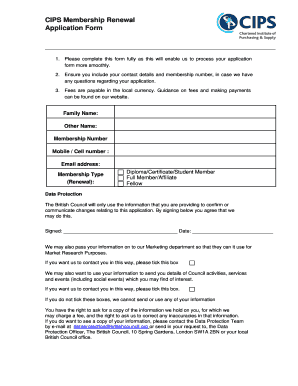
The CIPS Membership Application Form is an application document used by individuals to join the Chartered Institute of Procurement & Supply (CIPS) for professional membership.
pdfFiller scores top ratings on review platforms




Who needs CIPS Application?
Explore how professionals across industries use pdfFiller.

CIPS Application is needed by:
-
Individuals seeking professional membership in procurement and supply
-
Professionals looking to access industry resources and networking opportunities
-
Students studying procurement who wish to enhance their qualifications
-
Experienced procurement professionals wanting to validate their expertise
-
Companies wishing to support their staff in gaining CIPS membership
Comprehensive Guide to CIPS Application
What is the CIPS Membership Application Form?
The CIPS Membership Application Form is a crucial document for procurement and supply professionals aiming to join the Chartered Institute of Procurement & Supply (CIPS). This form aids applicants in showcasing their qualifications and intentions.
CIPS membership plays a vital role in enhancing one’s professional standing in the procurement landscape. It allows members to engage with a broader network of industry peers and leaders.
To complete the application, candidates must provide specific information about their background and experience. By joining CIPS, members unlock numerous benefits that promote career growth and valuable networking opportunities.
Purpose and Benefits of the CIPS Membership Application Form
The CIPS Membership Application Form serves as a gateway to a global community of procurement and supply professionals. A successful application opens doors to exclusive resources, events, and learning opportunities.
Members gain access to networking events, enabling them to connect with industry leaders and peers, which can significantly enhance their professional journey. Joining CIPS is not just about gaining credentials; it's about becoming part of a vibrant community focused on growth and development.
Eligibility Criteria for the CIPS Membership Application Form
To apply for CIPS membership, candidates must meet certain qualifications. This includes demonstrating adequate professional experience relevant to procurement and supply.
Additionally, there are age and residency stipulations. All applicants must agree to abide by the CIPS Code of Conduct, ensuring the integrity and ethical standards of the membership are maintained.
Required Information for the CIPS Membership Application Form
Applicants must provide various details to complete the CIPS membership application form. This includes personal information such as:
-
First names
-
Surname
-
Date of birth
-
Address
-
Postcode
-
Telephone
-
Email
Additionally, candidates need to include employment information and proof of relevant work experience and qualifications. Payment details are also essential and must be accurately filled to process the application.
How to Fill Out the CIPS Membership Application Form Online
Completing the CIPS Membership Application Form online is straightforward. Here’s a simple guide to utilizing pdfFiller's platform:
-
Access the form on pdfFiller.
-
Fill in the required fields such as 'First names' and 'Surname' carefully.
-
Ensure all entries are accurate before submission.
Taking these steps will help streamline your application process and reduce the likelihood of errors.
Common Errors and How to Avoid Them
Applicants often encounter common mistakes when filling out the CIPS membership application form. Typical errors include providing incorrect details or leaving required fields blank.
To avoid these pitfalls, validate your application thoroughly. It's crucial to review each section before submission to ensure all information is correct and complete.
Submission Methods for the CIPS Membership Application Form
Understanding how to submit your CIPS membership application is essential. Completed applications can be submitted through various methods:
-
Online submission via pdfFiller
-
Postal submissions
Be aware of typical processing times for applications to keep track of your submission's status. Confirming and tracking your application ensures that you stay informed throughout the process.
What Happens After You Submit the CIPS Membership Application Form
Once the application is submitted, applicants can expect to receive feedback regarding their status. This includes tracking notifications to check the progress of their application.
Outcomes may vary and can include acceptance, rejection, or requests for further information. Being prepared for any of these possibilities is part of the application process.
Security and Data Protection in the CIPS Membership Application Form Process
Ensuring the safety and privacy of personal data during the CIPS membership application process is paramount. pdfFiller employs robust security measures, including encryption, to protect sensitive information.
The application process complies with GDPR and data protection laws, providing users with confidence that their personal information is handled securely and responsibly.
Transform Your Application Experience with pdfFiller
Utilizing pdfFiller for your CIPS membership application can significantly enhance your experience. With features that allow for editing, e-signing, and document management, pdfFiller simplifies the process.
Experience the convenience of cloud-based document management for filling forms without downloads. This platform is designed to make your application journey as seamless as possible.
How to fill out the CIPS Application
-
1.To access the CIPS Membership Application Form on pdfFiller, visit the pdfFiller website and use the search feature to locate the form.
-
2.Once you find the form, click on it to open it in PDF editor. Familiarize yourself with the interface to understand where to input your information.
-
3.Before starting, gather necessary information such as your personal details, employment history, and preferred payment options. Make sure you have all relevant documents handy for reference.
-
4.Start filling in the required fields, including 'First names', 'Surname', 'Date of birth', 'Address', 'Postcode', 'Telephone', and 'Email'. Utilize the fillable fields and drop-down menus for accurate entries.
-
5.Pay special attention to the signature section; ensure you sign where indicated to validate your application. Instructions for completing the payment method should be highlighted in the form.
-
6.After completing all sections, review the form carefully to check for any errors or missing information. Make sure all your details are accurate and up to date.
-
7.Once satisfied with your entries, save your progress on pdfFiller. You can choose to download a copy of the completed form or submit it directly through your preferred method as stated in the application instructions.

What are the eligibility requirements for the CIPS Membership Application Form?
To be eligible for the CIPS Membership, you should have relevant work experience in procurement or supply chain management, along with appropriate qualifications. Ensure you review the specific membership tiers available.
Is there a deadline for submitting the CIPS Membership Application?
There is no set deadline for submitting the application; it can be completed at your convenience. However, check if there are specific enrollment periods for membership benefits and resources.
How can I submit the completed CIPS Membership Application Form?
You can submit the completed form directly through pdfFiller by following the prompts to send via email or print and mail it to the relevant address provided in the instructions.
What supporting documents are required with the application?
Typically, you will need to provide details of your qualifications, work experience, and may need to include proof of payment. Refer to the specific instructions on the form for additional guidance.
What common mistakes should I avoid when filling out the application?
Ensure that all fields are completed accurately. Common mistakes include missing signature sections, incorrect personal details, and failing to attach required documents like proof of payment.
How long does it take to process my CIPS Membership Application?
Processing times can vary; generally, it takes several weeks to review applications. You may check your application status by contacting the CIPS support team for updates.
What should I do if I encounter issues while completing the form on pdfFiller?
If you face technical issues, check the pdfFiller support section for troubleshooting tips or contact their customer service for assistance.
Related Forms





Related Catalogs
Get the latest insights from our blog


If you believe that this page should be taken down, please follow our DMCA take down process
here
.
This form may include fields for payment information. Data entered in these fields is not covered by PCI DSS compliance.