
Last updated on
Oct 31, 2026

MA Brigham and Womens Faulkner Hospital 84182BWHF 2017-2026 free printable template
pdfFiller is not affiliated with any government organization

Fill out
Complete the form online in a simple drag-and-drop editor.

eSign
Add your legally binding signature or send the form for signing.

Share
Share the form via a link, letting anyone fill it out from any device.

Export
Download, print, email, or move the form to your cloud storage.
Why pdfFiller is the best tool for your documents and forms


End-to-end document management
From editing and signing to collaboration and tracking, pdfFiller has everything you need to get your documents done quickly and efficiently.
Accessible from anywhere
pdfFiller is fully cloud-based. This means you can edit, sign, and share documents from anywhere using your computer, smartphone, or tablet.
Secure and compliant
pdfFiller lets you securely manage documents following global laws like ESIGN, CCPA, and GDPR. It's also HIPAA and SOC 2 compliant.
What is MA Brigham and Womens Faulkner Hospital 84182BWHF
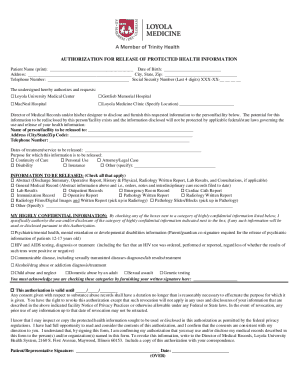
The Authorization for Release of Protected Health Information is a healthcare document used by patients and legal representatives to permit the sharing of protected health information.
pdfFiller scores top ratings on review platforms




Who needs MA Brigham and Womens Faulkner Hospital 84182BWHF?
Explore how professionals across industries use pdfFiller.

MA Brigham and Womens Faulkner Hospital 84182BWHF is needed by:
-
Patients seeking to share their medical records
-
Legal representatives acting on behalf of patients
-
Healthcare providers needing authorization for information release
-
Insurance companies requiring patient health information
-
Attorneys involved in legal cases needing medical records
-
Individuals requesting access to their personal health information
Comprehensive Guide to MA Brigham and Womens Faulkner Hospital 84182BWHF
What is the Authorization for Release of Protected Health Information?
The Authorization for Release of Protected Health Information is a crucial legal form used in Massachusetts to allow the sharing of medical information. This form plays an essential role in ensuring that patients and their legal representatives can grant permission for the exchange of sensitive health records. It is vital for maintaining effective communication between healthcare providers and involved parties.
Both patients and their legal representatives are allowed to utilize this form, ensuring comprehensive access to medical documentation. This facilitates the necessary discussions around treatment, legal matters, and other healthcare-related processes.
Purpose and Benefits of the Authorization for Release of Protected Health Information
This form is indispensable for patients seeking access to their medical records. It not only simplifies the process of sharing information but also ensures that all parties involved are compliant with privacy laws. By using this patient health information release form, individuals can effectively communicate their health needs.
The benefits extend beyond patients, impacting healthcare providers and legal representatives by streamlining access to vital medical records, enhancing the efficiency of care, and enabling informed decision-making concerning ongoing treatment.
Key Features of the Authorization for Release of Protected Health Information
The key features of this form include specific patient information fields, consent checkboxes, and details regarding the expiration of the authorization. Each section is designed to capture critical information, ensuring clarity and compliance with legal requirements.
A signature from the patient or legal representative is mandatory, reinforcing the importance of consent in the process of sharing protected health information. Detailed instructions assist users in completing the form accurately, which is essential for its validity.
Who Needs the Authorization for Release of Protected Health Information?
This authorization form is essential for various individuals, including patients and their legal representatives. It is commonly needed in situations such as when receiving medical care or submitting insurance claims, where sharing medical records is necessary to facilitate proper service.
Understanding who needs this authorization helps ensure that sensitive information is shared appropriately and responsibly in compliance with applicable laws.
How to Fill Out the Authorization for Release of Protected Health Information Online (Step-by-Step)
-
Access the authorization form on pdfFiller.
-
Enter the patient’s name and date of birth in the designated fields.
-
Select the specific information you wish to release using the consent checkboxes.
-
Provide details regarding the recipient(s) of the information.
-
Review the form for accuracy, ensuring all fields are filled out.
-
Sign and date the form to complete the authorization.
Common Errors and How to Avoid Them
When completing the authorization form, several common mistakes can occur. These include omitting required fields, failing to sign the form, or entering incorrect contact details of the recipient. Each of these errors can lead to delays in processing the authorization.
To avoid these pitfalls, it is imperative to review the completed form thoroughly before submission. Ensuring that all information is accurate and complete minimizes the chances of complications later on.
Submission Methods for the Authorization for Release of Protected Health Information
There are multiple methods available for submitting the authorization form, including in-person delivery, mailing, or online submission via platforms like pdfFiller. Each method offers distinct advantages, ensuring flexibility for users in managing their submissions.
Using pdfFiller streamlines the submission process, with tracking features that confirm receipt of the authorization. This added layer of security reassures users that their sensitive information is being handled appropriately.
Security and Compliance for the Authorization for Release of Protected Health Information
Security measures are paramount when handling protected health information. The authorization form complies with HIPAA regulations, ensuring that sensitive data is encrypted and adequately protected throughout the sharing process.
Users can rest assured that their information remains private and secure while utilizing pdfFiller. The platform's commitment to data protection helps build trust among those submitting their medical information.
Sample or Example of a Completed Authorization for Release of Protected Health Information
Providing a correctly filled-out example of the authorization form can offer great insights into completing the document accurately. Specific sections, such as patient information and consents, should be highlighted to illustrate their significance within the form.
This example serves not only as a template but also as a guide for users ensuring that they understand the purpose and importance of each component of the form.
Why Use pdfFiller for Your Authorization for Release of Protected Health Information?
pdfFiller presents numerous advantages for completing the Authorization for Release of Protected Health Information. Its user-friendly interface makes the process straightforward, accommodating individuals of varying technical skills.
Furthermore, pdfFiller’s cloud-based features add to the convenience, allowing users to edit, save, and eSign forms from any device. Emphasizing security and compliance, pdfFiller ensures a seamless experience in managing sensitive healthcare documents.
How to fill out the MA Brigham and Womens Faulkner Hospital 84182BWHF
-
1.To access the form on pdfFiller, visit the pdfFiller website, and search for 'Authorization for Release of Protected Health Information'.
-
2.Open the form by clicking on the link, and you will be directed to an editable PDF interface.
-
3.Before you begin filling out the form, gather necessary patient details including name, date of birth, and the names of recipients authorized to receive information.
-
4.Use your cursor to navigate through the form fields. Click on each blank space to enter the required information directly.
-
5.For the section that specifies what information can be released, check or fill in the appropriate boxes according to your needs such as medical records or specific reports.
-
6.Ensure that you indicate any sensitive information that requires specific consent by checking the relevant boxes provided in the form.
-
7.After all fields are filled out, take a moment to review the entire form to ensure all information is accurate and complete.
-
8.Once satisfied, navigate to the top menu on pdfFiller to save your progress. You can choose to download a copy or submit it directly to the relevant party.
-
9.Click the 'Download' button to save a copy to your device, or select 'Email' to send the form directly from pdfFiller.

Who is eligible to complete the Authorization for Release of Protected Health Information?
Patients and legal representatives have the right to fill out this form. It's important that the signatory has the authority to grant access to the patient's protected health information.
Is there a deadline for submitting this authorization form?
The authorization expires six months from the date signed unless stated otherwise. It should be submitted promptly to avoid any issues with timing.
How do I submit the completed form?
You can submit the form by email, fax, or by handing it directly to the intended recipient, such as your healthcare provider or insurance company. Always confirm the preferred submission method with the recipient.
Are there any fees associated with releasing medical records?
Yes, copying fees may apply when requesting the release of medical records. These costs should be verified with the provider or facility before requesting information.
What supporting documents do I need to submit with this form?
Typically, no additional documents are required; however, you may need to provide proof of identity or legal representation if you are a legal representative.
Can I make changes to the form after it has been signed?
Once signed, changes to the form can invalidate the authorization. If changes are necessary, it’s best to complete a new authorization form.
What common mistakes should I avoid when filling out the form?
Ensure all required fields are completed and the signatures are provided. Double-check the recipient's contact information and the expiration date of the authorization.
Related Forms

Related Catalogs
Get the latest insights from our blog


If you believe that this page should be taken down, please follow our DMCA take down process
here
.
This form may include fields for payment information. Data entered in these fields is not covered by PCI DSS compliance.