
Last updated on
Nov 9, 2026

MN 707.5.2P 2005 free printable template
pdfFiller is not affiliated with any government organization

Fill out
Complete the form online in a simple drag-and-drop editor.

eSign
Add your legally binding signature or send the form for signing.

Share
Share the form via a link, letting anyone fill it out from any device.

Export
Download, print, email, or move the form to your cloud storage.
Why pdfFiller is the best tool for your documents and forms


End-to-end document management
From editing and signing to collaboration and tracking, pdfFiller has everything you need to get your documents done quickly and efficiently.
Accessible from anywhere
pdfFiller is fully cloud-based. This means you can edit, sign, and share documents from anywhere using your computer, smartphone, or tablet.
Secure and compliant
pdfFiller lets you securely manage documents following global laws like ESIGN, CCPA, and GDPR. It's also HIPAA and SOC 2 compliant.
What is MN 707.5.2P
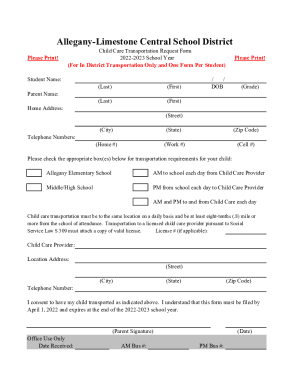
The Transportation for Students in Daycare is a permission form used by parents or guardians to request transport for their elementary school students between daycare and school.
pdfFiller scores top ratings on review platforms




Who needs MN 707.5.2P?
Explore how professionals across industries use pdfFiller.

MN 707.5.2P is needed by:
-
Parents/Guardians of elementary school students
-
Daycare providers seeking transportation arrangements
-
School administrators handling student transportation requests
-
Local school districts in Minnesota managing transportation services
-
Childcare coordinators working with families and schools
Comprehensive Guide to MN 707.5.2P
What is the Transportation for Students in Daycare?
The transportation form for students in daycare is a critical document designed to facilitate safe and organized transportation arrangements for elementary school children. This form allows parents and guardians to formally request transportation services for their children, enhancing both safety and communication within Minnesota's educational framework. By using this form, parents can ensure their child's transportation aligns with their daycare provider's schedule and school district policies.
Purpose and Benefits of the Transportation for Students in Daycare
This form serves several essential purposes that significantly benefit various stakeholders:
-
Ensures safe and reliable transportation for elementary school children.
-
Streamlines communication among parents, daycare providers, and schools.
-
Facilitates compliance with school district policies regarding student transport.
Utilizing the daycare transportation request form can lead to a more organized and efficient school day for both parents and children.
Who Needs the Transportation for Students in Daycare?
The transportation form for students in daycare is specifically designed for parents and guardians of elementary school students who require transport to and from their daycare facilities. Various scenarios necessitate the use of this form, such as changes in pick-up or drop-off locations, or in cases of new daycare enrollment. Completing the form is especially important for families within the attendance area of their respective schools.
Key Features of the Transportation for Students in Daycare
This essential document includes several critical fields required for completion:
-
Student details, including name and home address.
-
Parent/guardian information including contact details.
-
Daycare provider information to clarify where the child will be picked up or dropped off.
-
A transportation schedule section for outlining specific times and locations.
-
A signature requirement for parents or guardians, ensuring consent.
These features ensure that the form contains all necessary information for effective transportation arrangements.
How to Fill Out the Transportation for Students in Daycare Online (Step-by-Step)
Filling out the daycare transportation request form online can be done in a few straightforward steps:
-
Access the form through an online platform, such as pdfFiller.
-
Enter the required student and parent/guardian details into the appropriate fields.
-
Fill out the daycare provider information and transportation schedule.
-
Review all entries for accuracy before signing the form.
-
Submit the completed form according to your school district's guidelines.
Using a tool like pdfFiller can simplify the process by providing a user-friendly interface and helpful tips along the way.
Submitting the Transportation for Students in Daycare: What You Need to Know
Once the form is completed, submitting it requires attention to detail:
-
Submission methods include online forms and in-person delivery to the school's administration office.
-
Be aware of important deadlines for form submission and processing times, which can vary by school district.
-
Each district in Minnesota may have specific locations where forms must be submitted, so ensure you know your district's requirements.
Common Errors and How to Avoid Them When Submitting the Form
Understanding common pitfalls can help parents and guardians avoid delays in processing their transportation requests:
-
Incomplete entries in critical fields, such as contact information or transport schedules.
-
Neglecting to sign the form, which is mandatory for processing.
-
Submitting past deadlines, which can result in missed transportation services.
To ensure accuracy, double-check the completed form against the requirements before submitting it.
Security and Compliance for the Transportation for Students in Daycare
When handling sensitive information within the transportation form, security is paramount:
-
pdfFiller uses 256-bit encryption to protect the confidentiality of submitted forms.
-
The platform is compliant with privacy regulations, including HIPAA and GDPR.
-
Parental consent and data protection are prioritized to ensure compliance with educational requirements.
Next Steps After Submitting the Transportation for Students in Daycare
After submission, there are several important processes to be aware of:
-
Expect a confirmation notification to acknowledge receipt of your form.
-
Learn how to check the status of your transportation request for peace of mind.
-
If necessary, find out the procedure for amending any submitted forms.
Empowering Parents with pdfFiller for Their Document Needs
pdfFiller offers parents a seamless experience when completing the transportation form and managing other important documents:
-
The platform's ease of use helps simplify the form-filling process.
-
All documents can be securely stored and organized for easy access whenever needed.
-
Parents are encouraged to explore pdfFiller for all their document needs today, ensuring enhanced efficiency in managing school-related paperwork.
How to fill out the MN 707.5.2P
-
1.To access the Transportation for Students in Daycare form, visit pdfFiller's website and search for the form by name or category.
-
2.Once the form is loaded, you will see fillable fields. Start by clicking on the field for the student's name and type in the required information.
-
3.Continue to fill out the fields, providing necessary details such as the student’s home address, your contact information as the parent or guardian, and the daycare provider's information.
-
4.Gather all required information before starting, including the student’s school name, daycare details, transportation schedule, and any specific notes.
-
5.Make sure to carefully review each section for accuracy as you fill it out. Pay special attention to spelling and completeness to avoid delays.
-
6.After completing all fields, locate the designated signature line for the parent/guardian at the bottom of the form.
-
7.Use pdfFiller's signature tool to sign the form electronically, or you can print the form to sign it manually.
-
8.Once the form is filled out and signed, look for options to save your progress. You can download a copy of the form to your device for personal records.
-
9.Submit the completed form by following instructions provided on the pdfFiller site or by delivering it directly to your student’s elementary school, as required.

Who is eligible to submit the Transportation for Students in Daycare form?
Eligibility to submit the form is typically restricted to parents or guardians of elementary school students enrolled in daycare. Ensure you are authorized to request transportation services for the child.
What is the deadline for submitting the transportation request form?
It’s advisable to submit the Transportation for Students in Daycare form as early as possible, ideally at the start of the school year or as soon as transportation needs arise to ensure arrangements can be made.
How can I submit the completed transportation form?
You can submit the completed Transportation for Students in Daycare form by delivering it directly to your child’s school or by submitting it through pdfFiller’s e-filing options if available.
What information is required to complete the form?
You will need to provide specific information including the student’s name, home address, parent or guardian contact details, daycare provider information, and the desired transportation schedule.
What are common mistakes to avoid when filling out the form?
Avoid leaving any fields blank, especially those related to contact details and student identification. Double-check for spelling errors and ensure the signature is included before submission.
How long does it take to process the transportation request?
Processing times may vary by school district but generally expect a few days to a week after submission for your transportation request to be reviewed and confirmed.
Do I need to provide any additional documents with the form?
Generally, you do not need to attach supporting documents to the Transportation for Students in Daycare form unless explicitly required by the school. Always check with your local school for specific requirements.
MN 707.5.2P Form Versions
Related Forms




Related Catalogs
Get the latest insights from our blog


If you believe that this page should be taken down, please follow our DMCA take down process
here
.
This form may include fields for payment information. Data entered in these fields is not covered by PCI DSS compliance.