
Last updated on
Oct 31, 2026

Get the free New Service Utility Application
We are not affiliated with any brand or entity on this form

Fill out
Complete the form online in a simple drag-and-drop editor.

eSign
Add your legally binding signature or send the form for signing.

Share
Share the form via a link, letting anyone fill it out from any device.

Export
Download, print, email, or move the form to your cloud storage.
Why pdfFiller is the best tool for your documents and forms


End-to-end document management
From editing and signing to collaboration and tracking, pdfFiller has everything you need to get your documents done quickly and efficiently.
Accessible from anywhere
pdfFiller is fully cloud-based. This means you can edit, sign, and share documents from anywhere using your computer, smartphone, or tablet.
Secure and compliant
pdfFiller lets you securely manage documents following global laws like ESIGN, CCPA, and GDPR. It's also HIPAA and SOC 2 compliant.
What is Utility Application
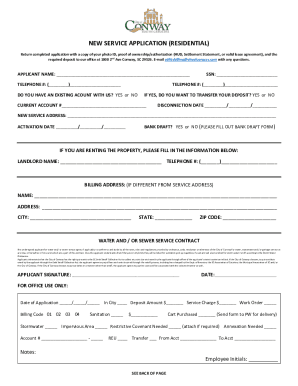
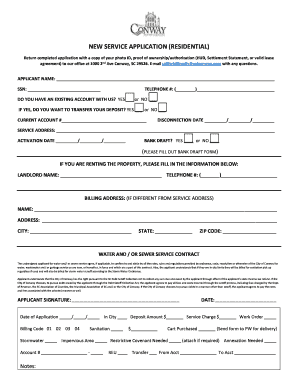
The New Service Utility Application is a fillable form used by individuals or entities in Texas to request new water and wastewater utility services.
pdfFiller scores top ratings on review platforms




Who needs Utility Application?
Explore how professionals across industries use pdfFiller.

Utility Application is needed by:
-
New residents seeking utility services in Texas
-
Landlords applying for water and wastewater services
-
Property management companies managing utility accounts
-
Small business owners needing utility services
-
Contractors requiring service for new constructions
Comprehensive Guide to Utility Application
What is the New Service Utility Application?
The New Service Utility Application serves as a crucial form for individuals and businesses aiming to initiate new water and wastewater utility services. This application not only facilitates service requests but also streamlines the process of setting up essential utilities. Applying for new services is significant as it ensures that residents and businesses have access to reliable water and wastewater management systems, which are vital for health and infrastructure.
Completing a new service utility application is important in establishing connectivity with local water authorities and securing the necessary resources for daily operations.
Purpose and Benefits of the New Service Utility Application
Users should complete the New Service Utility Application to efficiently initiate their utility service requests. This form offers benefits that enhance the overall user experience, particularly when utilized through pdfFiller. The online platform simplifies the process with clear instructions, immediate access to fillable sections, and an intuitive design.
By choosing to complete a utility application PDF through pdfFiller, users can expect a seamless process that minimizes delays and maximizes efficiency.
Key Features of the New Service Utility Application
The New Service Utility Application includes several key features designed to enhance user-friendliness and security. These features encompass fillable sections that allow for easy input of personal information, signature requirements ensuring authenticity, and a variety of payment methods to cater to different needs.
-
Fillable sections for personal and service address details
-
Signature lines for applicant verification
-
Multiple payment options available
-
Incorporates security features for sensitive information handling
Who Needs the New Service Utility Application?
The New Service Utility Application is intended for a diverse range of applicants, including individuals establishing new homes and businesses requiring utility services. It caters specifically to those in Texas, highlighting both residential and commercial needs for utility service initiation.
Understanding the target audience is crucial; individuals, landlords, and management companies all find this application relevant to their utility setup requirements.
How to Fill Out the New Service Utility Application Online (Step-by-Step)
Filling out the New Service Utility Application via pdfFiller is a straightforward process. Here is a step-by-step guide to facilitate the completion:
-
Access the New Service Utility Application on the pdfFiller platform.
-
Enter personal information in the designated fillable sections.
-
Provide your service address and contact details as required.
-
Review the form for accuracy and completeness.
-
Sign electronically to validate your application.
-
Select your preferred payment method for any applicable fees.
-
Submit the completed application online.
Submission Methods and Delivery of the New Service Utility Application
Upon completing the New Service Utility Application, users must choose a submission method that suits their needs. The application can be submitted online through pdfFiller, ensuring a quick and direct delivery to the utility service provider. Alternatively, applicants can opt for physical delivery, which may involve mailing the completed form.
Each method has its pros and cons, and users should select the one that aligns best with their schedule and circumstances.
Fees, Deadlines, and Processing Time
Understanding the associated costs and timelines is critical when submitting the New Service Utility Application. Generally, applicants can expect a processing fee, which varies based on different service providers in Texas. It is important to adhere to submission deadlines to ensure timely service activation and avoid unnecessary delays.
Typical processing times can vary, but users should be prepared for standard timelines from submission to service activation.
What Happens After You Submit the New Service Utility Application?
After submitting the New Service Utility Application, applicants will receive confirmation of receipt from the utility service provider. This step provides reassurance as it confirms that their application is under review. Users can typically monitor their application status online, which aids in managing expectations for service activation.
Familiarity with common rejection reasons can also prepare applicants for any potential issues that might arise during processing.
Security and Compliance for the New Service Utility Application
Data security is paramount when handling sensitive information through the New Service Utility Application. The platform ensures compliance with industry standards such as SOC 2 Type II and HIPAA, which safeguards user data throughout the application process. This commitment to privacy and data protection is integral in fostering trust between the applicant and the utility provider.
Get Started with Your New Service Utility Application Today!
Utilize pdfFiller to efficiently complete your New Service Utility Application. The platform not only simplifies form filling but also prioritizes security and ease of use, making the entire process more accessible for applicants. Start filling out your application today to enjoy streamlined service initiation and gain access to vital utility services without unnecessary delays.
How to fill out the Utility Application
-
1.To access the New Service Utility Application, visit pdfFiller's website and search for the form by its name.
-
2.Once located, open the form in the editor to begin filling it out. Familiarize yourself with the interface's tools.
-
3.Before starting, gather all necessary information including personal details, service address, and contact information.
-
4.Fill in personal information fields such as name, address, and contact details accurately using the provided fields.
-
5.Indicate if you are a landlord or management company by checking the appropriate box.
-
6.Complete the signature field by signing your name electronically, confirming your agreement to the application terms.
-
7.Review all filled fields to ensure accuracy and completeness, especially critical details like service address and payment method.
-
8.Once satisfied with the information entered, save your progress. Use the 'Download' option to save a copy or submit directly through the platform.
-
9.After submission, check for confirmation from the utility provider about the processing status and activation timeline.

What are the eligibility requirements for the New Service Utility Application?
To be eligible, applicants must be either residents or property owners in Texas, with a valid service address for utility connection. Identification and proof of occupancy may be required.
Is there a deadline to submit the New Service Utility Application?
While there is no specific deadline for application submission, processing takes time, so it’s recommended to apply at least a week before you require service activation.
How can I submit the New Service Utility Application?
The application can be submitted directly through pdfFiller or printed and sent to the appropriate utility service provider via mail or email, depending on their submission guidelines.
What supporting documents are required with the application?
Typically, a valid ID, proof of residence, and payment information are required. Confirm with the utility provider for any additional needed documents.
What are common mistakes to avoid when filling out the application?
Common mistakes include entering incorrect service addresses, forgetting to sign the form, and not providing full payment information. Double-check all fields before submission.
How long does it take to process the New Service Utility Application?
Processing times may vary by provider, but generally, applicants can expect service activation within 1-3 business days after submission.
Can I edit the application after submission?
Once submitted, changes may require a new application. However, contact the utility provider to inquire about the procedure for amendments to your application.
Related Forms






Get the latest insights from our blog


If you believe that this page should be taken down, please follow our DMCA take down process
here
.
This form may include fields for payment information. Data entered in these fields is not covered by PCI DSS compliance.